

mailchimp
-
i would like to find out if this theme supports mailchimp. i have installed mailchimp twice but its not showing on my my website.
The blog I need help with is: (visible only to logged in users)
-
All support docs are at https://en.support.wordpress.com/ where the most prominent feature is the search box. Search https://en.support.wordpress.com/?s=mailchimp
See: mailchimp https://en.support.wordpress.com/mailchimp/ -
gibbs – all themes support our MailChimp widget. I see the widget in your dashboard, but it doesn’t have any of your MailChimp code in it. Please follow the guide that timethief provided (thanks!) and let me know if you get stuck again. Thanks!
-
Hi happy people i cant seem to get mailchimp pop up on my website i have followed all instructions.please can someone take a look and kindly advice.I have applied the code both on the widget and on appearance dashboard but to no avail.the site is zimbabaweanodyssey.wordpress.com
-
Sure! I took another look in your MailChimp widget. The code that’s there now is not from MailChimp, it’s from PollDaddy, so you’ll need to remove all that.
Have you created a MailChimp account yet?
Have you created a subscriber list in MailChimp yet?
You need to do those two steps before being able to get the MailChimp code to put in your widget.
Please follow these instructions, which walk you through the process, after creating your MailChimp account:
Follow each step starting from this paragraph:
Next, create an email list for your website’s followers. Click here to view instructions on how to create a list in your MailChimp account. Once it’s created, navigate to your list, and click Signup forms.
From there select the Subscriber popup option.
Follow the rest of the guide.
The code you get after that process should look like what you see in the screenshot here:

Let me know how it goes. If you’re getting stuck, let me know exactly at which step.
-
Thank you Kathryn. I think I forgot to create list.I will have a go now i will update you.
-
-
hi Kathryn after i have put the code on my website i am getting this:
[mailchimp_subscriber_popup baseUrl='mc.us16.list-manage.com' uuid='c9357e4f0c2e8b7649f807892' lid='09a71762eb' usePlainJson='true' isDebug='false']
is it something that i should ignore
-
I see your MailChimp pop-up subscription form when visiting your site:
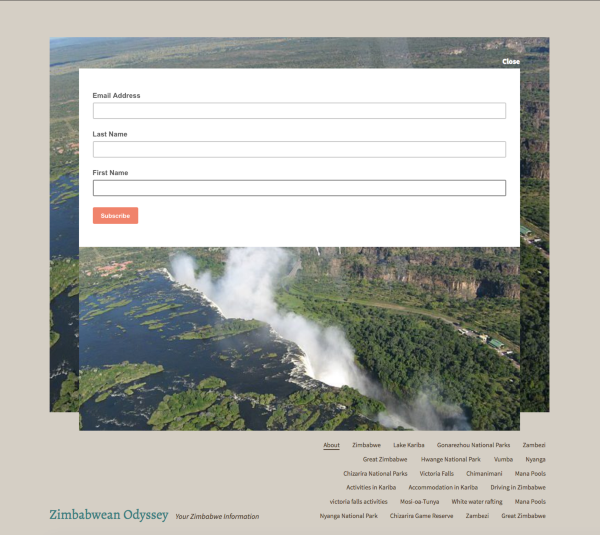
hi Kathryn after i have put the code on my website i am getting this:
I’m not sure what you mean – where are you seeing that? It looks to me like your widget is now set up correctly, but if you’re seeing something you think shouldn’t be there, could you explain in more detail where you’re seeing it?
-
Hi Kathryn thank you kindly for your patience.What i meant is if i copy and paste my mailchimp code on the widget immediately i am getting this message i have pasted below.i hve been to my site on desktop i cant seem to see the pop up.
once again thank you so much..[mailchimp_subscriber_popup baseUrl='mc.us16.list-manage.com' uuid='c9357e4f0c2e8b7649f807892' lid='09a71762eb' usePlainJson='true' isDebug='false']
This is what is appearing i dont know whether i should be worried about it.
-
If you’re seeing the widget code instead of the pop-up itself, I wonder if perhaps JavaScript isn’t active in your browser.
Please visit this page and let me know if it says “Yes” or “No” in the big turquoise at the top, just under “Is JavaScript Enabled?”
https://www.whatismybrowser.com/detect/is-javascript-enabled
-
-
OK, so we’ve ruled that out, thanks for checking.
Two things you could try next:
1. Would it be possible to upload a screenshot of the code you’re seeing so I can take a look?
Here’s a guide on how to make a screenshot:
http://en.support.wordpress.com/make-a-screenshot/You can upload the screenshot – in a graphic format like JPG, PNG, or GIF – in your Media Library so I can see it. Thanks.
2. Could you try viewing your site in a browser where you haven’t looked at your site since you added the MailChimp widget? The widget only shows to a user once, per browser:
The MailChimp form will only show to visitors once!
From: https://en.support.wordpress.com/mailchimp/
So try a different browser than what you normally use – Firefox, Opera, etc.
-
[mailchimp_subscriber_popup baseUrl='mc.us16.list-manage.com' uuid='c9357e4f0c2e8b7649f807892' lid='624d513bae' usePlainJson='true' isDebug='false']
This is what i am getting. i will also try using a a different browser and see if it appears
-
[mailchimp_subscriber_popup baseUrl='mc.us16.list-manage.com' uuid='c9357e4f0c2e8b7649f807892' lid='624d513bae' usePlainJson='true' isDebug='false']
This is what i am getting. i will also try using a a different browser and see if it appears
-
This is what i am getting.
Right, I know that’s what you’re seeing, but I’d like to see it context if possible. Could you take a screenshot of the entire browser window so I can see exactly what you are? It could provide a clue. Thanks!
-
Kathryn thank you so much. I changed my browser from chrome to opera and it appeared.So it looks like the browser i was using has got some issues.. Do y do support for Polldady as well?
-
So it looks like the browser i was using has got some issues.
Can you try turning off all extensions in the browser that’s giving you trouble – is it Chrome? If so, you can learn how to temporarily turn off extensions here:
https://support.google.com/chrome_webstore/answer/2664769?hl=en&rd=2
Look for the section called “Turn extensions on or off”
Do y do support for Polldady as well?
If you need help with Polldaddy, please contact support here:
https://polldaddy.com/feedback/
Thanks!


- The topic ‘mailchimp’ is closed to new replies.
 WordPress.com Forums