

Main image, posts thumbnails on main page
-
Hi there,
I realize that on the main page/home, the main image and thumbnails has a sort of ‘colour layer’ that overlays them, but is absent on the tablet and mobile version. Is there any way that I could remove them altogether in the full web version? Any help in this issue is greatly appreciated.
Thanks in advance!
The blog I need help with is: (visible only to logged in users)
-
Hello there, please see this Staff reply concerning Ixion: https://en.forums.wordpress.com/topic/the-depresive-mood-of-the-header-image-in-ixion-theme?replies=4#post-2811400
This will only work if you have either the Premium or Business upgrade Plan in order to work with CSS on your site.
-
Ah, thank you very much good sir. That explains a lot, though it did confused me a bit since the tablet/mobile version does not have any of that irritating overlay.
Thanks again!
-
I have some good news! Based on several requests, we’ve added a new option to Ixion to change the opacity of the overlays in Ixion, or even remove them entirely.
Go into your Customizer’s Theme Options panel and you should see the new options. Under “Header Image Overlay” and “Featured Content Image Overlay” – choose “None” if you’d like to completely remove the overlays, like in this screenshot:
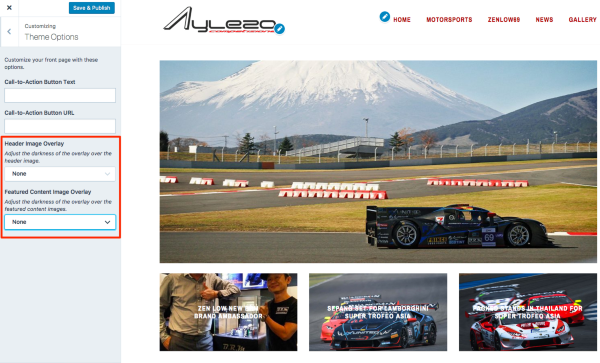
Just let me know if you need any help with it.


- The topic ‘Main image, posts thumbnails on main page’ is closed to new replies.
 WordPress.com Forums