

Making display image smaller
-
How would i make my background image smaller using CSS.
thanks.
The blog I need help with is: (visible only to logged in users)
-
-
So I enter the modified CSS code into the CSS window on wordpress customizer for radcliff, but it does not update? Nothing happens? I have tried clearing my internet cache.
Using google chrome
-
When i inspect the code on chrome and change the values, the image is made smaller. but as soon as i paste the code into the wordpress CSS window and try to apply settings. nothing happens.
this is all in the customizer.
-
Sorry for all the messages – CSS is new to me.
Ok, so after having put the modified code into the CSS box on wordpress, the code in google chrome keeps overriding it. I try to copy and paste the selector into the CSS box with the modified code but it still keeps overriding everything when i regresh the page.
Anyone know how to overcome this?
-
Hi there – I answered your question about making your logo (background image) smaller over in your other thread, yesterday:
https://en.forums.wordpress.com/topic/radcliff-2-theme
As for the CSS not working in the Customizer, could you please paste the CSS you’re trying to use here, and put it between code tags. I don’t see any custom CSS in your Customizer’s CSS panel, so if you paste it here, I’ll have a look so we can figure out why it’s not working.
-
For instance:
If i want to change the title of my website red, it works through the code
.site-title a {
color: rgb(202, 32, 23);
}However, whenever I refresh the site, it goes back to the original color (black). It is being overrided by the CSS code in chrome.
-
Thanks for that.
I don’t see any CSS revisions on your site, so it doesn’t look like any CSS you may have added in the past was actually saved in the Customizer.
After you add CSS in the Customizer, make sure you hit the “Publish” button.
Also,
site-titledoesn’t look like the right element for the Pocket theme. Try this intead:.logo-text a { color: rgb(202, 32, 23); }It should look like this:
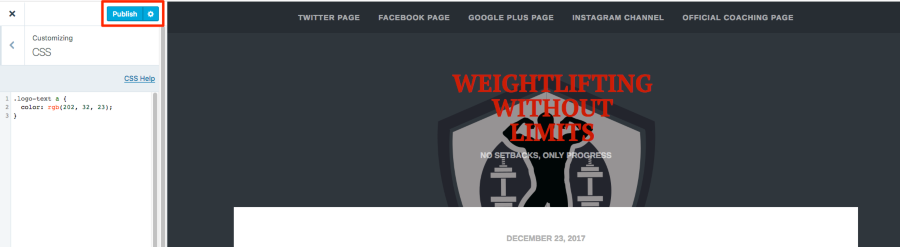
Give this a try and let me know how it goes.
-
NO the thing is, I am actually working on a new site using Radcliff 2. I am actually moving from pocket to Radcliff 2. So I dont want to publish anything just yet.
-
Thanks for clarifying that.
The CSS you were using is the correct CSS to change the colour of the site title in Radcliffe 2:
.site-title a { color: rgb(202, 32, 23); }But you do need to save the CSS in the Customizer with Radcliffe 2 applied to your site to see the effect on the front end (public side). If you keep using Pocket, you won’t see the effects of the CSS intended for Radcliffe 2. Their HTML structure is different, so the CSS needed to modify certain elements is also different.
I’d suggest you save your custom CSS in a code or text editor until you’re ready to switch themes — that way you can add it all at once.
-
Ok, so I now activated the radcliff 2 design. At the moment, the main image across the home page is way too big. Not my logo but the featured image.
I really want to make this a little smaller but not sure how I change this in CSS. I tried making image smaller in photoshop and re inserting it but it did not change so i guess i have to override the css. But not sure how to do this?
-
Hi there – I’m not seeing any image on the homepage, have you removed it? In order to help you modify it with custom CSS, I’ll need to see the image active on your site if possible – would you mind adding it back and I’ll take a look?
-
-
for some reason, everytime i make a css change nothing is being saved. It always goes back to original settings
-
It sounds like you might still be going to your Customizer from the trial area, i.e. via “Try and Customize” – where you had been testing the theme earlier, before you switched to Radcliffe 2.
Try instead going to My Site (top left) > Customize.
You can also access it directly at this link https://wordpress.com/customize
Let me know how it goes.
-
Nope. It is not solving the issue. Any change i make to the css, as soon as i click something on the site, it reverts back to original settings
-
Could you please paste the exact CSS you’re trying to add here in the forum, with code tags around it? CSS properties need to be on our whitelist, so if you’re trying to use something that’s not whitelisted, it would be getting stripped out.
-
.site-description {
color: #014662;
}
body {background-color: #ffffff;}
.entry-thumbnail {
filter: sepia(0.0);
}
article {
background-color: rgba(0, 28, 166, 0.0);
border-width: 4px;
border-style: double;
border-color: rgb(0, 28, 166);
border-top-color: rgb(0,28, 166);
border-right-color: rgb(0, 28, 166);
border-bottom-color: rgb(0, 28, 166);
border-left-color: rgb(0, 28, 166);
border-image: initial;
}
element.style {
background-image: url(https://weightliftingwithoutlimits.files.wordpress.com/2018/01/psx_20180102_152026.jpg?w=2000);
height: 400px;
}For som reason though the image css does not work. The image size does not change.
-
Thanks! I see that you’re in the Customizer currently. Would it be alright if I took over editing there so I can see what’s going on more directly?
-


- The topic ‘Making display image smaller’ is closed to new replies.
 WordPress.com Forums
