

Making display image smaller
-
p.s. this CSS is not valid:
element.style {
background-image: url(https://weightliftingwithoutlimits.files.wordpress.com/2018/01/psx_20180102_152026.jpg?w=2000);
height: 400px;
}
I’ll have a look directly now – stand by. :)
-
re: your CSS not being saved, I do see all the CSS you posted above in the Customizer, so it looks like it’s there, and most of it is being applied, with the exception of…
All the declarations targeting
element.styleare not valid CSS. When you seeelement.stylein the inspector, it means those styles are inline on an HTML element, within the HTML portion of the page. You can’t use that selector to target something in custom CSS. Inline CSS can be difficult, and often impossible, to override in custom CSS, because of the way CSS specificity works: CSS that’s closest to an element “wins out.”I’m now looking at the invalid CSS to try to understand the effect you were going for, so I can help you with the code for that.
I’m still a bit confused, since I’m not seeing any featured images on your posts.
I just noticed something that might be related here. In the Customizer’s Homepage Settings panel, there is a little problem:
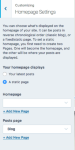
You’ve selected a static page for your front page, but the page selection is blank. Could you try going in there and reselecting which page you’d like displayed as your homepage? Let me know when that’s done and then I’ll take another look – – I have a feeling that the featured image you’re trying to modify might be there. Thanks!
-
-
-
Great! You’ll need to also publish that page so I can see it on your homepage – right now it’s a draft. Could you let me know once that’s done?
-
-
-
-
-
Thanks for publishing the page!
Let’s take things one step at a time so we can figure out what’s going on.
First, it would be easiest if we could start fresh. Could you remove everything currently in your CSS editor except this one:
.site-description {
	color: #014662;
}
Most of the rest of that code is not doing anything.
The CSS above is turning your site tagline navy blue. Is that working for you? It looks right to me, and I see your tagline in very dark blue. It’s a bit hard to see on some screens, but if you use a test colour like #bb00bb it should be very obvious that it’s working. Can you confirm?
Now let’s get the effects you’re looking for, one at a time – stay tuned. I have a meeting shortly so may not get this to you all in one piece. If you need immediate help in the meantime, you’re welcome to chat in real-time with a Happiness Engineer via live chat, instead:
https://wordpress.com/help/contact
I’d just ask that you choose one route or another, so we’re not duplicating efforts. :)
-
1. Making the featured images smaller on pages. After you’ve removed the other CSS (as I just suggested above) give this a try:
/* Reduce the height of your featured images on pages */
.page .entry-thumbnail {
  max-height: 400px;
}
If you’d like to do the same thing on posts as well as pages, use this instead:
/* Reduce the height of your featured images on pages and posts */
.page .entry-thumbnai, .post .entry-thumbnaill {
  max-height: 400px;
}
You can adjust the max-height as you like. Try to test your site on screens of different sizes, large and small.
-
it works!
Another question: how do i change my background to white? rather than the sepia color i now have?
Thanks.
-
Another question: how do i change my background to white? rather than the sepia color i now have?
I’m seeing a white background now – are you set with this one?
-
The reason you’re still seeing a sepia background colour in your Customizer preview has to do with the way the Style Pack CSS interacts with your custom CSS.
Try changing
body {
	background-color: #ffffff;
}
to:
body.style-pack-vintage {
  background-color: #ffffff;
}
And you should be set for the background.
-
-
I have another question:
How do i change the colour of the box around the text on the homepage? the thin box?
Not sure of the css code.
p.s. you been very helpful!
-
Here you go:
/* Change colour of double border on posts and pages */
.single-post article, .page article {
  border: 4px double #bb00bb;
}
Change the test purple colour to whatever you like.
If you have any new questions, please go ahead and start a new thread. Thank you!
https://en.forums.wordpress.com/forum/css-customization#postform


- The topic ‘Making display image smaller’ is closed to new replies.
 WordPress.com Forums