

Managing pages
-
I know just enough to get me in trouble. I have a wordpress blog. It includes a Home page that I don’t want/need. Additionally, the home page opens when I enter the blog and it has an image that can’t be found. I know how to inspect the element and I see the error, but I don’t know how to save my corrections/deletions to fix the initial problem.
The blog I need help with is: (visible only to logged in users)
-
-
HI Joanne!
I took a look at your site and found that your Home past is currently set as your Posts page – meaning that all your published posts will show up there. If you remove this page, your posts will not be published to your site.
I tried to find an image that was missing, but I couldn’t find any. This is what I see when I go to your site:
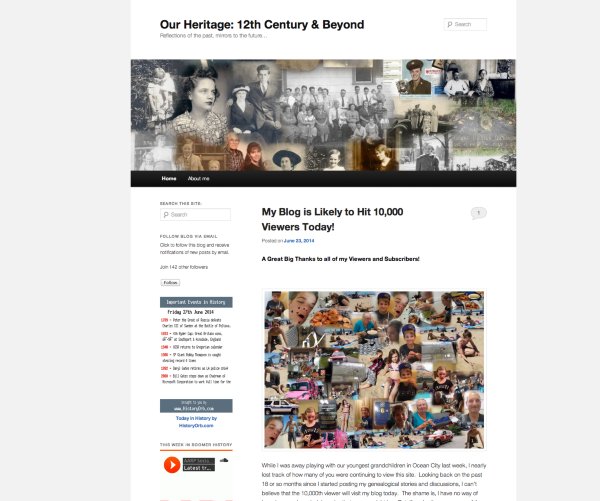
If you still see a missing image, can you give me the link to that page? I’d be happy to take a further look.
Cheers!
-
Sorry, Grace, It's my secondary blog site: joannedi
My latest post:My Blog is Likely to Hit 10,000 Viewers Today! Read more | My blog
Get this email app!
Get a signature like this: Click here!
-
Hi Joanne,
That was the site I was looking at and I couldn’t find any missing images.
Can you take a screenshot of the issue and I can take a look? Please upload the image to your Media > Library page and I’ll be able to see it.
Thank you!
-
I somehow deleted the 404-not found image and this corrected the home page’s appearance . However, before the deletion of this image, WordPress’s Page view had been displaying individual header images. I used the set image feature which still exists when you look at the edit version of all pages to accomplish this–and this is my true goal–to get individual images on each page’s header –not a set image or a random image in the headers. E.g., 1930 sub page under FVFD History page has a 1930 header background image. Thanks for all of your help. Greatly appreciated. Joanne [Redacted by staff]
-
Hi Joanne,
Each of your posts and static pages can display a different custom header image by adding a Featured Image that’s at least 1000 x 288 pixels to each post or page.
If that isn’t working for you, please send me a link to the page where it isn’t working so I can take a closer look. :)
-
Hi Joanne,
I see that you posted a reply to this support thread, but nothing came through in your reply. Can you try reposting your reply? Thanks!
-
Hi Joanne,
I’m sorry, but I’m still not getting your reply. If you’ve been replying via email, could you please try visiting this page in the support forums to post your reply there:
https://en.forums.wordpress.com/topic/managing-pages-3?replies=10
Thanks!
-
Post: ” Amazing Film of a Boat Ride Down the Potomac in 1917!” appears under my “Home” tab.
The set featured image is a boat:
The displayed image is another header image in my media gallery, a brick wall.
And this brick wall image now appears on all posts within my “Home” tab. I noticed that my “About Me” page always displays accurately. Do I need to set up my posts or home page differently?
Could this be a Google Chrome Cache issue? Thanks again. -
Hi Joanne,
I see the boat image when I view that post here: http://joannedi.wordpress.com/2014/06/29/amazing-film-of-a-boat-ride-down-the-potomac-in-1917/
Here’s a screenshot of what I see on that post: https://cloudup.com/c1hCBMG3_lL
I checked your other recent posts and I see their featured images, too. It’s possible that you’re experiencing a caching issue in your browser. You may need to refresh your browser or clear your browser’s cache to fix that up.
Please let me know how that goes!
-
Google Chrome’s cache loading was my issue. I downloaded for FREE Google Chrome’s “Cache Killer” which is a toggle on/off app. My set feature and header images now display accurately.
Thanks Rachel for you patience and help.
-
You’re welcome. I’m so glad everything is displaying correctly for you now! :) Just let me know if I can do anything more to help.
-
I stand corrected once again. The header images are still displaying randomly, though I haven’t checked random or radio boxes in my header image set up. They only display accurately when I click on them from my dashboard or my archives on my home page! Very curious. (My theme template is Twenty-Eleven.)
-
Hi Joanne,
I’m not seeing the random header images you mentioned.
When I go to the front page of your blog at http://joannedi.wordpress.com/ I see the default header image you set for the blog.
Then, when I click on the title of any of your posts, I see the individual post with its featured header image.
Can you send me a link to where on your blog you see the random images?


- The topic ‘Managing pages’ is closed to new replies.
 WordPress.com Forums