

Mapping domain and using a domain name like www.xxx.it
-
Hi, I can’t see my worpress blog (lostpropertyband.wordpress.com) on the domain I’ve mapped (www.lotsproperty.it bought through aruba.it). I think I’ve done correctly what it’s needed in order to get it, but for some reason it doesn’t work. I’ve changed my record name servers on the settings page of my domain days ago, but nothing happens and the http://www.lostproperty.it domain is still offline. In addition to that I see this message on my https://wordpress.com/my-upgrades/ page: “DNS needs to be updated”.
I don’t know what to do, could you please help me?
The blog I need help with is: (visible only to logged in users)
-
Hi there,
It looks like your nameservers haven’t been updated quite yet for lostproperty.it. I just did a whois lookup:
http://who.is/whois/lostproperty.it
And according to that, your nameservers are pointing to technorail.com and arubadns. If you can log in and change your nameservers over to us, then it will usually take up to 72 hours for propagation to complete:
NS1.WORDPRESS.COM
NS2.WORDPRESS.COM
NS3.WORDPRESS.COM
Please keep in mind that some domains require all three nameservers, and I believe that .it domains are one of those. So definitely enter all three when you are changing your nameservers!
Let me know if you have any questions.
-
Hi,
Thank you for the answer. I’ve been waiting for more than 72 hours to see if the nameservers were updated after I changed them into my aruba.it account (which is my domain provider). Today I’ve re-done the procedure (I’ve re-entered the names of the name servers provided by wordpress – the ones you suggested in your post) so maybe I have to wait a bit more, but you could you please take a look at my account page to see if I’ve done everything properly? Here’s the link to the snapshot of the screen I made, which is in my Dropbox account:
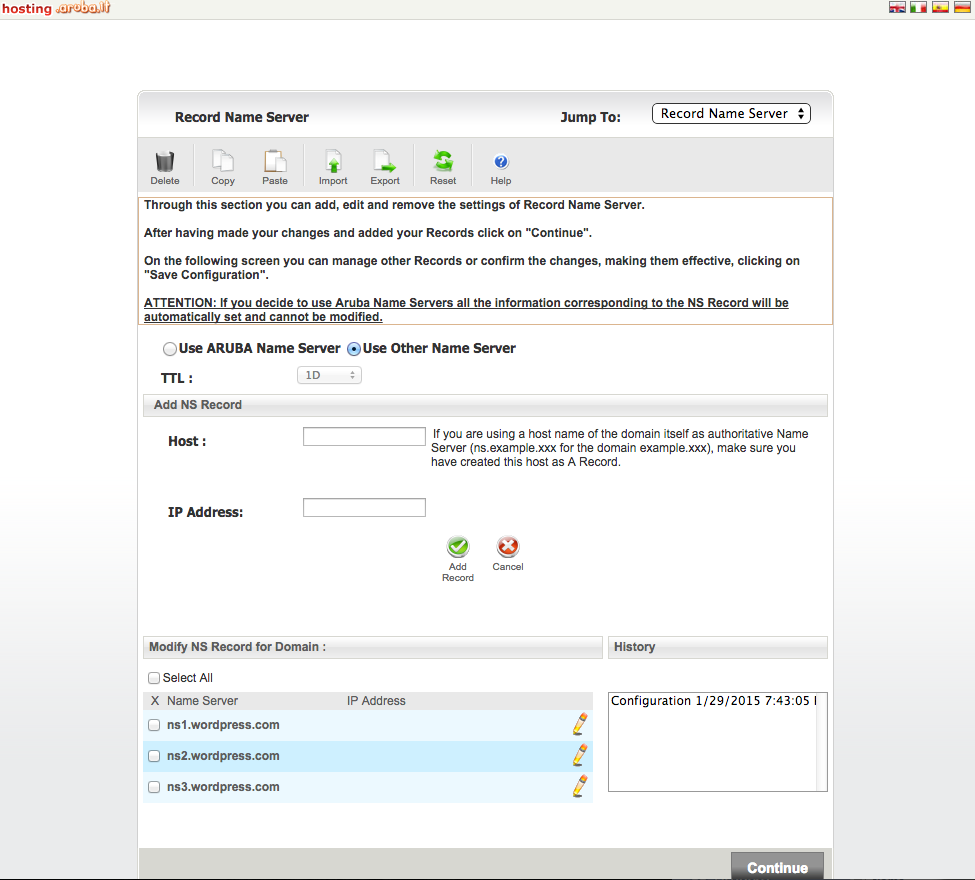
Thank you very much!
-
Yes, those look correct. You may need to press Continue and go through other steps if you haven’t already. Assuming their system is working correctly then everything should work fine.
-
Ok, thanks. Yes, I pressed Continue and went through all the other steps… So now I guess I only have to wait….
Thank you very much for your help!
-
-
Hi, here I am again, with further problems… :)
I’ve just found out – after a chat with the domain provider support team – that the Authority that should have accepted the change in the nameservers says that the nameservers of WordPress are not valid.
Could you please take a look at this log to see if there’s a way to make things work properly? Again, I am not an expert so I don’t know what to think about it…
Here is the link to the file on my Dropbox folder:
https://www.dropbox.com/s/tnrakvtrw4sslt3/DNS%20www.lostproperty.rtf?dl=0
Thank you very much, again. :)
-
The only error I see in this document is in relation to the MX record mx.lostproperty.it, which is configured incorrectly. This is not a default MX record, so it was either manually entered by you or it was imported from your previous DNS settings.
If you know your correct MX records, you can enter them by logging in to your Dashboard and going to Store >> My Domains >> Edit Domain >> Edit DNS and changing it there, or alternatively I can go in and remove this MX record for you.
That seems to be the only issue with the report that you provided. Once you fix that and wait a few hours for the change to propagate through the internet, you should be able to set your nameservers correctly.
-
Ok, I’m not so sure about what is the MX records for… is it related to the domain email account? If it is so, I don’t need to use it, so maybe it would be fine if you can remove it. At least we can try… So please go on with this if you can… Thank you! :)
-
It is indeed related to your email. MX stands for Mail Exchange, and it tells the internet where to send your email for that domain.
I removed that MX record, so if you wait for a while (all changes to DNS can take up to 72 hours, so don’t be surprised if it takes that long), and according to that page you sent me it should work OK! :)
-
Ok thanks! I’m still waiting but now the Whois page is saying that the status is “ok” instead of “update pending”, or something like that… :)
-
Hey there!
Terrific, please let us know when your domain has propagated! As Ash mentioned, it can take up to 72-hours after you made your name server adjustments.
If you have any other troubles or concerns, let us know and we can look further into your mapping issues.
Wishing you the best. Thanks!
-
-


- The topic ‘Mapping domain and using a domain name like www.xxx.it’ is closed to new replies.
 WordPress.com Forums