

Mapping Existing Domain not working
-
Hello,
Recently I followed the WordPress instructions to map my paid for domain (pchc-mom.ca) to my WordPress website (pchcmom.wordpress.com). I updated the nameservers at GoDaddy where I bought the domain, and I switched the primary domain. But when I go to pchc-mom.ca it still either goes to a blank GoDaddy space or to the old host on Blogger. Please help!
The blog I need help with is: (visible only to logged in users)
-
I just tried to hit your site and it pulled up a WordPress.com site which I think is what it’s supposed to be. It might just have been that your computer has cached the old DNS settings. If it’s still messed up on you, the easiest thing would probably be to just reboot and check it again to see if that’s how it’s supposed to look.
-
Thanks for your reply!
Hmm, that’s interesting. It directs to the WordPress site now but all of my tabs are missing. Does this just mean that when you map a domain to a new host it just takes a day or two for everything to fall into place?
-
The tabs missing probably isn’t related to the mapping. You might want to check your menu settings to see if it’s setup to display correctly.
As for changing your hosts, what happens is that you tell the Domain Name Servers (DNS) your address is now hosted somewhere else.
The Internet uses DNS to point numeric addresses to something readable like pchc-mom.ca. Sometimes it takes a little while to update on that system. But, your computer will cache that mapping so it doesn’t have to look it up every time you try to go there, making your web pages load faster.
The computer eventually will check again every so often but you’ll get what you’re seeing if it hasn’t updated after you switched everything.
-
@pchcmomintern
Congratulations! The nameservers appear to be set up correctly for pchc-mom.ca. pchc-mom.ca is set as the primary domain for pchcmom.wordpress.com and will appear in the address bar when you visit the site.It can take as long as 72 hours for DNS changes to become widely available. If you’re still not seeing your site loading at pchc-mom.ca, please wait a few more hours, clear your browser cache, and try again.
NOTE: Your URL is correctly redirecting for me. I am in Canada. It is not unusual for the last place to flush their DNS caches to be your own ISP. You can view the DNS changes here > http://www.whatsmydns.net/ What’s important during this stage is to be patient.
-
but all of my tabs are missing
The detailed theme description page is at https://theme.wordpress.com/themes/sela/
They must be public pages – not private and not drafts.
Public – The page will be visible to everyone.
Protected – The page is protected with a password you set. Only people who have the password can view a protected page.
Private – Pages are only visible to blog Editors and Administrators. Private pages are not visible in Reader, feeds, or in any search. A page can be private without being password protected.
http://en.support.wordpress.com/pages/page-visibility/See also:
Creating a Custom Menu http://en.support.wordpress.com/menus/#creating-a-custom-menu
Adding Pages http://en.support.wordpress.com/menus/#adding-pages
Changing the Order & Creating Sub-Menus http://en.support.wordpress.com/menus/#changing-the-order-creating-sub-menusIf you do not succeed then we need to know what the title of the missing and/or URL of the missing Page or sub-page is.
-
Hi,
I’m having a similar problem with my blog http://www.diaryofaplainzimbogirl.com. I have recently transferred from blogger to wordpress and now I was trying to map my wordpress to my existing domain. It worked on the night i did it (thursday the 28th of Jan) but now when I search my url, i’m taken back to my old blogger site.
Please help.
Thanks,
Tats -
It looks like you didn’t completely change the IP addresses when you updated the DNS at GoDaddy. It looks like http://www.diaryofaplainzimbogirl.com is still pointing to Google, while just diaryofaplainzimbogirl.com isn’t.
-
@stothek
I am a long time Volunteer with zero aspirations of becoming a Staff member and there are several other regular Volunteers like me here.Are you a Staff wannbe trying to get experience by answering support questions here?
If your answer is yes then I will wish you well avoid correcting any errors you make and simply tag any threads of that nature for Staff.
P.S. I am not suggesting that your responses above are incorrect. I am just tired and I do not wish to tailgate you into every thread and check your answers like I have been doing with every Staff wannbe for over 8 years.
-
@terrajessi
Hello there,WordPress.com does not accept domain transfers but mapping an existing domain is possible. Domain mapping of an existing domain URL that you already own and purchased elsewhere is not done free of charge. You will have to renew the domain name purchase where you made it and the domain mapping purchase here every year.
Mapping an existing domain costs $13. annually. In order to map to a domain one must have an underlying .wordpress.com subdomain blog to map from and it does not matter what that underlying .wordpress.com URL is. It does not have to match the domain URL. If you have registered a .wordpress.com blog you log in as Admin under the exact same username account that registered the blog and purchase a domain name by purchasing an annually renewable domain mapping upgrade for the blog.
If you own that domain then see here for mapping an existing domain that you already own http://en.support.wordpress.com/domains/map-existing-domain/
Dashboard > Store > My Upgrades is where you do the primary blog set up knowing it can take between 24 – 72 hours for domain name propagation to take place throughout the internet. You can view the DNS changes here > http://www.whatsmydns.net/ What’s important during that stage is to be patient.
I did a check on your progress and note that you have not repointed the namservers as stothek stated above.
We require that your name server configuration include only the following servers or their numeric equivalents:
NS1.WORDPRESS.COM
NS2.WORDPRESS.COM
NS3.WORDPRESS.COMYour name servers are as follows:
NS41.DOMAINCONTROL.COM
NS42.DOMAINCONTROL.COMIf you have access to change the nameservers for this domain, please remove all nameservers not on the required list above.
-
-
@pchcmomintern
You succeeded! I see your Page tabs. You are welcome and best wishes with your site. :) -
That’s really helpful. I think I got it. Hopefully it will change over soon. Thanks for taking time to help :)
-
@terrajessi
Nameservers Validated!
Congratulations! The nameservers appear to be set up correctly for diaryofaplainzimbogirl.com.I am in Canada on a very tiny island off the west coast and your URL is redirecting for me right now. It is not unusual for the last place to flush their DNS caches to be your own ISP. You can view the DNS changes here > http://www.whatsmydns.net/ What’s important during this stage is to be patient.
-
Hi there,
I am able to see your site as seen here:
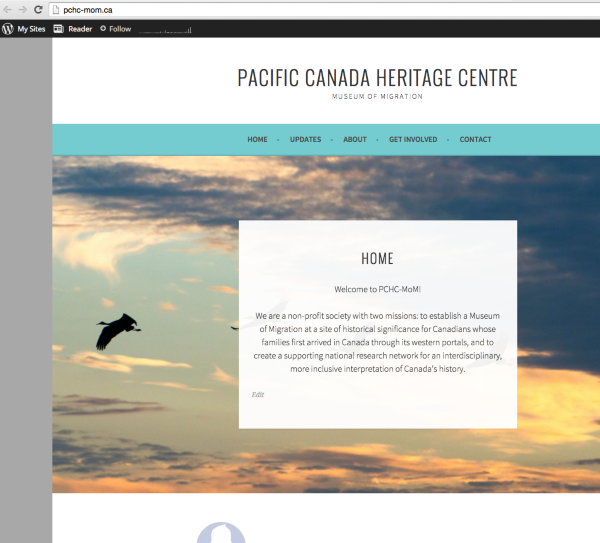
Thank you @timethief for all the help.
Let me know if you have any questions with this!
-
@gracejiyoung
I’m so tired that I think a holiday is a necessity but I insist that it cannot be a a holiday any place with parrots … if take my meaning then lol :D :) -
-
I don’t understand what “Mapping” means.
I have a domain registered with Domain .com.
(Jimmysgroovysite) for example
And a website hosted on earthlink, (that I haven’t touched in three years)
I want to now have the website on WordPress (where I have a different blog and a domain registered http://www.toourlittlegirl.com)
I don’t understand what ‘mapping’ will do.
Will I be able to create a new website for the domain that remains at domain.com, and domain .com simply points at the new website residing on WordPress?
I understand what I’m supposed to do at Domain . com.
What I don’t understand is what will happen at WordPress.
Can I
-
Hi Jim,
This is a new line of inquiry, and we’ll be happy to help you out but if you wouldn’t mind could you please open up a new thread right here:
https://en.forums.wordpress.com/?new=1
So that everyone who has participated earlier is not getting notifications for a conversation which they are not involved in?
Thanks!


- The topic ‘Mapping Existing Domain not working’ is closed to new replies.
 WordPress.com Forums