

margins
-
Hi. I messed up the width of my white background when I used a plugin tonight. I got rid of the plugin with your help, but the white background is still too narrow.
Could you please change it back to the way it was 24 hours ago?
Thanks!
The blog I need help with is: (visible only to logged in users)
-
Could you clarify a bit more about how wide you want the white background on your blog? Here’s what I see currently:
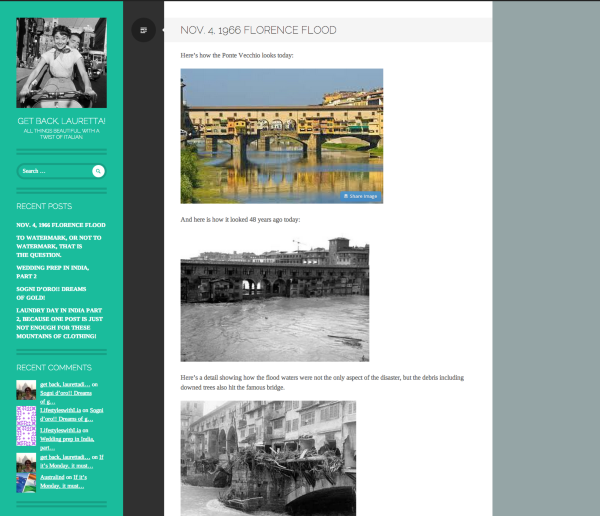
Are you looking for the white background to expand across the entire screen? If so, you’ll need to change the background color under Appearance -> Customize -> Colors. More information on that here:
http://en.support.wordpress.com/themes/custom-backgrounds/#setting-a-background-color
Please clarify if you’re looking for something else!
-
Hello and thank you for writing.
Until yesterday I had the look I wanted for my blog. Then I installed a webmaster thing a ma jig and experiemented with it (I read about this on another blog and it seemed like a good thing to do: wrong, I am not advanced enough to use it).
The webmaster experimentation left me with language showing up about the dimensions of my images on my blog.
I got that fixed last night with one of your colleague’s help.
But now my “white paper space”, or the space on which I write and place media, is too narrow.
If you can compare how my blog looks now with how it looked 24 hours ago, you’ll see what I mean.
Yesterday, before I experimented with the webmaster thing, I had enough horizontal space on my blog to place two photos side by side in a nice large format.
Now, with my photos the size I like them, there is only enough horizontal space for one photo.
Thank you so much. I promise not to experiment with webmaster again!
-
Hi there,
Thanks for clarifying! I’m unable to flip back 24 hours ago to see how your blog looked so I’m still having a bit of a hard time figuring out exactly what you’re referring to. It does look like certain photos on your site are side to side as shown here:
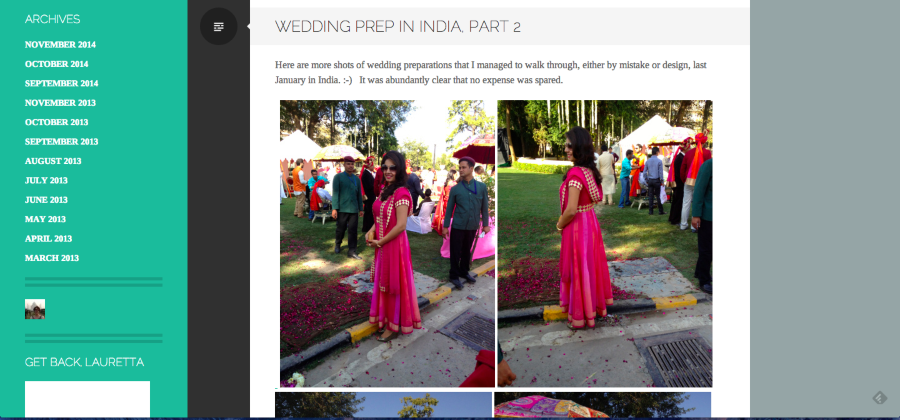
If you’ve disabled the browser plugin that you installed previously, all of the effects should have disappeared as well. Could you help me pinpoint what you’re referring to?
- Are you referring to how photos appear when you’re editing a post or when you’re viewing them from the home page?
- Is there a particular post where you’re noticing this issue or is it across your entire site?
- Can you upload a photo of the issue to your Media Library? Screenshot instructions can be found here:
Sorry for misunderstanding!
-
Here’s the screen shot of what I see, which is different than what your screen shot shows. /Users/laurettadimmick/Desktop/Screen Shot 2014-11-05 at 3.29.16 PM.png
-
-
OK Jeremy, I think I have done what you asked. I took a screen shot of what I see on my posts (all of them, across the board, not just the most recent post).
You will find my screen shot in my media uploads as you suggested.
Hope you can get my white paper wider for me. Thank you.
-
Thanks for the screenshot! So, it looks like you’re seeing the default layout of the theme, similar to the demo here:
http://writrdemo.wordpress.com/
It is possible to widen the content area (the part of the page where your blog posts live) by navigating to Appearance -> Customize -> Theme Options and checking the “Wider Content Area” box. Can you give that a try?
-
-
Sorry we couldn’t get this fixed up sooner! Please let me know if you need anything else.


- The topic ‘margins’ is closed to new replies.


 WordPress.com Forums