

.me blogs
-
What happens to my .me blog if I don’t keep paying money each year. I am so confused.
I want to set up another blog with a more general name for future travels. Trying to figure out whether to do an .me one again.The blog I need help with is: (visible only to logged in users)
-
I don’t think I set this up to be paid automatically, so I wouldn’t even know how to pay if I wanted to do that. Also, I chose a domain name that was too narrow. Now I want to set up a new (more general) name. So I wondering if I should do that as an .me or as a .wordpress.com. What are the benefits of having an .me.
Thanks. -
I just realized that my .me blog will expire in July. Does that mean that it will disappear and nobody will be able to see it anymore or just that I won’t be able to post to it again.
I want to set up a new blog because this one is too specific. But I don’t want this one to disappear. Please help me so I know how to proceed. -
Nobody is answering my previous questions. Can I change the name of my blog from nancyoncamino.me to travelingnancy.me? Will it keep my old blog entries if I do that?
-
See here to note what happens when you fail to renew a domain URL and it expires https://en.support.wordpress.com/domains/domain-expiration/
If you cancel and do not renew a domain URL then every link to the content under that domain URL will be broken in the search engines and everywhere the links appear online. So when clicked they will produce 404 Page not found) errors.
http://onecoolsitebloggingtips.com/2012/01/30/omg-my-domain-name-expired/
http://onecoolsitebloggingtips.com/2011/08/05/avoid-creating-404-pages/ -
Can I change the name of my blog from nancyoncamino.me to travelingnancy.me? Will it keep my old blog entries if I do that?
Yes. Please read what I posted above. I tagged this thread for Staff assistance with that. Please subscribe to it so you are notified when they respond. To subscribe look in the sidebar of this thread, find the subscribe to topics link and click it.
-
Thank you timethief. I am still so confused. I think I am subscribed to this thread. But I don’t understand the instructions. Are there simple instructions about how to change nancyoncamino.me to travelingnancy.me? Is there a way to let everybody who has been following me know that the name has changed? I will be doing some other traveling that is not on the Camino so I want to have all of my blogs in the same place.
-
Can I just change the nancyoncamino.me back to nancyoncamino.wordpress.com and have it permanently saved that way. I don’t want to lose my blog.
-
Hi there!
Let’s walk through how your site is connected to your domain. I think this will help clear up your confusion. :)
Every site here on WordPress.com has a .wordpress.com address. Your site, which is accessible at nancyoncamino.me, has a WordPress.com address of nancyoncamino.wordpress.com.
Since you have the custom domain nancyoncamino.me, your readers probably have no idea what your WordPress.com address is.
We keep all of your content at the WordPress.com address. This makes it easy for you to change your custom domain at any time without changing or losing your content.
You can always change your primary domain back to your WordPress.com address using the selector here:
https://wordpress.com/my-domains
And you can add as many domains as you want to a single WordPress.com site.
If you’d like to register a new domain for your site, you can do that here:
Select “Register a New Domain Name”. Then you can go through the process of choosing your new domain and selecting the correct site to connect it to.
Once you have your domain set up the way you want, come back here and let me know. There are a few more questions I have for you regarding the way your upgrades are set up, but it won’t affect setting up the domain. :)
-
Yikes. I am so confused. So if I don’t change the domain to nancyoncamino.wordpress.com, the whole blog will disappear in July unless I pay another $99. And is it still $99 since it offered me a .me account for less than that on a new blog I started.
Also, I just tried to add another blog called (email visible only to moderators and staff). I carefully chose a theme for it (clicking on the new blog), but it changed the theme of my old blog instead.
Is there anyway I can actually talk to somebody since I paid $99 for this blog. Is there a chat line so I can stay with the same person and work on this. -
Shawn, Okay. I changed the domain to (email visible only to moderators and staff). Now it will never expire – right?
My friends will still find the nancyoncamino.me until July when it expires, but the nancyoncamino.wordpress.com will always be there. Right?
If I want the .me back, I can switch it again – right? How much will that cost? The add for the new one travelingnancy.worpress.com says I can upgrade for $18 per year. What is the difference.
I really want to set this up for next trip. So, if I have travelingnancy.worpress.com, can I have various blogs under that. I would love to transfer all the postings from nancyoncamino to the travelingnancy blog. I would be willing to pay for that. Then if I set it up as travelingnancy.me and my friends log into that one, they can see my previous trips.
Or can I just change nancyoncamino.wordpress.com back to nancyoncamino.me and then purchase Site Redirect and change the name of the site to travelingnancy or some other name that would include all of my travels and have all of my travels in one place. I sure hope you can help me with this.
Nancy -
Glad to hear you’ve updated the domain. I’m going to run through your concerns but let me know if I missed anything! :)
So if I don’t change the domain to nancyoncamino.wordpress.com, the whole blog will disappear in July unless I pay another $99. And is it still $99 since it offered me a .me account for less than that on a new blog I started.
Your domain by itself costs $25/year. You currently have a subscription for our Premium plan which is $99/year and includes the following things:
Also, I just tried to add another blog called (email visible only to moderators and staff). I carefully chose a theme for it (clicking on the new blog), but it changed the theme of my old blog instead.
Is there anyway I can actually talk to somebody since I paid $99 for this blog. Is there a chat line so I can stay with the same person and work on this.I’m happy to help you out here in the forums. We also offer chat to as many users as we can, but we’re currently unable to offer chat support to everyone. If you see the chat box in the lower right while visiting your dashboard, you can chat with a Happiness Engineer live. :)
As for your theme issue, if you find a theme you like in our showcase:
When you click on ‘Activate’ you’ll be prompted to select the correct site to activate the theme on.
If I want the .me back, I can switch it again – right? How much will that cost? The add for the new one travelingnancy.worpress.com says I can upgrade for $18 per year. What is the difference.
Domains are priced based on their extension. .com addresses cost $18/year and .me addresses cost $25/year. You can see all of the extensions (TLDs) we offer and their costs here:
It is possible to combine these two sites under one domain. For clarity’s sake, let’s focus on your domain setup and questions first. Then I’ll come back to your questions about combining these two sites. :)
-
Thank you. Okay. I think I understand. So I just went back to nancyoncamino.me.
But now I really want to make travelingnancy my primary blog and combine the other blogs with that one. Please help me do that so that it is done before I leave on my trip. I will switch that blog to be my primary one. I will pay the $99 for that one and the $25 for the nancyoncamino.me.
What happens if I upgrade the travelingnancy to an .me and then transfer the premium from nancyoncamino.me to travelingnancy.me. Then can you help me add the blogs from nancyoncamino.me and from curlywheels.wordpress.com to travelingnancy.me?
Can we do that? -
Oops. I couldn’t change from travelingnancy.wordpress.com to travelingnancy.me. Or at lease I didn’t know how to do it.
Do you work on the weekend or do we wait until Monday for you to answer me again? -
Hi there!
Shawna is off for the weekend, but I saw your question and I can help too. :)
To make this easy as possible so you don’t need to make multiple payments, I’ve removed the Premium plan from nancyoncamino.me, and refunded you with $74 of WordPress.com credits. nancyoncamino.me is still setup for nancyoncamino.wordpress.com.
Next, visit this page and setup a premium plan on your new primary site:
https://wordpress.com/plans/travelingnancy.wordpress.com
Since I gave you those 74 credits instead of a cash refund, you’ll only need to pay $25 for the premium plan.
After you have the Premium plan setup for that site, you can register travelingnancy.me and the Premium plan will cover the cost.
Let me know when you have that all setup, and I can help you through combining all the blogs together as well.
-Alex G.
-
Okay. I have set up a premium plan for travelingnancy but I want it to be travelingnancy.me. I also want to add all the blogs from nancyoncamino.me (which you now changed to nancyoncamino.wordpress.com) to the travelingnancy blog.
I know you wrote to click on the button that says “register” but I don’t know how to switch the travelingnancy.worpress.com to travelingnancy.me. I feel so inept using wordpress. Also, is there going to be a way to notify people that I have switched the name of the blog to travelingnancy.me so they can still fine the nancyoncamino posts? I look forward to more help from you. -
Great job on the Premium plan! These little details can be tough, but you’re doing great. :)
Next let’s register travelingnancy.me by visiting this page:
When you arrive there, select your site “travelingnancy”. On the next page, underneath “Register a New Domain” type in travelingnancy.me and click search. You’ll see a button like this appear:
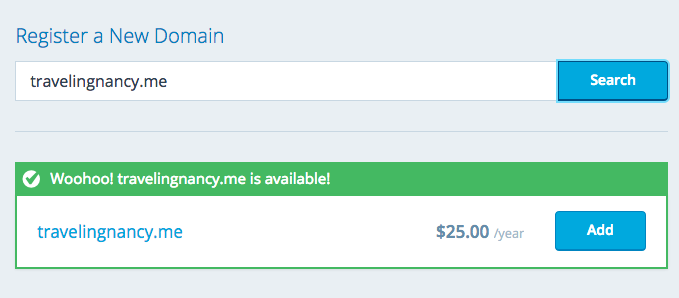
Don’t worry about the price. Your Premium plan will cover that for you. :)
Click Add and just follow the steps it leads you through to register the domain. Once you’re done, travelingnancy.wordpress.com will be travelingnancy.me.
I also want to add all the blogs from nancyoncamino.me (which you now changed to nancyoncamino.wordpress.com) to the travelingnancy blog.
You actually still own nancyoncamino.me through July 27th. Do you want to have that domain point to travelingnancy.me going forward? I can make that transfer for you.
To move all your posts from nancyoncamino onto travelingnancy, follow these steps to Export all your content from nancyoncamino:
Then follow these steps to Import that content onto travelingnancy:
Also, is there going to be a way to notify people that I have switched the name of the blog to travelingnancy.me so they can still fine the nancyoncamino posts?
Yes! We can move all your subscribers from WordPress.com and over email onto your new site for you, then it’d be a good idea to write a post saying that you’ve moved to the new domain name. :)
-
Getting more done. Yea. Thanks for hanging in there with me. I established travelingnancy.me.
It says it renews on March 13, 2106. Is that accurate?
Yes, I want nancyoncamino.me to point to travelingnancy.me. Does that mean that when people go to nancyoncamino.me, they will be directed to travelingnancy.me?
Now I am trying to export the nancyoncamino.me files and import them to travelingnancy.me.
I can’t find the “tools” link. I am on this page: https://wordpress.com/stats/nancyoncamino.me
Am I in the right place to do this? I may actually have to pay you to do this, but I want to understand what will happen. After we import all of my files from nancyoncamino.me to travelingnancy.me will the old files all appear in the calendar on the right? So when people go to travelingnancy.me they will find all of my old posts?
The blogspot calendar lists all the dates for blogs on the right hand side so people don’t have to manipulate the calendar. Can the WordPress calendar be set up to do that?
After we do this, I would like you to move all the subscribers over for me. Then do I write the post telling them that I have moved in nancyoncamino.me or in travelingnancy.me?
Will I be able to choose a new theme for travelingnancy.me after we are all done? How? Can I post my own photo to go across the top? -
Yay! Making progress. :)
Getting more done. Yea. Thanks for hanging in there with me. I established travelingnancy.me.
It says it renews on March 13, 2106. Is that accurate?It expires on April 13th, 2016, but domains set to auto-renew are automatically renewed 30 days early so that if any issues arise, we have 30 days to figure it out and we don’t accidentally lose the domain. :) So yes, it will renew on March 13, 2016.
Yes, I want nancyoncamino.me to point to travelingnancy.me. Does that mean that when people go to nancyoncamino.me, they will be directed to travelingnancy.me?
That’s exactly what it means! I’ve set that up for you.
Now I am trying to export the nancyoncamino.me files and import them to travelingnancy.me.
I can’t find the “tools” link. I am on this page: https://wordpress.com/stats/nancyoncamino.meWe’ll actually need to go into the /wp-admin/ dashboard for this. Visit this link to Export your content:
https://nancyoncamino.wordpress.com/wp-admin/export.php
And once you have the XML file, visit this link to Import it:
https://travelingnancy.wordpress.com/wp-admin/admin.php?import=wordpress
After we import all of my files from nancyoncamino.me to travelingnancy.me will the old files all appear in the calendar on the right? So when people go to travelingnancy.me they will find all of my old posts?
All the posts will still have the same date and comments and everything. But the URL will be different because it’s on the new site.
The blogspot calendar lists all the dates for blogs on the right hand side so people don’t have to manipulate the calendar. Can the WordPress calendar be set up to do that?
Sounds like you’ll want to add a Calendar Widget to your site:
It let’s people find your posts by the day on the calendar.
After we do this, I would like you to move all the subscribers over for me. Then do I write the post telling them that I have moved in nancyoncamino.me or in travelingnancy.me?
I can move the subscribers for you, but probably best to wait until we’ve got all your content imported.
If you want to publish the post before we move the subscribers, you’d write it on nancyoncamino.wordpress.com . But if you publish the post after we move the subscribers, you’ll need to write it on travelingnancy.me for them to get the email.
Will I be able to choose a new theme for travelingnancy.me after we are all done? How?
You can even do that now, here:
https://travelingnancy.wordpress.com/wp-admin/themes.php
Can I post my own photo to go across the top?
This is a Custom Header image, and not all themes have them so you might want to pick your theme first. But you can add this in your Customizer here:
https://travelingnancy.wordpress.com/wp-admin/customize.php?return=%2Fwp-admin%2Fthemes.php
-Alex G.
-
Hi again. I think I did the export and import, but I am not sure if it went to the right place. It said Import WordPress and it went to laughingriver. Then I got the following message. Can you tell if I did it correctly?
Processing…
We’re processing your import now and will send you an email when it’s all done. If you don’t hear from us within 24 hours, please contact support, and we’ll get everything fixed.
So am I just waiting or did I do something wrong.
About the calendar. There is a calendar in the sidebar of travelingnancy.me. The directions you sent say something about sharing the calendar with everybody. That is not what I want. I just wanted the calendar to list the dates in the reverse order of when I posted instead of people needing to click on each of the dates that are colored blue. The following is how it looks in the sidebar on blogspot:
Blog Archive
▼ 2015 (35)
▼ April (1)
► March (2)
► February (13)
► January (19)
► 2014 (90)
► 2013 (68)
► 2012 (17)
► 2011 (125)
► 2010 (48)


- The topic ‘.me blogs’ is closed to new replies.
 WordPress.com Forums