

.me blogs
-
Alex, You can ignore my previous post. Wow. The import was successful. All of my blogs are in the same place.
I am assuming that if you move all of the subscribers, they will just be there until I do a new post on travelingnancy.me. If so, that would be great. As soon as I am ready to go on my trip, I will do a post and all my old subscribers will get the post and know that I am now posting from my new trip. If that is correct, lets do it.
Then can we deal with the calendar. Is there a way it can be listed like the archive that blogspot does.
See below:
Blog Archive
▼ 2015 (35)
▼ April (1)
► March (2)
► February (13)
► January (19)
► 2014 (90)
► 2013 (68)
► 2012 (17)
► 2011 (125)
► 2010 (48) -
Alex, More good news. I fond the archive widget. You can look at my blog at travelingnancy.me to see what I have done.
Two more questions. Can videos be added to this blog?
want to make sure I am good through March 13, 2016. Will they notify me when I have to pay more money? I
Nancy -
Alex, I just came up with another question and I hope you will help me.
My daughter just pointed out that I really want to have tabs at the top of the blog that direct people to the various trips. Now that all of the blogs are on one page, is it possible to do that. How? I seem to spend hours trying to figure this out. -
If you review what you paid $99 for, you will see that you bought Videopress. So yes, you can upload videos as long as your upgrade is paid for. Instructions are in the Support documents under “Videopress.” https://support.wordpress.com/
Whether or not you can have tabs depends on whether or not you picked a theme with a tabbed header. If you want to separate things out it’s just a step by step process https://wpbtips.wordpress.com/2010/06/30/posts-on-pages/
-
Thanks again. I can’t believe how complicated this gets. I found this theme by colorlib.com called Travelify and tried to download it. Then I had to sign in. Somehow my password didn’t work so after being confused for a long time and trying different things, I got a new one. It turns out that the site is wordpress.org instead of wordpress.com. Is that a whole other company? Have I screwed up?
Also, will wordpress.com remind me when I have to pay more money by sending me an email? Or do I have to watch it myself? -
Great job with the imports and adding the calendar and archive widgets. :)
Can videos be added to this blog?
Since you have the Premium plan you can upload videos to your Media Library:
Or you can add videos from YouTube, Vimeo or other video sources as embeds:
want to make sure I am good through March 13, 2016. Will they notify me when I have to pay more money?
Your Premium Plan and travelingnancy.me have auto-renew enabled, so you’ll get multiple emails letting you know that we’re about to charge your credit card on file automatically to renew those upgrades.
Your domain nancyoncamino.me does not have auto-renew enabled. You might consider doing that, here:
https://wordpress.com/my-upgrades
My daughter just pointed out that I really want to have tabs at the top of the blog that direct people to the various trips. Now that all of the blogs are on one page, is it possible to do that. How? I seem to spend hours trying to figure this out.
I’d recommend adding categories to separate your blog posts into their various trips, and then add Category Pages to your menu:
I found this theme by colorlib.com called Travelify and tried to download it. Then I had to sign in. Somehow my password didn’t work so after being confused for a long time and trying different things, I got a new one. It turns out that the site is wordpress.org instead of wordpress.com. Is that a whole other company? Have I screwed up?
You can find an explanation between using the software from WordPress.org and setting up sites on WordPress.com here:
You haven’t messed up anything, but you won’t be able to use that third-party theme here on WordPress.com. On WordPress.com you can pick from themes available here:
-
Alex, you are back.
You said Your domain nancyoncamino.me does not have auto-renew enabled. You might consider doing that, here:
I don’t think I need to do that because you moved everything from that blog to my new blog (travelingnancy.me) and I won’t be posting to that blog again.I don’t think we answered the following question”
I am assuming that if you move all of the subscribers from nancyoncamino.me to travelingnancy.me, they will just be there until I do a new post on travelingnancy.me. If so, that would be great. As soon as I am ready to go on my trip, I will do a post and all my old subscribers will get the post and know that I am now posting from my new trip. If that is correct, lets do it.I am going to work on the Category issue. I hope you will still be there if I run into more clitches. The theme I have chosen has 2 menu items. I don’t think this is where you mean that I can put various blogs under each one. Is it? Or do I actually create a category and put all the already posted Camino posts under one of them? And then create a new category for the trip I am taking and put those posts under that one. I sure wish there was somebody who could talk me through all of this as I do it.
-
Hi again!
Alex, you are back.
All of the Happiness Engineers are helping out with Live Chat support this week. So we’re in the forums less than usual. I apologize for the longer waits on replies.
You said Your domain nancyoncamino.me does not have auto-renew enabled. You might consider doing that, here:
I don’t think I need to do that because you moved everything from that blog to my new blog (travelingnancy.me) and I won’t be posting to that blog again.Sounds like a plan!
I don’t think we answered the following question”
I am assuming that if you move all of the subscribers from nancyoncamino.me to travelingnancy.me, they will just be there until I do a new post on travelingnancy.me. If so, that would be great. As soon as I am ready to go on my trip, I will do a post and all my old subscribers will get the post and know that I am now posting from my new trip. If that is correct, lets do it.Great! I’ve moved all of your old subscribers from nancyoncamino onto travelingnancy. No need to post anything on nancyoncamino anymore, posting on travelingnancy will reach them all over the Reader and/or Email — however each follower subscribed.
I am going to work on the Category issue. I hope you will still be there if I run into more clitches. The theme I have chosen has 2 menu items. I don’t think this is where you mean that I can put various blogs under each one. Is it? Or do I actually create a category and put all the already posted Camino posts under one of them? And then create a new category for the trip I am taking and put those posts under that one. I sure wish there was somebody who could talk me through all of this as I do it.
So the way to go about this is to create a Category, and add that Category to several of your posts. For Example, I might create a “Recipes” category, and then on my posts for Brownies, Salad, and Steak, I can add the “Recipes” category to each of them.
Then, in your Menu one of the things you can add is a “Category”. It looks like this:
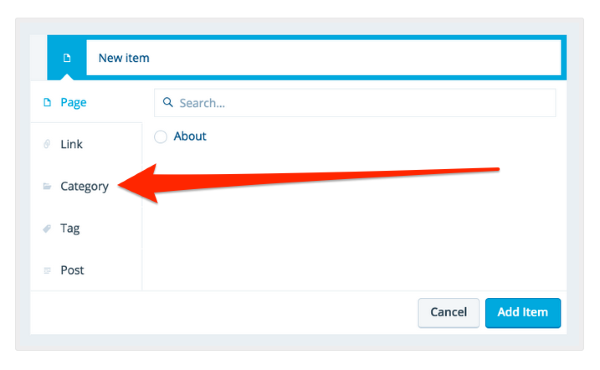
I’d select the “Recipes” category and add it to my menu. Once that menu is saved I can visit my site, click on “Recipes” at the top, and the site will automatically show my posts for Brownies, Salad, Steak, and any other post to which I added that “Recipes” category.
-Alex G.
-
Thank you. I am going to change nancyoncamino.me back to nancyoncamino.wordpress.com (if I can remember how to do that) so it doesn’t disappear after my subscription is over.
I have been trying to do the category thing and I get so confused. If I can get through this, once I add categories (like. a Camino one and an Ireland one), how do I get the old posts to go into that category. It is so mind boggling. I wish there was somebody I could just talk to when I am doing this. I will stay in touch with you. You have been very helpful. -
Alex,
I am working on the category thing and trying to find somebody who can help me.
But here is a new problem. When I go into my dashboard for travelingnancy.me it says the name is travelingnancy.wordpress.com.
When I try to change the name it says I have to do a domain upgrade. But I thought we already did that. So why is it not listed in my blogs as travelingnancy.me. I have marked all the other blogs I was doing as hide them. This is the only visible one and I marked it as primary. What happened. If I type in travelingnancy.me into the search bar, I can find it, but it is not on my dashboard correctly. Help please. -
-
Alex and/or Raincoaster
Thanks for hanging in there with me. I am working so hard on this category/menu thing. I find all of the directions very confusing.
What is the difference between a category and a menu. I want to see if I am on the right track and I need more help.
Please continue to help me. Are you able to look at my blog travelingnancy.me? I have put two categories/menus at the top of my blog. Is that the beginning of what I need to do?
How to I add all of my past blogs from August 18, 2014 through October 28, 2014 to the one that says Camino?
Then how do I add the blogs I am going to be posting about Ireland to the one that says Ireland?
Then in the future I want to add more tabs at the top and add future trips to my blog. -
Hello hello :)
Thank you. I am going to change nancyoncamino.me back to nancyoncamino.wordpress.com (if I can remember how to do that) so it doesn’t disappear after my subscription is over.
Okay, I’ve moved nancyoncamino.me back over to the site nancyoncamino.wordpress.com. It no longer points to travelingnancy.
I have been trying to do the category thing and I get so confused. If I can get through this, once I add categories (like. a Camino one and an Ireland one), how do I get the old posts to go into that category. It is so mind boggling.
To add categories to a post, you’ll need to edit a post and add the category to it:
But since you want to add categories to lots of post, you can bulk edit posts to get it done in one fell swoop:
https://en.support.wordpress.com/posts/edit-posts-screen/#bulk-edit
I wish there was somebody I could just talk to when I am doing this. I will stay in touch with you. You have been very helpful.
While working on your site, you may occasionally see this live chat option pop up. It’s a blue box that says “Howdy! How may we help you?”
That will let you chat with someone immediately. But whenever that’s not available. I’m here. :)
When I go into my dashboard for travelingnancy.me it says the name is travelingnancy.wordpress.com.
When I try to change the name it says I have to do a domain upgrade. But I thought we already did that. So why is it not listed in my blogs as travelingnancy.me. I have marked all the other blogs I was doing as hide them. This is the only visible one and I marked it as primary. What happened. If I type in travelingnancy.me into the search bar, I can find it, but it is not on my dashboard correctly. Help please.It does take time for the name to change in My Sites. I checked out your site’s dashboard and it appears to have updated already though:

If you’re referring to your /wp-admin/ dashboard at https://travelingnancy.wordpress.com/wp-admin/ , the URL will always be the same even with the custom domain.
What is the difference between a category and a menu. I want to see if I am on the right track and I need more help.
A menu is really just an area with links to help you navigate a site. Your menu is here:
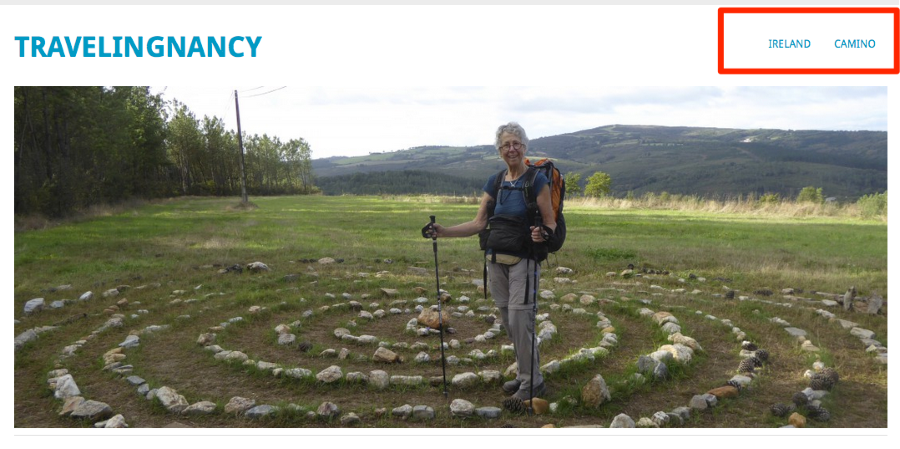
A category is something you assigned to post to tell WordPress that they go along with all the other posts of that category. That way, you can look at category pages like you’re creating for Ireland and Camino
I have put two categories/menus at the top of my blog. Is that the beginning of what I need to do?
Currently your “Ireland” and “Camino” links lead to a couple of pages. So you’ve correctly added some items to your menu, but you added Pages, not Categories.
How to I add all of my past blogs from August 18, 2014 through October 28, 2014 to the one that says Camino?
Then how do I add the blogs I am going to be posting about Ireland to the one that says Ireland?
Then in the future I want to add more tabs at the top and add future trips to my blogFirst go here to create a category called “Camino”:
https://travelingnancy.wordpress.com/wp-admin/edit-tags.php?taxonomy=category
Type in “Camino” under name, then click the blue “Add New Category” button.
Next, go to your All Posts page here:
https://travelingnancy.wordpress.com/wp-admin/edit.php
Check the checkboxes next to any posts about Camino. Then in the “Bulk Actions” dropdown select Edit, and click Apply. Some new options will open up. Check the box next to “Camino” and click the blue Update button.
Now, all those boxes you checked will have the Category “Camino” attached to them.
Next, go to your menu here:
https://travelingnancy.wordpress.com/wp-admin/nav-menus.php?action=edit&menu=7518
Click on Categories on the left that looks like this:
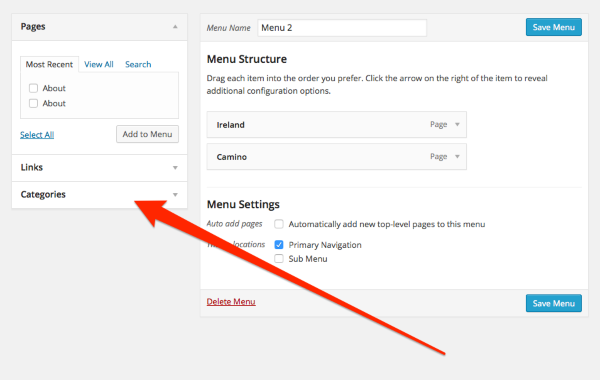
And check the box next to “Camino” and click add to menu. Click Save menu. You now have a Category page for all your Camino posts available in your menu.
You’ll want to Remove your Ireland and Camino links that are not working as well:
-Alex G.
-
Alex, I hope you are still there. When I search for my followers by clicking on the “My Sites” link on the bar at the top and then scrolling down. Near the bottom of the stats page you will see a section called Followers. I only saw 3 followers. I thought you moved them all to travelingnancy.me from nancyoncamino.me
Help please. -
Hi again. :)
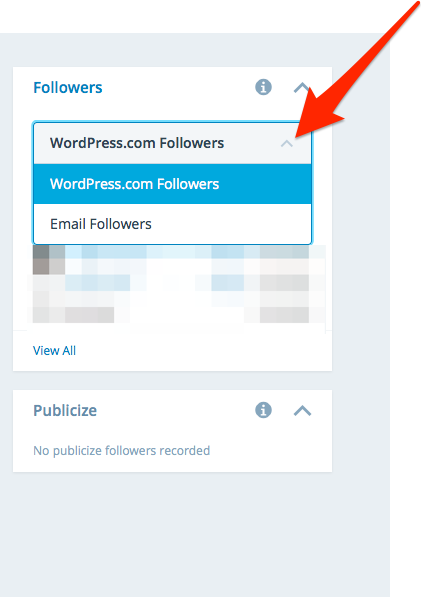
You have 83 followers on travelingnancy. 3 of them WordPress.com followers, and the other 80 are Email-only followers.
In your Stats, you can toggle between the two views:
-
Alex,
Hope you are there. I have one last question.
I received a message to pay for nancyoncamino.me because it is about to expire. I switched it to nancyoncamino.wordpress.com so that is now problem.
I paid more and you put the money into travelingnancy.me.
Here is the question: When will the premium expire on that blog? I know you said I had until some time next year for the .me to stay on that blog, but I forgot the date. And I don’t know how long the premium payment lasts. Please help.
Also, check out the changes I made on my site: travelingnancy.me.
I think I have this process down.
Still working on it to reduce the size of some of my photos.
Thanks so much,
Nancy -
Hi Nancy,
Alex is actually away at the moment, and I see Jeff is helping you with this via email. You can reply to that email from Jeff if you have any other questions or concerns. :) Please let me know if you didn’t receive that email from him!
-
I received Jeff’s reply and am still trying to process what it all means.
I will get back to him after I figure it out.


- The topic ‘.me blogs’ is closed to new replies.
 WordPress.com Forums