

Media
-
Why can’t I no longer attach link URL’s to images?
The blog I need help with is: (visible only to logged in users)
-
Hi there!
You can definitely still do this! There are a few ways that you can do this.
1. When you insert the image:
Before you click on ‘Insert into page,’ you can edit the link. At the bottom of the editor panel on the right, you’ll find “Attachement display settings.” The ‘Link To’ setting has four options: Media File, Attachment Page, Custom URL, None.
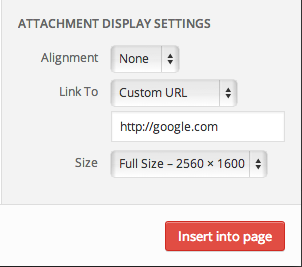
For an external link, select Custom URL and enter your URL in to the text box. Go ahead and insert the image!
2. Through the image editor:
Open the editor by clicking on the pencil in the upper right hand corner of the image. Under the alignment settings, you’ll find the ‘Link To’ setting again.
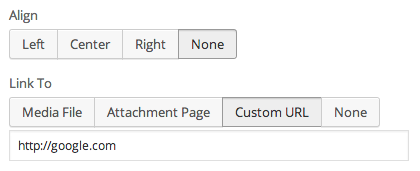
3. Through the link editor:
Click on your image so that its actively selected in your post. Click on the Link editor and edit as usual.
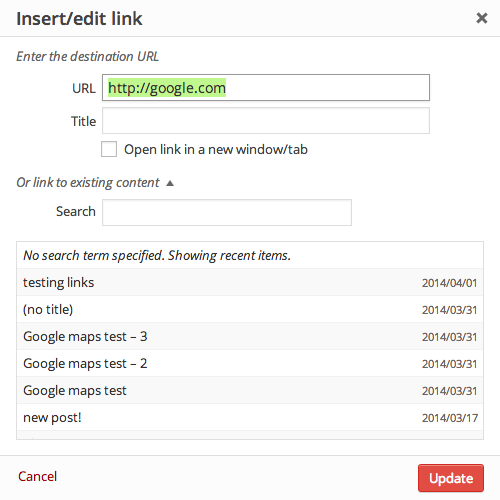
Let me know if I can help with anything else!
-
Thank you for the advice. I got confused because, when I edited my blog, the images had started to appear as script rather than pictures, taking away the pencil option I used to use. It’s really useful to have other options in case this continues to happen, so I appreciate you taking the time to answer.
-
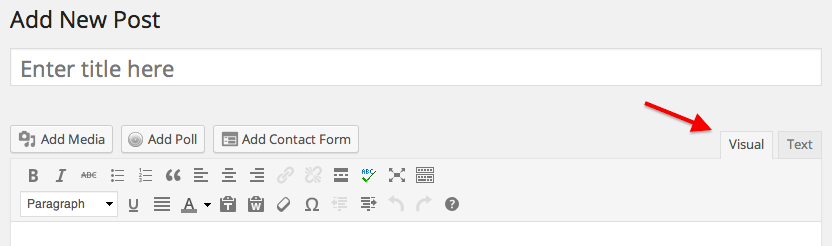
It sounds like you’re in the Text Editor instead of the Visual Editor. Here’s a bit about the two editor panels we have:
You can change back to Visual by clicking on the Visual tab in the upper right hand corner:
Let me know if I can help with anything else! :)
-
-


- The topic ‘Media’ is closed to new replies.


 WordPress.com Forums