

Media Content Widening
-
I am hoping to ammend in css the center width of media on my blog. Right now I’m using Intergalactic and the max width is set at 1000px. I’m hoping to set it to 2000px. Is that possible?
blog is http://www.maketrybe.wordpress.com
Much thanks in advance
The blog I need help with is: (visible only to logged in users)
-
To clarify I’d like to change images specifically, but I’m also open to widening the margins for text as well.
-
Looks like you found the location where you can modify the theme’s default media width under Appearance > Customize > CSS.
Right now you’re using Custom Design in preview mode, so you can preview the changes you make to things like fonts, colours, and CSS, but not save them.
Just let me know if you need further help.
-
Hey thanks, yeah I found the manage media content width box under the CSS sidebar but when I change the number nothing happens, it doesn’t matter if I go higher or lower than 1000px or if I check or uncheck the “do not use the original theme style” box.
-
I think there may be a couple of things at play here:
First, you don’t have Custom Design active on your site. You’re using using Custom Design in preview mode only, which does not allow you to see any changes in the CSS tab outside of the Customizer. If you were to purchase one of the WordPress.com Premium or Business plans, Custom Design would be active, and you’ll be able to fully use all the features that come with it, including the ones on the CSS tab.
Another thing at play is that there is currently a glitch in Intergalactic that I think is affecting the ability to display a larger image, such as what you’re trying to do:
https://en.forums.wordpress.com/topic/having-issues-centering-images
You could subscribe to that thread if you’d like find out when the bug is fixed. I think when it is you’ll be able to successfully increase the maximum content width, once Custom Design is active on your site.
-
I’m not sure I understand, though I don’t have a business or premium plan, I have purchased the customization upgrade, does that not allow for the same thing you’re talking about, am I crazy?
As for that thread, thank you! I’ll check it out, it would be really helpful.
-
I have purchased the customization upgrade
Ah, interesting. I see that you did purchase it last year, and yet it’s not showing as active on your site, so something must be amiss. Let me look into this further and get back to you.
-
-
-
Last question I promise. I guess an added benefit of the glitch that I could change some things but not others was that I could manipulate the size of the text. When customization kicked in it changed the font.
Now I can change the font and the size of the changed font but not keep the default font but change it’s size, either of the header of the body, is this possible?
-
To clarify, I’ve been through every font on the list visually checked it against a screen shot I had of my original header and it’s not there. So either I need to find a way to change the header font size in CSS or figure out if I can access the Intergalactic default font but manipulate it’s size.
-
Sure, you can keep the Intergalactic default font but change its size with some custom CSS.
Is your goal to change the size of your site title, the big words in black “MAKE TRYBE” in the middle of your header?
If so, try adding this custom CSS:
@media screen and (min-width: 768px) {
  .site-title {
      font-size: 80px;
  }
}
You can adjust the size from 80px as you like. I wrapped the CSS in a media query so it preserves the special sizes already declared in the theme that kick in on smaller screens.
Let me know if this is what you’re after.
-
Yes, to enlarge both ‘Make Trybe’ and the post titles on the blogroll. For some reason when I click on individual posts it’s exactly the size I want it to be, but not on the home page.
Sadly when I input the above css or any css into the text field nothing seems to happen. I appreciate the suggestion however.
-
Whoa, so when I just put in
dropped the top line, it changed.
Is there another short code for the post title font size? -
Sorry that sentence made no sense. When I input
.site-title {
font-size: 80;it became changeable.
-
Sadly when I input the above css or any css into the text field nothing seems to happen. I appreciate the suggestion however.
Custom CSS goes in the CSS editor, under Appearance > Customize > CSS.
Since you want your site title and post titles on the blog page larger, try adding:
@media screen and (min-width: 768px) {
  .site-title {
    font-size: 140px;
  }
 .blog .entry-title {
		font-size: 70px;
  }
}
Just erase the default comments that are there in the CSS editor and add your new CSS, like this:
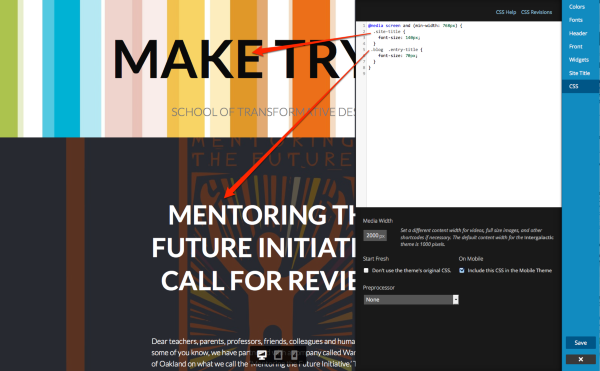
Be sure to press Save in the Customizer when you’re done.
Let me know how it goes.
-
-
-
Getting back to your original question, since you do have Custom Design after all, you could try adding this to your custom CSS editor and seeing if you’re then able to increase the default media width to 2000px as you’d originally wanted:
.entry-content img.size-full {
   max-width: 2000px;
}
You’ll still need to also add the number 2000 here:
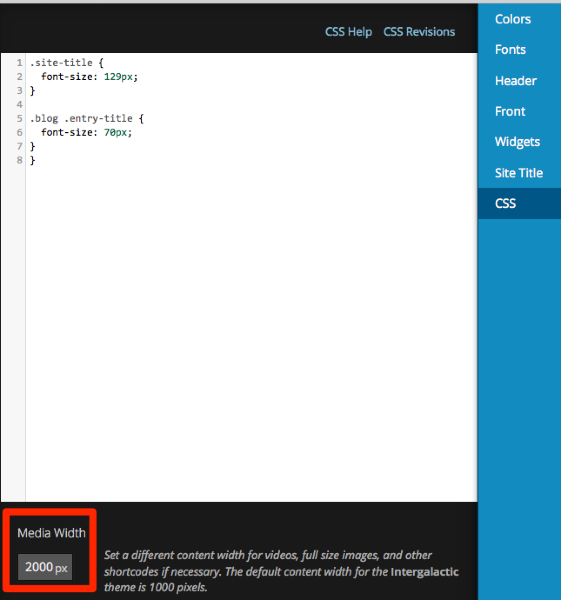
Let me know if this workaround does the trick.


- The topic ‘Media Content Widening’ is closed to new replies.
 WordPress.com Forums