

Menu and category
-
I can’t figure out the menus and categories . I will explain this better when you contact me. Please do so ASAP, I am annoyed that there isn’t a number to call to get support!
The blog I need help with is: (visible only to logged in users)
-
Hi there,
Currently, we don’t offer support over the phone, but I’m happy to help here. It looks like you recently chatted with David in Live Chat regarding a few theme issues. Were you able to get those resolved? It looks like you wanted a refund of the Moka theme. I’m happy to do that for you. Just please respond back to confirm!
If you explain your other questions, I’m happy to help!
-
Hey, ya I am ok with the other theme Moka, I canceled it and I assume they will refund me.
I switched to a new theme, Kelly, and I love it, I want to keep it. But I can’t get my headers/menus/tabs/categories (whatever they are called) in order.
Previously my blog was in Chalkboard theme. It has 6 main headers or categories:
-Babies and toddlers and kids Oh My!
-Let’s laugh about online dating
-Let’s laugh about pictures
-Let’s laugh about sex
-Let’s laugh in general
-Mysterious unnamed categoryUnder each heading/category, is where I had my individual posts. When I would hover over a category, the whole list of posts under that category/header would appear.
Now, for some reason, the headers are all there, looking pretty but the posts to go in each one are not there.
So that is number 1– Fix the headers and posts listed within each header.
Number 2 is–
I used to have it set up under chalkboard, so the first thing people saw, was the part titled: “This is a good place to start reading”. It was not it’s own post, it was like a welcome blurb, explaining what the blog is. Now that part is somehow listed under “home” (I don’t want any tab that says “home”) and it isn’t the first thing you see, you even have to scroll down to see it.
I don’t know what a “static” page is in wordpress lingo, but I think and assume I want this “here is a good place to start reading” page to be static, right? Does that just mean it stays in one place as a page, not as a post?
Anyhow, does this even make sense? Sorry I am so bad at this, I am hoping you can make sense of what I am asking! Lol!
Thanks
Kylee
-
Howdy Kylee!
Please see my answers below:
Hey, ya I am ok with the other theme Moka, I canceled it and I assume they will refund me.
It doesn’t look like the Moka theme has been cancelled quite yet. I went ahead and cancelled it from your account and issued a full refund.
So that is number 1– Fix the headers and posts listed within each header.
It looks like the custom menu you had previously is still available; it’s just not activated on the theme yet. Can you navigate to the following page?
https://theconfusedbloggerdotcom.wordpress.com/wp-admin/nav-menus.php?action=locations
From that page, select “Menu 1” under the primary menu and save the changes. Then, your menu should be back to the previous version!
I used to have it set up under chalkboard, so the first thing people saw, was the part titled: “This is a good place to start reading”. It was not it’s own post, it was like a welcome blurb, explaining what the blog is. Now that part is somehow listed under “home” (I don’t want any tab that says “home”) and it isn’t the first thing you see, you even have to scroll down to see it.
I don’t know what a “static” page is in wordpress lingo, but I think and assume I want this “here is a good place to start reading” page to be static, right? Does that just mean it stays in one place as a page, not as a post?
So, there are two parts to the second issue. First, your Front Page and Blog Page are the same in your Reading Settings here:
https://theconfusedbloggerdotcom.wordpress.com/wp-admin/options-reading.php
Basically, now when you post something new to your blog, it’s getting displayed on the same page that is also your home page, which is causing an issue. You want a static page set as your front page, which means the content won’t change at all.
To solve this, you’ll want to create a new page titled “Blog”. In reality, it doesn’t matter what you call it as you likely won’t be using it at all. It will just be a page that will collect all of your latest blog posts. But, if you keep your custom menu the same as above, it will not be shown to readers. Once you have created the new page, navigate to the Reading Settings linked above and set your “Posts Page” to the newly-created “Blog” page. That should take care of the miscellaneous post that appears over your welcome message.
Then, once you enable the custom menu as explained above, the “Home” tab should be removed.
Give those steps a try and let me know if you run into any trouble!
-
You deserve a raise!! That was totally painless the way you described it. I was able to quickly get things back in order. Thank you!!
Also, don’t make the biggest mistake of your life. Don’t read blogs that are not written by me. That leaves millions of blogs out… I guess you can read a couple that aren’t mine. But it’s like my Mom always said, “Tech support guys employed by WordPress should read your blog honey.”
So… I hope we are on the same page.
…..Read my blog.
xxK
-
-
Hey, now that things are all fixed, I am running into a related problem, for which I am sure you have the answer.
The categories are all what I want them to be, and posts are listed under each category are appropriately placed.
But now that I am adding new posts, and I am trying to put them under the correct category, I am finding that I can’t do that.
For example, the post entitled “I forget he is 5” is published and listed as the most recent post, however, it is not listed under the category, “Babies and Toddlers and Kids, Oh My!” where it belongs. In fact, it isn’t listed under any of those 6 categories. It is just kind of there, down at the bottom listed under “recent posts”.
On the old format, I used to go to ‘appearance, then to menu, then add the name of the post to the menu, then I was able to click and drag the name of the new post under whichever category I wanted it listed in.
But I tried to do that here, and it isn’t the same layout and I have no idea how to do that now.
So, this is the long winded way of saying, how do I post each time under the category that I want it posted under?
-
OK and now there is another post I added, with the same dilemma. It is there at the bottom under recent posts, but I can’t get it under the correct category. Help! :-)
Thanks!
-
Hi there,
So, it looks like you’re creating a new category for each new post you add to your blog. Then, you’re adding the category to your menu, which effectively links to the post in that category. Normally, categories include a variety of posts on the same subject, not just one post. Either way, we can get this to work.
Every time you create a new post and add it to its own category, you’ll need to add the category to your menu here:
https://theconfusedbloggerdotcom.wordpress.com/wp-admin/nav-menus.php
For example, with your post titled “I forget he is 5”, if you click “Categories” on the left-hand side of the menu page and select “View All”, you should see the corresponding category “I forget he is 5” as shown here:
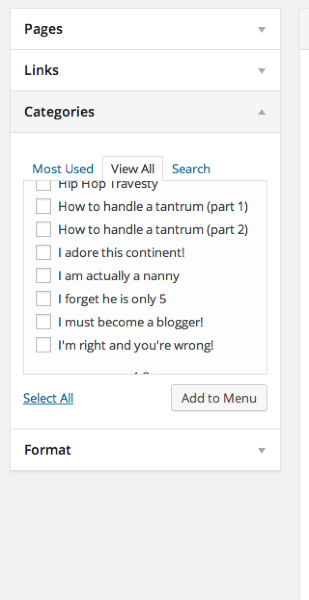
If you check the box next to that category, you will then be able to add it to your menu and drag and drop it wherever you would like.
Can you give that a try and let me know if it works for you?
-
I don’t need to add a new category. I need to be able to add each new post to one of the existing 6 categories.
So for example, I need to add “I forget he is 5” to the category on my blog entitled “babies and toddlers and kids, oh my”.
And I need to add “Orgasm Myths Debunked” to the category on my blog called, “Let’s laugh about sex”.
So I am not creating new categories, simply trying to add each new post to an appropriate existing category. Is that possible?
Thanks:-)
Kylee
-
Sorry to bother you again, but I also need to know how to insert music into my post about ayahuasca. It is there at the bottom under recent posts, but it is password protected. The password is 1598. As you can see, I inserted the link to the music I want (it happens to be a youtube clip, not an MP3) and when you click on it, it directs you away from my blog and to you tube.
I would like it, ideally, to be something they can click on, and it opens in another tab or window, so it can be playing the music while they read.
Thanks for your help!
Kylee
-
Hi Kylee,
I don’t need to add a new category. I need to be able to add each new post to one of the existing 6 categories.
The six items you’re referring to at the top of your blog right now are not actually categories; they’re just menu items. Let me explain a bit more. Please reference this annotated screenshot:
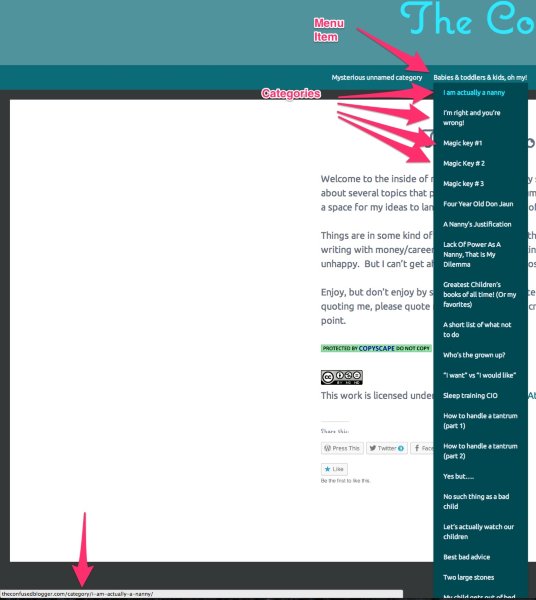
The top menu items are actually just individual pages you have created that serve as “topics” for the menu items below them. For example, if you click on the item “Babies & Toddlers & Kids, Oh My” you’re directed to the following page:
http://theconfusedblogger.com/babies-toddlers-kids-oh-my/
That page is actually blank.
Compare that to the following:
http://theconfusedblogger.com/category/i-am-actually-a-nanny/
That’s a category called “I am actually a nanny”. There is only one post under that category that bears the same name. If you take a look at your custom menu here, you’ll notice that the current format is:
– Topic page (blank)
–Category
–Categoryhttps://theconfusedbloggerdotcom.wordpress.com/wp-admin/nav-menus.php
Does that make more sense? So, the only way to add new posts to your menu would be to first create a new category for that individual post. Then, you would need to add the category to the custom menu under the appropriate topic.
If you would like to associate a post with an already established category like “I am actually a nanny”, you could do that following the instructions here:
Selecting “I am actually a nanny” for a new post would cause the post to appear under your category page here:
http://theconfusedblogger.com/category/i-am-actually-a-nanny/
However, the post would not appear under the topic “Babies & toddlers & kids, oh my!”. Does that help to explain the difference between topics, categories, and posts a bit more?
Sorry to bother you again, but I also need to know how to insert music into my post about ayahuasca. It is there at the bottom under recent posts, but it is password protected. The password is 1598. As you can see, I inserted the link to the music I want (it happens to be a youtube clip, not an MP3) and when you click on it, it directs you away from my blog and to you tube.
So, there are two ways we can approach this:
- You could just paste the YouTube clip as a link and let users open it up to listen. This would open the link in YouTube. If you would like the link to open in a new tab, replace the current link with the following text. Please do this in the Text Editor:
<a href="https://www.youtube.com/watch?v=Av2bPolPpkA" target="_blank">https://www.youtube.com/watch?v=Av2bPolPpkA</a>The “target=_blank” attribute forces the link to open in a new tab.
- You could also just embed the YouTube video within your actual blog post so readers can listen without leaving your page. Instructions for doing that can be found here:
Please let me know if you need any further clarification on any of the above!
- You could just paste the YouTube clip as a link and let users open it up to listen. This would open the link in YouTube. If you would like the link to open in a new tab, replace the current link with the following text. Please do this in the Text Editor:
-
OK… I see what you are saying. I guess, despite what things are called (menu/category/topics etc), I want to just have my blog continue to look the way it looks now.
So in order to accomplish that, I need to treat each new post as it’s own category? And then add that new “category” to one of the 6 pages, right? Pages, which so far, I have been referring to as categories. Right? And yes, the youtube part makes sense. Thanks!
Kylee
-
Hey Kylee,
So in order to accomplish that, I need to treat each new post as it’s own category? And then add that new “category” to one of the 6 pages, right?
Yep! That’s exactly correct. For each post, you should be able to add new categories via the Category Module as explained here:
Then, just add that category to the menu here:
https://theconfusedbloggerdotcom.wordpress.com/wp-admin/nav-menus.php
That should get you all setup! Give that a try and let me know if you run into any issues.
-
No, I’m sorry, I am so confused. Can I call you? I need help with this. It is making no sense:-(
-
Hi!
We don’t offer phone support, but I’m happy to explain more. Can you let me know where you’re getting hung up?
-
Fuck. OK… hang on. I am so frustrated that I need to stop and figure out where exactly I am getting tripped up…
Alright. Can you just pretend I am your old, confused, tech-impaired, but very sweet grandparent for a moment?
A huge part of the problem is the language I am using. I don’t understand the format here, so I am calling things categories when they are menus and whatnot, which is confusing me. For the sake of trying to convey clearly what my problem is, I need to continue referring to things the way I was used to.
So, to me, the following are my categories or topics if you prefer:
Mysterious unnamed category
Babies & toddlers & kids, oh my!
Let’s laugh about online dating
Let’s laugh about sex
Let’s laugh in general
Let’s laugh about picturesUnderneath those 6 topics/categories, are all of my posts which fall under each of those topics, sorted appropriately.
All I want to do, is make my whole blog stay exactly the way it is. In order. As I am making new posts, I am unable to put them under one of those 6 topics, instead they just appear under the heading, “recent posts”.
I need you to tell me, as if I am slow grandma, how to get “I forget he is 5” to appear under the babies and toddler and kids oh my, topic. I need the “orgasm myths debunked” post to appear under let’s laugh about sex. And I need the Ayahuasca posts to appear under mysterious unnamed category.
PLEASE, as if I am the slow kid in computer class, tell me how to achieve this! Sorry I am just not understanding…
Kylee
-
Hi Kylee!
Not a problem! Let’s break this down individually by post. I’ll include screenshots and screencasts to hopefully simplify the issue as much as possible.
To start, we’re trying to get the post titled “I forget he is 5” to appear under the topic “Babies & toddlers & kids, oh my!”. Follow these steps:
- Navigate to your posts page to find the post we want to edit:
https://theconfusedbloggerdotcom.wordpress.com/wp-admin/edit.php
- Move your cursor over that post and click “Edit”. You’ll be directed to the screen like this:
https://theconfusedbloggerdotcom.wordpress.com/wp-admin/post.php?post=1054&action=edit
- In the bottom left-hand portion of the page, you’ll see “Categories” shown here:

In this case, you’ll notice that there’s already a category titled “I forget he is 5” that has already been checked. If there was not already a category, you would need to follow these steps to add the new category:
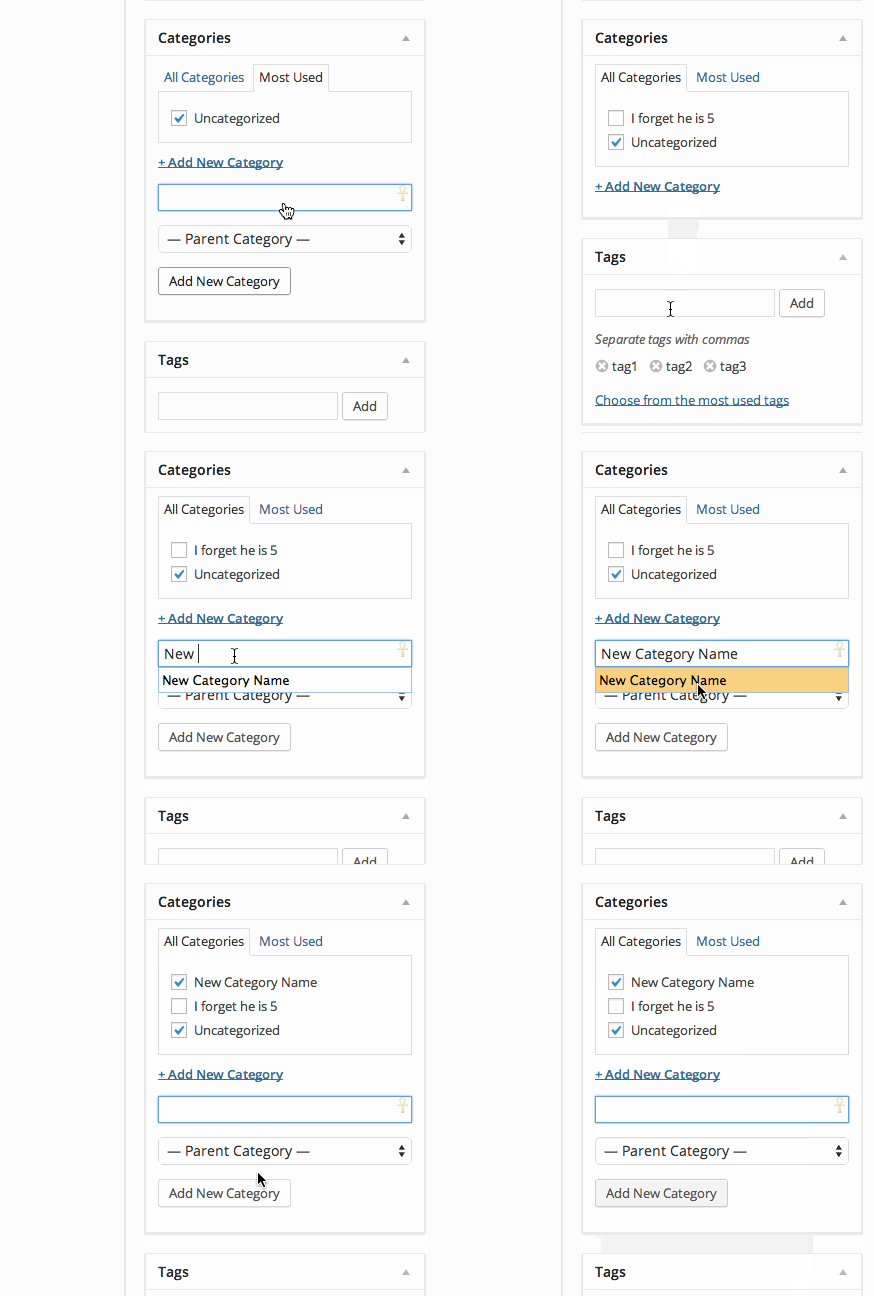
That’s an animated video that demonstrates how to add a category. In your case, you can just copy and paste the title of the post as a new category for every new post you add to your blog.
- Now, we need to add the new post to your menu topics. To do that, start by navigating to Appearance -> Menus found here:
https://theconfusedbloggerdotcom.wordpress.com/wp-admin/nav-menus.php
- On the left-hand side of the screen, select “Categories” then “View All” like this:
- Scroll through the list until you find the new category for the new post we just added to your blog. In this case, I’m going to demonstrate how to select and add “”I forget he is 5” to your menu under “Babies & toddlers & kids, oh my!”. The steps are as follow:
- Find the category and select it by checking the box
- Click “Add to Menu” to add it to your menu of your site
- Drag and drop the “category” under the topic where you want it to appear
- Click “Save Menu”
Here’s an animated video of that process happening from the very beginning:
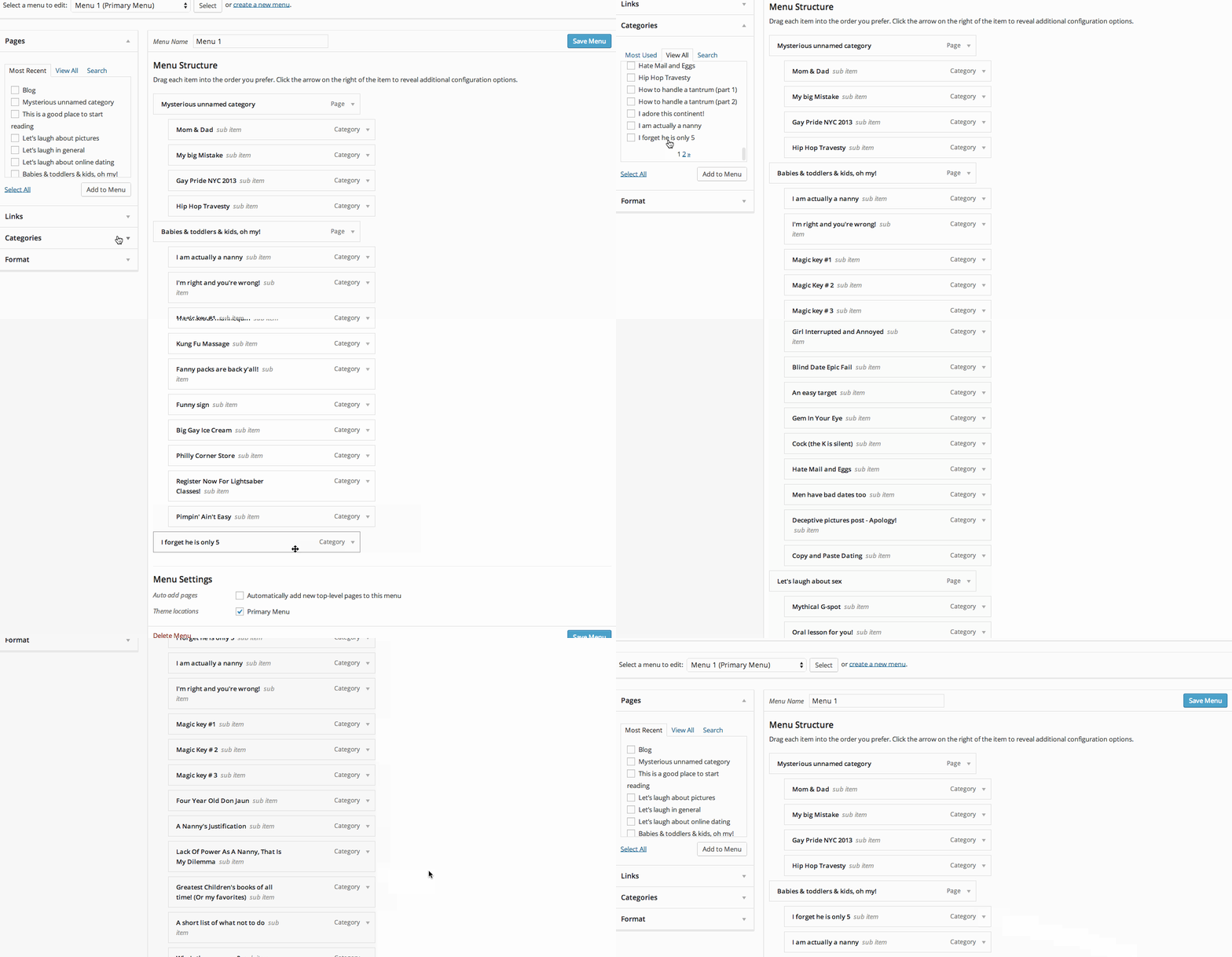
I have removed it from your menu so you can practice doing it on your own.
Once you click “Save Menu”, you should be all done. You’ll need to retrace those steps for each new post and category that you add to your blog.
Can you give those steps above a try and let me know if you need further clarification on any of the steps?
- Navigate to your posts page to find the post we want to edit:
-
You are amazing to break this down, you deserve a RAISE! I will try this tonight when I am off work!
Kylee
-
OK…
The problem was so confusing, that I can’t even explain it. Lol! But the solution, was accidental. I accidentally clicked on something that revealed what I needed. So thank you for being SO endlessly patient with me!!!
xxK


- The topic ‘Menu and category’ is closed to new replies.


 WordPress.com Forums