

Menu View
-
For some reason when I view the website from my computer, only 5 menus will display…the 6th one appears under the Home menu using Google Chrome. When I view my site using IE, it displays perfectly — 6 menus across. I have requested others to view from their computer and they see the 6 menus across perfectly. Why is it only happening at my end?
The blog I need help with is: (visible only to logged in users)
-
Hi, your site appears ok using Chrome from here too, zooming in out out doesn’t replicate your issue either, and reducing window size below 1024px automatically changes the menu from bar to button for mobile devices. This looks like a browser issue, check out this page of advice for debugging such problems to see if this helps:
https://en.support.wordpress.com/browser-issues/
and let us know how you get on. -
Would upgrading Google Chrome have anything to do with the view? All other websites I visit do not have this issue.
-
We’ll need a bit more information to get to the bottom of this. Please follow these steps:
1. Please provide a screenshot of what you’re seeing in Chrome. Here’s a guide on how to make a screenshot:
http://en.support.wordpress.com/make-a-screenshot/You can upload the screenshot – in a graphic format like JPG, PNG, or GIF – in your Media Library so I can see it. Thanks.
2. Please visit https://supportdetails.com/ and give me the following information:
– Exact version of Chrome
– Operating system
– Browser size
– Screen resolution3. In Chrome, please go to View > Actual Size to reset the zoom. (May not be applicable, if greyed out, let me know.)
Once we have all this information I’ll see if I can replicate the issue. Thanks!
-
Thanks for your assistance.
Attached is a screenshot of the web view on Google Chrome and the screenshot of the web view on Internet Explorer.
The version of Chrome I have on my computer is currently Version 62.0.3202.89 (Official Build) (64-bit). My OS is Windows 8.1, the browser size/view is 100%, and the screen resolution is 1366×768 (landscape orientation).
How do I attach the screenshots?
-
I have uploaded the 2 pictures to media library. Quick question: How is it you get access to my Media Library (account)?
-
Thanks very much for the screenshots.
You mentioned your screen resolution, but not the browser window size. Would you be able to tell me that as well? It would be found here at SupportDetails.com:
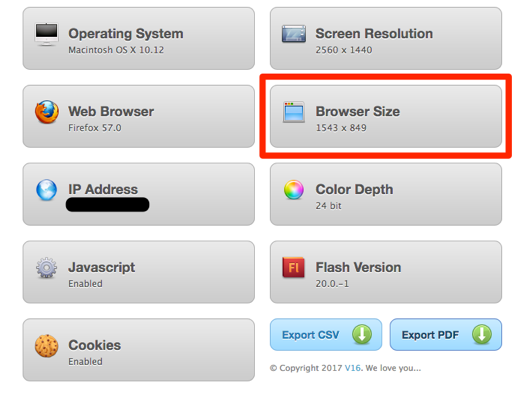
I tried to replicate what you’re seeing, but have not been able to so far. Here is a screenshot showing what I see on Windows 8.1 with Chrome, and a browser window width of 1396px:
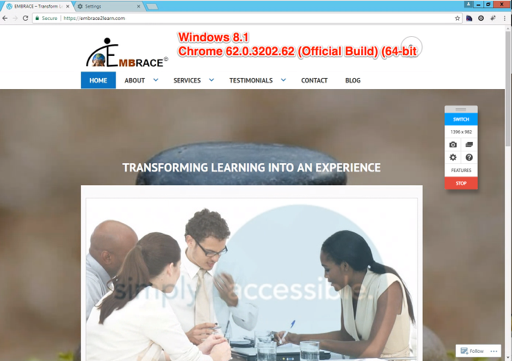
Looking at your IE and Chrome screenshots side-by-side, the menu font looks a bit bigger in the Chrome screenshot. That size difference could be enough to push it onto a second line.
One thing you rule out is whether a Chrome extension might be interfering, by turning them all off temporarily.
https://support.google.com/chrome_webstore/answer/2664769?hl=en&rd=2
Look for the section called “Turn extensions on or off”
If the menu returns to one line, you can try reactivating the extensions one-by-one to find the culprit.
How is it you get access to my Media Library (account)?
WordPress.com staff can access your site’s back end in order to provide support.
-
Yeh!
I found the issue. I did some search on the internet which led me to check the web content settings under Google Chrome Settings. The Appearance section listed Font Size. It was set as “Custom”. I changed it to “Large” and now everything looks fine.
Thanks for your help because a lot throughout your assistance/IT support.
Regards
-


- The topic ‘Menu View’ is closed to new replies.
 WordPress.com Forums