

Menu won't appear
-
The menu for my blog isn’t appearing. Please help! This is extremely important. I paid for the option to customize my blog and now it won’t even display properly, even though I cleared my cache.
The blog I need help with is: (visible only to logged in users)
-
Hi there!
It looks like you haven’t set where the menu should appear. You can do this through your dashboard at Appearance > Menus > Manage Locations:
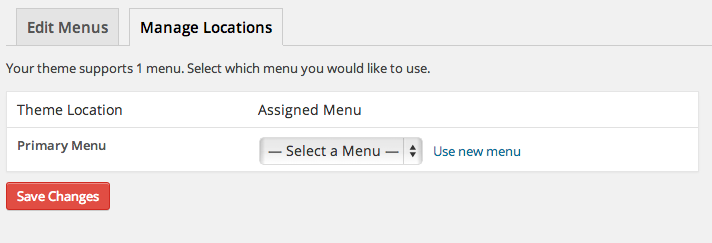
Select your menu from the drop down and make sure to save!
Let me know if I can help with anything else!
-
Hi Shawna!
Thank you so much for responding, but for some reason it still won’t appear correctly even though I changed the menu settings. Any other solutions? -
I see! Your header has a black background, and the menu items are being displayed in black. Can you add this code to your CSS menu:
.main-navigation a, .main-small-navigation ul li a {
	color: #ffffff;
}
Let me know if I can help with anything else! :)
-
-
It worked! Last question. Is there CSS coding I can insert to change the menu font back to Rockwell bold, and not have it displayed in Calluna Sans? I changed the body text to Calluna Sans, and it automatically changed the menu font as well, but I didn’t intend for the latter to happen…
-
Here you go! Use this instead (it duplicates the previous code, as you can see):
.main-navigation a, .main-small-navigation ul li a {
	color: #ffffff;
	font-family:'arvo', georgia;
}
Let me know if I can help further!
-
-
Hi Shawna,
Your suggestion worked! Thank so much. My only concern now is that the size of the menu text is shrinking with the size of the body text when I make adjustments. Any way that I can change that?Additional questions: how do I change the color of my body text? I’m trying to change it in customize section, but the function for changing the color of text either isn’t there or isn’t working…
Also, what is the coding I could use to change the font of the headings in the sidebar of the blog such as “Top Posts & Pages,” “Tags” and “As Seen In” to match the font of the headings, or headlines like, “For Harriet: A Flygirl’s Lament”?
Lastly and most importantly, I love the way that the blog looks with the giant black bar for the menu with the blog’s title, “Twerked”, the featured image(s) on the slider, and then the layout of the additional posts below. But is there any way that I can insert coding into the blog so that the top half has the giant black menu and the featured posts slider, while the bottom portion featuring blog posts just have white background? I find that whenever I set the background to be white from the “customize” section it ruins the menu bar so that “Twerked” is the only word with a black background and then the rest of the menu is washed out with a white background.
Thank you.
-
My only concern now is that the size of the menu text is shrinking with the size of the body text when I make adjustments. Any way that I can change that?
Yep! First, you’ll need to set the font size in the Customizer back to ‘0.’ Then this code will set the menu font:
.main-navigation a, .main-small-navigation ul li a {
	color: #ffffff;
	font-family: 'arvo', georgia;
	font-size: 19px;
}
And this will set the body text:
.entry-content {
	font-size: 24px;
}
how do I change the color of my body text? I’m trying to change it in customize section, but the function for changing the color of text either isn’t there or isn’t working
You can add this code for the font color:
.entry-content {
	color: #262626;
}
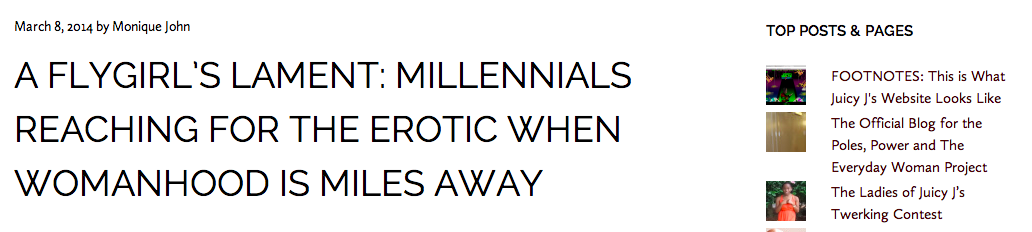
what is the coding I could use to change the font of the headings in the sidebar of the blog such as “Top Posts & Pages,” “Tags” and “As Seen In” to match the font of the headings, or headlines like, “For Harriet: A Flygirl’s Lament”
These look like they’re already the same font?
I love the way that the blog looks with the giant black bar for the menu with the blog’s title, “Twerked”, the featured image(s) on the slider, and then the layout of the additional posts below. But is there any way that I can insert coding into the blog so that the top half has the giant black menu and the featured posts slider, while the bottom portion featuring blog posts just have white background? I find that whenever I set the background to be white from the “customize” section it ruins the menu bar so that “Twerked” is the only word with a black background and then the rest of the menu is washed out with a white background.
This is a bigger customization than I can really assist you with. We do have a forum specifically for helping with CSS customizations.
https://en.forums.wordpress.com/forum/css-customization
They’ll be able to help you with you CSS and design questions.
Let me know if I can help with anything else! :)


- The topic ‘Menu won't appear’ is closed to new replies.
 WordPress.com Forums