

Minimize number of posts on home page
-
How do I change the number of posts on my home page and make them only be a summary and not show the whole post so you can easily view the most recent ones? Right now they are all on there as full posts right after another and I don’t want to have to scroll through them all to get to the bottom. I have the theme Truly Minimal and in the preview for that theme it shows this being done (two posts which are just shown as a summary) so I know it can be done. Any help would be greatly appreciated, thanks!
The blog I need help with is: (visible only to logged in users)
-
Hi there!
How do I change the number of posts on my home page
You can change the number of posts that display per page through Settings > Reading. Change the number next to “Blog pages show at most.” Make sure you save your changes!
and make them only be a summary and not show the whole post so you can easily view the most recent ones?
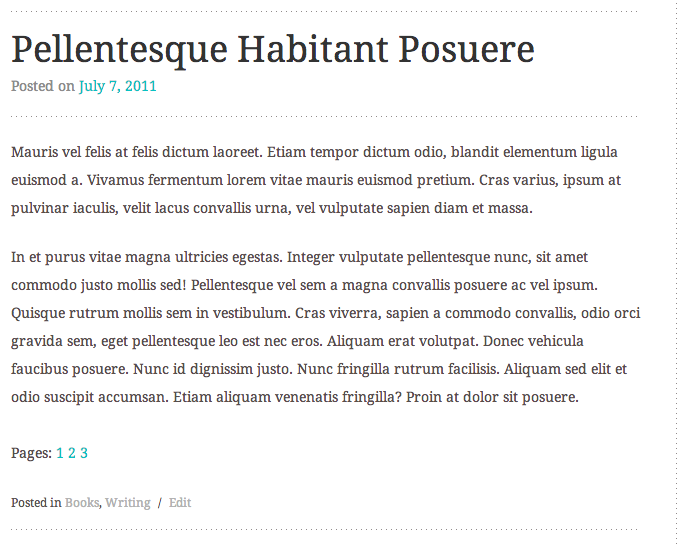
You can shorten your posts on your blog page by adding More tags, Next Page tags, or Custom Excerpts.
Here’s what the Next Page tag looks like on the demo site:
And here’s the More tag:
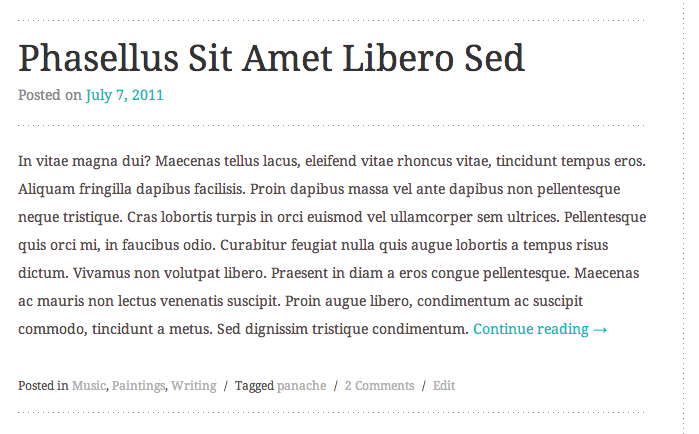
You can also customize the wording of the More tag. Directions are at the link above.
Let me know if I can help further! :)


- The topic ‘Minimize number of posts on home page’ is closed to new replies.
 WordPress.com Forums