

Mobile version of site map is not showing any links
-
Mobile version of site map is not showing any pages. It’s empty. I think it’s a bug.
The blog I need help with is: (visible only to logged in users)
-
Hi there,
Mobile site maps are only required if your site is mobile exclusive. For example, if you have a mobile version of your site like m.eatalready.com, that would require a separate site map. However, since mobile viewers are served up the traditional version of your site, a mobile site map is not required. The traditional site map works in this case for mobile views.
Please let me know if you need anything else!
-
When I look at my site mobile version and click on “recipes” link which is an auto generated site map, I see nothing. Is that something that I overlooked and didn’t configure correctly or it’s a bug?
I couldn’t understand that from your reply. -
Hi there,
Here’s what I see when I visit your “Recipes” page currently:
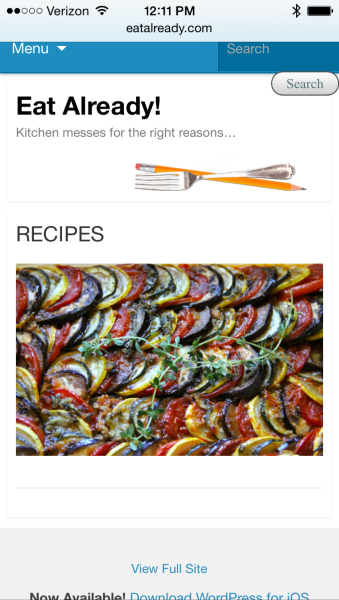
The content seems to match the page content on your blog. The page looks a bit different than your traditional blog because you have the default WordPress.com mobile theme activated here:
https://crainny.wordpress.com/wp-admin/themes.php?page=mobile-options&settings-updated=true
This takes over when your site is viewed through mobile devices.
If you were to disable the mobile theme, here’s how your theme would look:
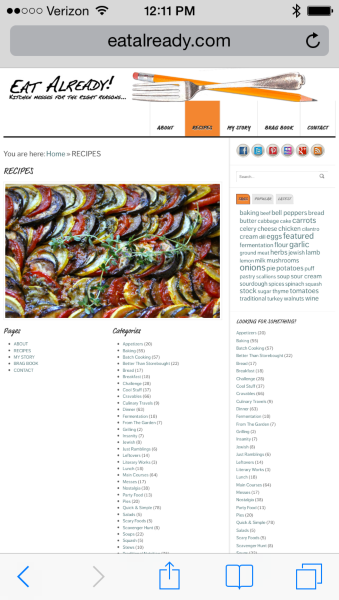
You can disable the mobile theme from the page I linked above. You can read more about mobile themes here:
http://en.support.wordpress.com/themes/mobile-themes/
Is that the discrepancy you’re referring to?
-
Even the image you sent me shows the featured picture and nothing underneath it. There is no actual map, no links to recipes.
In the full site there are numerous links under that food picture. There are links to pages, categories and all recipes by category.
Mobile version has the pretty picture but the links aren’t there -
Hi there,
The links you’re referring to are actually widgets, which are hidden when the mobile theme is active. I’ve created a breakdown of the page shown here:
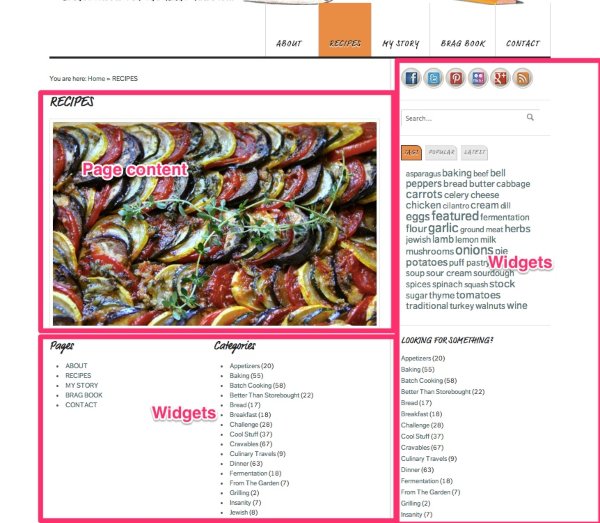
The only actual content on that page is the image.
If you disable the mobile theme, the widgets will be shown. Here’s an example of how your site would look on a mobile device:
You can disable the mobile theme from the following page:
https://crainny.wordpress.com/wp-admin/themes.php?page=mobile-options&settings-updated=true
Let me know if you need any additional clarification!
-
Thanks. Now I understand. Sitemap is a widget, not a pre-built template… I will disable the mobile theme. Thanks for being so patient with me :)
-


- The topic ‘Mobile version of site map is not showing any links’ is closed to new replies.
 WordPress.com Forums