Move tagline below header image on homepage
-
Hello,
I need help with CSS code to move the tagline on my website to below my header image. Currently the text is over the image which makes it difficult to read. When the browser size is changed smaller, the image and text work much better together. My site is imaginethenvote.wordpress.com. Thanks!
The blog I need help with is: (visible only to logged in users)
-
Hi there, I’m not currently seeing a tagline on your site, but it appears you have included the tagline at the top of your main page content. I see you have this marked as resolved. Do you still need help with this?
-
Yes I figured out that it works better if I add the tagline to the text on the page, thank you though!
-
-
@nsirianni89 how did you delete the title and tagline? I want the site to have a title but I am unsure where to access the backend code on the free version.
-
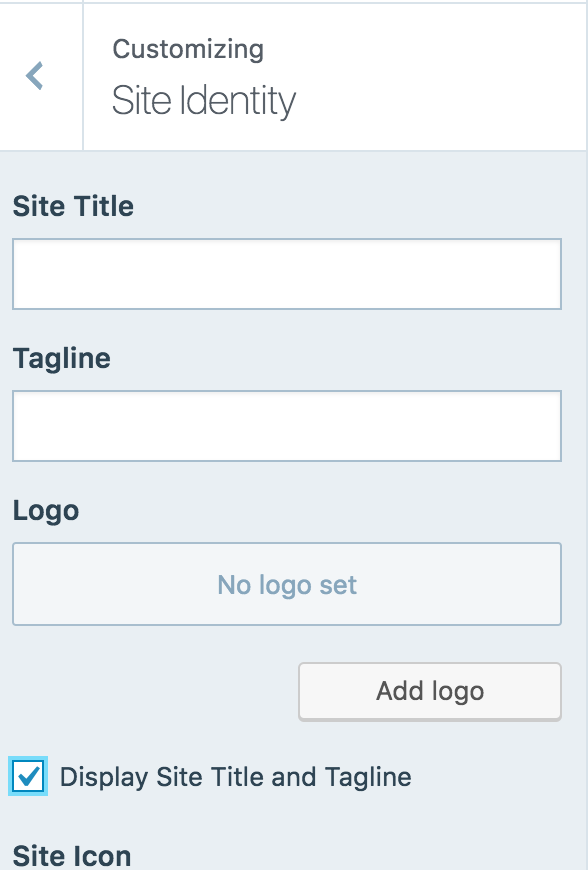
On the page that helps with the site identity (i.e. where you type in the name and tagline of your page) there is a little box you can click that says hide/show tagline and title. I hide mine and am just using the logo. Hope that helps!
-
Here’s a screenshot:
https://cldup.com/3Klpj9vK3X.pngEnter your title/tagline and uncheck the box as nsirianni89 mentioned.


- The topic ‘Move tagline below header image on homepage’ is closed to new replies.
 WordPress.com Forums