

Multiple CSS queries with Twenty Fourteen
-
I have just changed themes and I’m having a nightmare with Twenty Fourteen:
1. The sidebar reverts back to black halfway down the page. How can I make sure it is turquoise all the way down?
2. I don’t understand how I can get my latest posts at the top with a pull-quote? I’ve read the theme details and it doesn’t give explicit instructions.
3. How do I change the size of the font in the top menu and the colour to bright white?
4. How do I add more space between widgets on the sidebar?
5. How do I change the properties for captions text?
6. All the spaces that I’ve put in posts between images and text seem to have disappeared, which means everything looks very squashed. Is there a way I can make it so pictures have padding?
Sorry for all the questions!
-
Hi there, Twenty Fourteen is quite advanced when it comes design (CSS and HTML)
1. The sidebar reverts back to black halfway down the page. How can I make sure it is turquoise all the way down?
The black at the end of the sidebar area is set in .site:before Add the following and adjust the color as desired.
.site:before {
    background-color: #FFFFFF !important;
}
2. I don’t understand how I can get my latest posts at the top with a pull-quote? I’ve read the theme details and it doesn’t give explicit instructions.
You can display up to 6 posts at the top in a slider, or a grid. To have them appear in the grid, go to Appearance > Customize > Featured Content and set the layout to “Grid” and save. Up to 6 posts you have tagged with the tag you set for featured posts will then be shown in the grid.
3. How do I change the size of the font in the top menu and the colour to bright white?
.primary-navigation a {
    font-size: 120%;
    color: #FFFFFF;
}
4. How do I add more space between widgets on the sidebar?
Add a margin-bottom declaration to the .primary-sidebar .widget rule you already have in your custom CSS (like this)
.primary-sidebar .widget {
    border-bottom: 2px solid #039F9B;
    color: #000000;
    font-size: 14px;
    margin-bottom: 100px;
}
5. How do I change the properties for captions text?
Here is the CSS rule that styles the image captions. You can adjust any and all of it to suit your desires.
.wp-caption-text {
    box-sizing: border-box;
    color: #CC0000;
    font-size: 12px;
    font-style: italic;
    font-weight: bold;
    line-height: 1.5;
    margin: 9px 0;
}
6. All the spaces that I’ve put in posts between images and text seem to have disappeared, which means everything looks very squashed. Is there a way I can make it so pictures have padding?
Add the following CSS and adjust the bottom margin as desired.
blockquote.aligncenter, img.aligncenter, .wp-caption.aligncenter { margin-bottom: 7px; } -
Fantastic, thank you! It’s a tricky one, so much harder to navigate CSS-wise than the last Origin theme I had. A couple of small things:
– the sidebar divider is weirdly close to the Bloglovin button – how can I space this like the other widgets?
– how can I centre the posts below the featured slider (while not making them full width?)
– how can I insert a long divider (like the ones in the side widget) underneath the featured slider?
Thanks again!
-
– the sidebar divider is weirdly close to the Bloglovin button – how can I space this like the other widgets?
In your text widget, try adding some bottom margin below the Bloglovin badge. Here’s what you have now:
<a title="Follow Curious London on Bloglovin" href="http://www.bloglovin.com/en/blog/11843975"><img alt="Follow on Bloglovin" src="http://www.bloglovin.com/widget/bilder/en/lank.gif?id=11843975" border="0"></a><p>Try putting the badge in a div with some margin on it instead:
<div style="margin-bottom: 10px;"><a title="Follow Curious London on Bloglovin" href="http://www.bloglovin.com/en/blog/11843975"><img alt="Follow on Bloglovin" src="http://www.bloglovin.com/widget/bilder/en/lank.gif?id=11843975" border="0"></a></div> -
– how can I insert a long divider (like the ones in the side widget) underneath the featured slider?
I actually think it looks nice and clean the way it is now :-) but if you really wanted to do that, this will add a border below the slider:
.home .featured-content { border-bottom: 2px solid #039F9B; } -
– how can I centre the posts below the featured slider (while not making them full width?)
Do you intend to ever use the secondary (right) sidebar?
-
Ah, perfect, thanks. :) I’ve tried the right sidebar – I don’t think I want to do it, but I’d like to centre everything else!
-
Could you please try removing the Ephemera widget currently in the Content Sidebar? It’s set to display posts with the Aside post format, but since it’s not currently displaying anything you must not have any posts with that format.
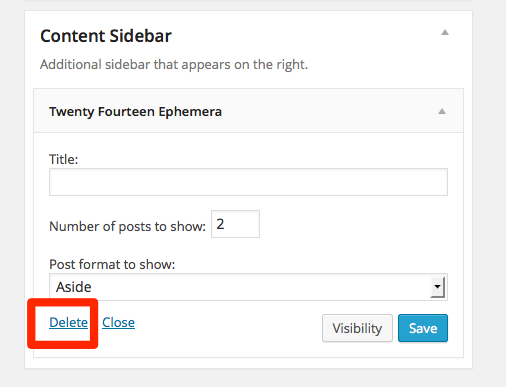
The main column should center after the widget goes away. Let me know how it goes.
-
http://curious-london.co.uk/ looks like a really cool site! I love the name Curious London too. :)


- The topic ‘Multiple CSS queries with Twenty Fourteen’ is closed to new replies.
 WordPress.com Forums