

multiple message complaints
-
A few readers following our blog complain they receive multiple messages when new posts are published. How do I fix this?
The blog I need help with is: (visible only to logged in users)
-
Hello there!
I am going to follow your site, so I can see what issue they’re having. This way I can determine if the problem is stemming from your site, or their settings.
Do you know what notifications your subscribers have set for your site?
Let me know. Thanks much!
-
Thanks Robyn,
Here’s the typical message that I receive
When I originally commented I clicked the “Notify me when new comments are added”
checkbox and now each time a comment is added I get three e-mails with the same comment.
Is there any way you can remove people from that service?
Thanks a lot! -
Hello there!
These folks are going to have to adjust their own notification settings. However, I’ve outlined the steps to do this, so you can simply cut/paste a response:
- Log into WordPress.com. Make sure you are in your Reader.
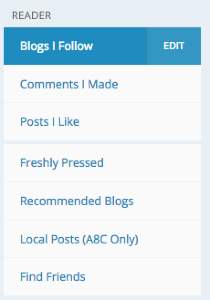
- Click the Edit link next to “Blogs I Follow.” See image below:
- Find Imagine Travel Discover in the blog list, and click Edit. See image below:
https://cloudup.com/cvc9bdIblq0 - Change the settings for “Send new comments by email” to OFF. As seen below:
https://cloudup.com/cLUTWQJ0viA - Click Close.
That should do the trick! If I can help in any other way, please drop me a line. Cheers :)
-
Once again, thanks for your quick response Robyn.
Here’s a standard response I give to these folks – it appears to track along the lines that you’ve provided. What do you think?
There should be a link in the messages you are receiving to control notification. Click on unsubscribe in one of the messages.
OR
For posts you are following, you can do that here http://wordpress.com/following/edit then click delivery settings http://wordpress.com/settings/notifications/ Scroll down to the bottom of that page and Block Emails to block all email updates from blogs you’re following on WordPress.com
For comments you are following, go back to the posts you clicked the link to follow comments on and then click again to unsubscribe.Please let us know if that works for you.
-
Hey there!
The response is perfect. I love that you included mention of the links on the notification email.
You can also tell them to check in with us, if they want individual assistance. It’s easier for us to help them directly, rather than having you forced to play middle man.
Thanks so much. Take care!
-
-


- The topic ‘multiple message complaints’ is closed to new replies.
 WordPress.com Forums