

Multiple posts on pages
-
I’m interested in creating pages with multiple posts that readers can find by clicking on the top/main menu bar. I read in the support forum that it’s not possible to do this, however, something similar can be achieved by creating a parent page with subcategories. I was confused and wanted to make sure I understood this correctly. Also, can the subcategories include multiple posts? Is this achieved by setting up subcategories first, then creating a post, then assigning subcategories (or subpages) to it? Thank you!
The blog I need help with is: (visible only to logged in users)
-
Howdy Lauren!
I believe what you’re referring to is definitely possible. Just to make sure I understand, you would like to create pages that feature only certain posts arranged by category. Is that correct? If so, you can achieve this using category pages as explained here:
http://en.support.wordpress.com/category-pages/
Those pages can be added to your menu for your readers to find. You can also create category pages from subcategories.
Can you let me know if that’s what you’re looking for?
-
Hi Jeremy!
Thanks so much for getting back to me so quickly. Yes, I think you have it! But after reading through the support page I’m still confused.:)On the homepage of my site there are page links atop the main menu bar (health, parenting, pets, etc). I envision filling each of those w/content (multiple posts) that pertain to each. From the reading it sounds like I need to create a custom menu and fill it w/categories that match the content themes of each page. When I attempt to do this the Menu section is already populated w/items named for each page. When I check off the categories that I want to add to the menu, the categories duplicate the page names that are already there. Do I clear out the pages from the menu structure?
Thanks again,
Lauren -
Hey Lauren!
Yep! You’ll want to clear out the current menu structure. The current menu items link to actual pages, which isn’t exactly what we want. Those won’t be populated by the specific categories. You’ll want to click each of the items that say “Page” to the right-hand side of the block. Then, remove each of them. Finally, you’ll just need to add the category pages following the instructions here:
http://en.support.wordpress.com/category-pages/
Give that a shot, and let me know if you get tripped up!
-
Hi Jeremy!
I removed the pages from the menu and added the categories that correspond with the page names. I save it but when I click on the menu item across the top of the site, ‘parenting’, for instance, there aren’t any entries. I did notice that at the bottom of the menu customization page where it says ‘menu settings’, there are two choices – neither of which I have selected. Might that be the problem? Does it matter which, if any, of those boxes is checked?
Thank you again!
Lauren -
Howdy Lauren!
This should be fixed now. Can you give it a try?
You had correctly created the menu. However, you hadn’t set the menu under the location here:
https://karmamamma.wordpress.com/wp-admin/nav-menus.php?action=locations
So, the menu you created wasn’t the one that was displaying.
Let me know if you need anything else!
-
It’s working! So very exciting!!
Thank you so much for your correspondence and your help, Jeremy.
Best,
Lauren -
-
I do have another question that arose yesterday while I was posting. I had posted about it previously and gotten help but for some reason it’s popping up again..
(It’s a different topic, so if you want me to re-post as a new thread, more than happy to.)
Two questions: When I schedule a post, if I don’t select ‘publish’, then the post remains as a draft and doesn’t send out automatically. If I do select publish, it sends immediately. On the same note, when the post is publicized to facebook, it’s listed as coming from laurenshow.com, instead of karmamamma.com. I looked for a way to change that on share & publicize and can’t seem to alter it. Is it something behind the scenes?
Thank you so much!
Lauren -
Hey Lauren,
Regarding the scheduling issue, I’ve created a short loop of the process here:
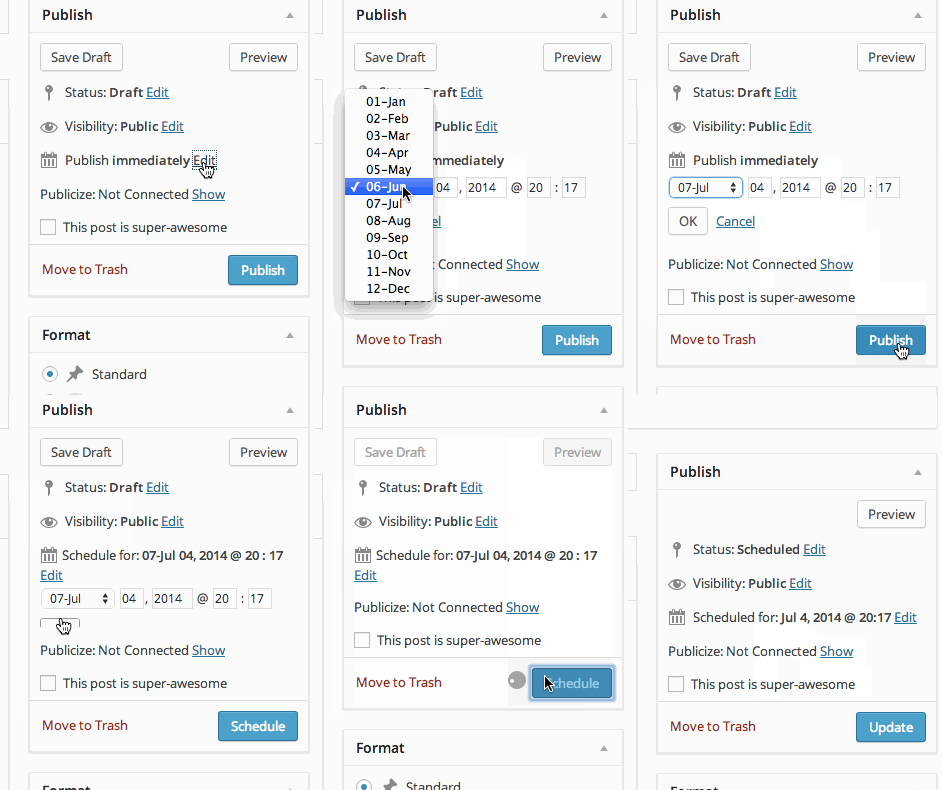
Can you make sure you’re clicking “OK” after selecting the appropriate date and time? Otherwise, the button will still read “Publish” and the post will be published immediately. Clicking “OK” effectively sets the publish date.
On the same note, when the post is publicized to facebook, it’s listed as coming from laurenshow.com, instead of karmamamma.com. I looked for a way to change that on share & publicize and can’t seem to alter it. Is it something behind the scenes?
I was trying to take a look at your Facebook profile to see this in action, but it looks like your privacy settings won’t allow me to. Can you upload a screenshot of your latest publicized post to Facebook to your Media Library so I can take a look and see this in action?
-
The cloud up demo is really helpful, thanks Jeremy. I tried the same on mine and the publish button only switches to ‘schedule’ if I change the date of when I want it scheduled. If I only change the time, it doesn’t give me the option. Is it not possible to schedule a post for a later time on the same day you’re creating it? It also seems like the time is still set to military time, though Robyn and I definitely switched it. Is there a way for me to double check?
As for a facebook screen grab, once I saw my last post come up under laurenshow I deleted it and reposted under karmamamma. But I can make a screen grab this coming Tuesday when the next post goes up.
Thank you,
Lauren -
Hey Lauren!
Regarding the military time, the “Schedule a Post” feature is going to display and be set in military time as there isn’t an AM/PM toggle at the moment. So, military time is the only way to set the difference.
As for setting a post to publish later on the same day as creation, that’s working on my side provided I have set the post time for later that day (keeping current timezone in mind) and clicking “OK”. The “Publish” button changes to “Schedule”. Can you make sure your time zone is correct? Instructions on setting it can be found here:
http://en.support.wordpress.com/settings/general-settings/#timezone
Perhaps that’s causing the issue. If you’re setting the time for the post ahead of your current time but it’s still behind the time zone that is set, the button will still read “Publish”.
-
Hi Jeremy,
Thanks so much for sending all above. I updated the time zone to ‘New York’ time, which is what I’m on, and that enabled the ‘schedule’ option on posts. It’s strange because I remember Robyn and I fixing this previously. It’s as if it reset, if that’s possible. Hopefully it’s good now!
I’ll check back in w/a screen shot of the post on facebook Tuesday.
Until then & with thanks,
Lauren -
Great Lauren! I’m glad the time zone helped with the post scheduling. Let me know about the Facebook post on Tuesday.
-
I think we’re good! I re-checked my publicize settings and saw that the Facebook setting was set to the show page for laurenshow. I had reset it to karmamamma previously but had not seen the ‘okay’ button at the bottom needed to be selected. I think this is where the error was when publishing. I think we’ll be smooth for Tuesday. Thanks again for all of your help and super fast follow up Jeremy. I really appreciate it!
Best,
Lauren -
Great to hear! I’m happy to help. I’m just glad we got this resolved.
Let me know if you need anything else!
-
Hi Jeremy, The post is still listing on Facebook under laurenshow, even though I’m publishing from karmamamma. I took a photo w my phone, it’s so hard to see though, and uploaded it to my media library. I can also friend you if that’s easier. The screen grab wasn’t working.
Can you take a look and let me know the best way to correct it?
Thanks so much, Lauren -
Hey Lauren!
I apologize – I initially misunderstood what section of the Facebook post you were referring to. Although the post is coming from your karmamamma blog, the post is appearing by “LaurenShow”. I believe this is connected to your author profile. Can you try updating the information here (under Display Name and Links)?
https://karmamamma.wordpress.com/wp-admin/users.php?page=grofiles-editor
The “Links” portion is still displaying LaurenShow.com.
Let’s change that and see if that adjusts the Facebook author title!
-
Awesome! Just did it. And you said I can get to it under Dashboard – display name? Fingers crossed for the next post next week.
Thanks so much, Jeremy.
Lauren -
Hello again:)
Not related but for some reason the video in my latest post isn’t loading. I haven’t done anything differently than I do for the other video post. Do you know what went awry? Here’s the post and the video is at the bottom. http://karmamamma.com/2014/06/10/natural-flea-prevention-frontline-alternative/
Thank you again,
Lauren


- The topic ‘Multiple posts on pages’ is closed to new replies.
 WordPress.com Forums