

Multiple posts on pages
-
Howdy Lauren,
Yes, it should go under the display name. That should change the “By:” version of your Facebook post.
Regarding your video, it looks like you were using the file URL instead of the Ogg file URL. The difference is:
https://karmamamma.files.wordpress.com/2014/06/roseoil.wmvvs.
https://videos.files.wordpress.com/DdOTCU1S/roseoil_fmt1.ogvThe latter URL seems to do the trick. Can you see if it’s working on your side? The Ogg file URL can be found on the Media page for the individual file underneath the caption and description.
-
Hi Jeremy!
When I load the page the video is still coming up as a black box with the words download file in the top left corner. Do I need to reset something in the dashboard?
Thank you,
Lauren -
Can you try clearing your browser’s cache? Instructions can be found here:
Let me know if that works!
-
Hi Jeremy!
The video seems to be working – thank you! The part I’m confused about is that above you mention that the latter ogv URL is preferable to the wmv file URL. I’m confused because when I add videos to posts I click the ‘insert into post’ tab at the bottom of the media window, and wordpress selects the URL; I don’t do it manually. Most times it posts correctly, but this time it didn’t. Since I’m not selecting a specific URL, how do I prevent this from happening in the future?
Thank you!!
Lauren -
Hello again Jeremy,
I apologize for the multiple posts..
I just posted a new blog post to Facebook and it’s still listing as originating from ‘laurenshow’. I included a new screengrab in the media library so you can see it if that’s helpful.
Thank you & best,
Lauren -
Hi Lauren,
Regarding the byline on Facebook, I apologize; it looks like this is a caching error on the part of Facebook. Basically, Facebook has “saved” a byline from sometime previously. As a result, it applies that byline to the post although it has been changed at WordPress.com. Unfortunately, this will just take some time for Facebook to update. I ran your post through Facebook’s debugger, and it looks like we’re passing the correct info (KarmaMamma):
Regarding the video embeds, I did some tests on a test post on your site. It seems like that video is the only one creating a different embed code for some reason. I tried embedding other videos on your site without any trouble. Please let me know if you experience trouble with videos going forward!
-
Hi Jeremy,
Thanks so much for doing all of that!! I really appreciate it!
Regarding the video, do you think it might be something with the rendering? I didn’t change anything but I did shoot with another camera. If you think adjusting any settings during export would help, I can try that. Would it be ok to leave the topic open to see how the next few videos go? If not, I can start a new one. Also, regarding facebook’s cache, how long might it take? I’m guessing this may be hard to answer but thought I’d try.
Thank you again & best,
Lauren -
Hey Lauren,
I don’t think it’s anything you did with the video. This thread will stay open so please do post if you experience trouble with future videos.
Regarding the Facebook caching, it’s honestly hard to say how long that will take. I’m hoping it should update within the next week or so, but I can’t confirm that for sure. Let’s wait for a week and see if anything changes on the Facebook front!
-
All sounds perfect. Thanks so much for everything, Jeremy. I really appreciate all if your help!
With gratitude,
Lauren -
Not a problem! Please let me know if the video issue isn’t resolved when you next try to upload a video!
-
Hi Jeremy!
I noticed that when my karma mamma scheduled posts go to Facebook they’re posting now under wordpress. Previously we had written about how they were coming up under Lauren show instead of KM. Now the post will read ‘Lauren Mattia Levine published an article on word press’ and show a preview. Is there a way to get it back to posting from Karma Mamma?
Thanks so much and hope all is well,
Lauren -
Hey Lauren!
Can you take a screenshot of your most recent publicized post to Facebook and upload it to your Media Library so I can take a look?
-
Hi Jeremy,
Thanks so much for getting back to me so quickly. I have no idea why, but I’m having trouble taking a screen shot. I’m working on a dell (or if it’s possible from an iphone). Can you direct me? I’d like to show you two. One is how the post looks when it’s published automatically, and the other is when I post it manually.
Thanks,
Lauren -
Hey Lauren,
The instructions here for Windows should work:
Can you give those a try?
-
Okay just uploaded the two shots to the media library so you
Can see the difference.
Thank you!
Lauren -
Hey Lauren,
I just wanted to let you know I’m looking into this! I’ll get back with you as soon as possible.
-
Hey Lauren,
It looks like this is an issue with how Facebook displays posts on the mobile app. I’m experiencing the same thing with a test post as shown here:
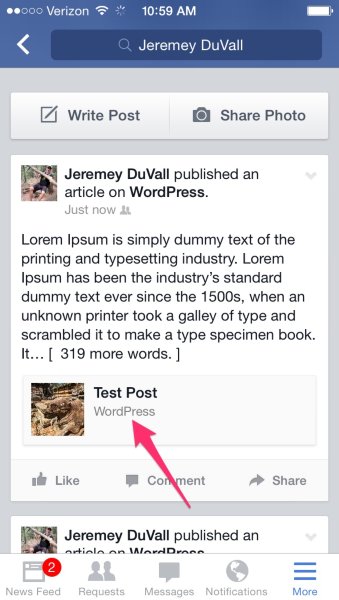
Unfortunately, there isn’t anything we can do to change how the post appears on the mobile app. However, the byline should be correct on the desktop browser. Can you try that and let me know what you experience?
-
Hi Jeremy,
Thanks so much for getting back to me. I checked and they appear the same way on the desktop too.
Lauren -
Hey Lauren,
They have WordPress as the byline on the posts? They should appear similar to this:
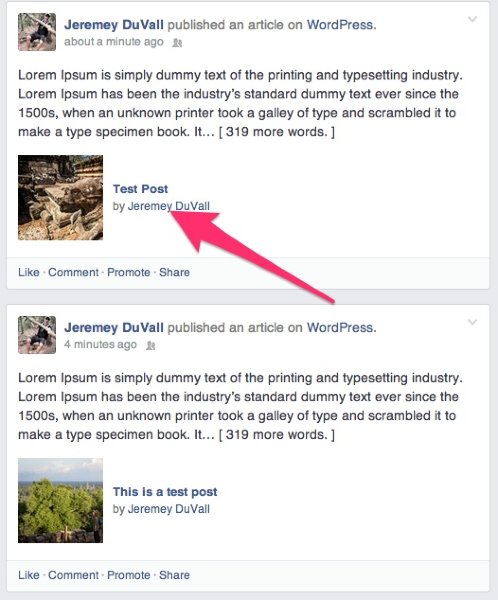
Can you upload one last screenshot? I appreciate all of your help on this!
-
I just double checked and I think I misunderstood. So on the desktop version if I post manually it will say “Lauren shared a link” and then it will show a the preview of the post with karmamamma.com as the byline.
When the post is scheduled, it will read “Lauren published an article on WordPress” and then the preview will show the post title, image, and have my name as the byline instead of my site name (as your example does on CloudUp). I’d prefer the former because it promotes my site, instead of promoting WordPress. Is there a way to adjust this?
And not that I don’t love wordpress!:) but for the purpose of getting my site name visible the former is more effective.
Thank you!!
Lauren


- The topic ‘Multiple posts on pages’ is closed to new replies.
 WordPress.com Forums