

Multiple posts on pages
-
Hey Lauren,
Sorry for the confusion! I think we’re both misunderstanding each other. Let me try to break it down so we can get on the same page.
Posts that are automatically Publicized to Facebook will appear like this on the mobile app:
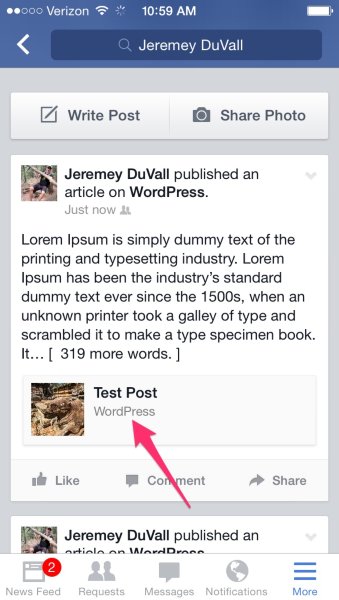
The post will read “WordPress” in the byline for the post. Unfortunately, that isn’t able to be changed.
Posts that are not Publicized via WordPress.com will appear differently on the app (won’t have the WordPress byline).
The same post that was Publicized by WordPress.com on the browser should appear with the correct byline as shown here:
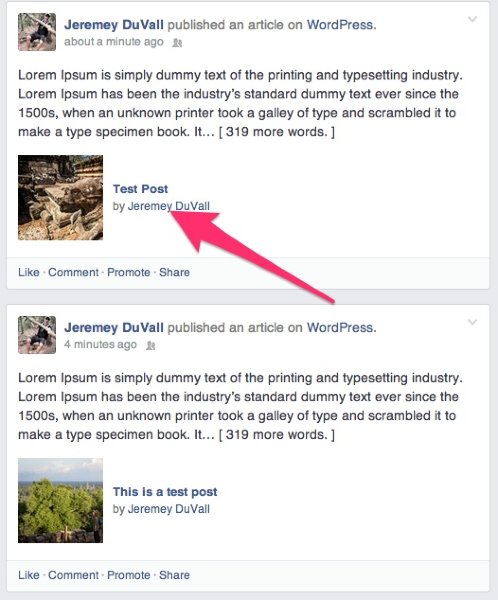
Does that make sense? So, if you’re referring to the WordPress byline on the mobile app, unfortunately, we can’t change that. However, if you’re referring to the byline on desktop browsers, that we can change. Can you just clarify for me which one you’re referring to?
-
Hi Jeremy,
Thanks so much for writing. Yes, I am referring to the desktop version. Your publicized post has your name in the byline as does mine. But when the same post is published manually on a desktop it will list your site URL instead, which is my preference. Thank you! Lauren -
Hey Lauren,
Thanks for clarifying. Unfortunately, that’s not able to be changed. The byline for Publicized posts automatically assumes the name of the author that published the post. The posting format between Publicized posts and manually-published posts is a bit different. The only way to change this would be to change your author display name to your site URL, which wouldn’t be the best option as that would change how your name appears everywhere across WordPress.com. I’m sorry!
-
Hi Jeremy,
Thanks so much for getting back to me and explaining that. I really appreciate it!
I just noticed something that we worked on earlier in this thread. The video on my post about natural flea repellant is still not loading. It’s strange because I’m almost certain we fixed it. I’m sending the link below. Would you mind taking a look? On my version when I pull it up it shows a black screen that reads ‘download file’. I’m viewing on mobile, but got the same image on desktop also. Thank you!
http://karmamamma.com/2014/06/10/natural-flea-prevention-frontline-alternative/ -
Hey Lauren,
I wanted to let you know that I’m looking into this. Can you confirm what browser you’re using when you experience the issue? Currently, the video is working correctly for me in Chrome, but I am experiencing issues with Safari. I believe this is because the video is in WMV format, which isn’t entirely supported by Safari.
-
Hi Jeremy,
Thank you so much for looking into it.
I’m experiencing problems with it in Safari and Explorer. The other videos are also wmv format and seem to be okay so far, thankfully. But if that could be an issue, should I render them in a different format? -
Hi again Jeremy,
I have another challenge while we work out the kinks on the rose oil video. When I tried twice to post the following post to Facebook it’s not posting with the featured image for the post. It will only let me chose an image of a W ( the wp logo) or my bio image of my family. Do you know why that might be happening? http://karmamamma.com/2014/07/01/what-mom-really-thinks/
Thank you so much, Lauren -
Hey Lauren,
Well, if the other videos are playing fine, then you likely don’t need to change the upload format. It looks like WMV videos play correctly in Safari normally. Previously, I was addressing this thread:
https://discussions.apple.com/thread/2554836?tstart=0
Your “Giving Allowance” video is playing correctly on my side in Safari, so I don’t think this is a WMV issue. I don’t believe we’ve tried re-uploading the Rose Oil video. I’d like to give that a try and add it to the post using the standard format [wpvideo #####] as that’s working for the other videos.
As for the featured image not sharing correctly to Facebook, the Publicize feature will use a featured image. However, manually sharing the post would normally use a regularly inserted image into the post provided the featured image isn’t displayed somewhere. Some themes for example, use the featured image on the individual post page. Adelle doesn’t appear to do that. The main image in the post looks like it might be inserted incorrectly as it’s appearing broken on my side. The image source URL is as follows;
https://mail.google.com/mail/u/0/?ui=2&ik=36840aaffa&view=att&th=146e51d899821371&attid=0.1.1&disp=emb&zw&atsh=1That looks like an image you received via email. Can you try downloading the image to your computer, adding it to your library, and then re-adding it to your post?
-
Hi Jeremy,
Thanks so much for getting back to me.I tried re-uploading the rose oil video twice and am getting the following message, which is strange because I wasn’t getting the error when I initially uploaded and it hasn’t been encoded differently from my other videos. “Error
Your uploaded video is encoded incorrectly: we are unable to process it. Please try using a standard format (.avi, .mp4, .m4v, .mov, .wmv, .mpg), or different encoding software.”Regarding the ‘mom podcast’ post not showing the related image when posted to facebook, I replaced the image and tried again to post it. It’s still posting with the image from my bio pic. I know you mentioned that Adelle doesn’t always grab the featured image from each post. The strange thing is that it had been grabbing each featured image when I would post manually and then all of the sudden – with this one post specifically – it stopped.
Thank you!
Lauren -
Hi Lauren!
First, regarding the featured image for the Mom Podcast post, it looks like this may just be another error with Facebook. When I run the post through the Facebook Debugger, it returns the correct featured image with the share preview. You can find the debugger here:
https://developers.facebook.com/tools/debug/
Here’s what I’m getting when I run the post URL of the Mom Podcast post:
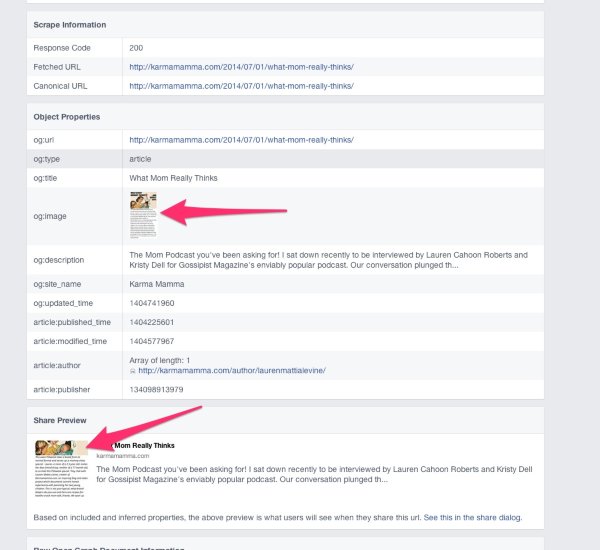
The image is being sent through correctly. I’m not exactly sure why Facebook isn’t sharing the right image, but it looks like we’re sending the right featured image. Did you by chance publish the post then go back and add the featured image?
Regarding the video file, as the error message alludes to, it sounds like this is some kind of encoding error that happened along the way. Basically, when this happens, our video upload doesn’t recognize the video file or finds something unusual with it. The best option would be to try to convert it to a different file format like mp4. Can you try using something like Handbrake found here?
-
Hi Jeremy,
Thank you so much for sending all above. I used the debugger on Facebook and it seems to have made a difference. I’m going to re-post it tomorrow and will keep you posted. That debugger also seems like a good tool to have so thank you for sharing it.
I also re-edited and re compressed the video and it seems to be working. I didn’t end up changing format just because I was trying to see if I could avoid a step. Do you mind taking a look too at the flea spray post to see if it’s working on your end?
I also noticed when I was checking the video that the vp water mark still appears at the end of some of the videos. I recall I had – I think w Robyn’s help – customized the CSS to clear out the water mark. Do you know why that might still be appearing?
Thank you again!
Lauren -
Do you mind taking a look too at the flea spray post to see if it’s working on your end?
It’s working on my side!
I also noticed when I was checking the video that the vp water mark still appears at the end of some of the videos. I recall I had – I think w Robyn’s help – customized the CSS to clear out the water mark. Do you know why that might still be appearing?
It looks like the VideoPress watermark has been removed from the start of the video. I looked over your latest posts, and I didn’t see it. Just a note, the watermark will display after a video has played to the end. The CSS only removes the watermark from the beginning. Let me know if I missed the watermark on your post!
-
Hi Jeremy!
Thanks so very much for getting back on all. For some reason I thought I read that the wp watermark can be removed entirely. If that is possible, will you let me know how to do it?
One additional tactical question, I noticed that if a person posts a comment, and I reply, and then the person posts a reply to my response, the option to reply directly to the last comment in the string disappears. Is there a way to alter that?
Thank you again for your help,
Lauren -
Hey Lauren!
Please see below:
For some reason I thought I read that the wp watermark can be removed entirely. If that is possible, will you let me know how to do it?
It’s possible to remove the watermark from the play of the video but not from the ending.
One additional tactical question, I noticed that if a person posts a comment, and I reply, and then the person posts a reply to my response, the option to reply directly to the last comment in the string disappears. Is there a way to alter that?
This is occurring because your threaded comments are currently limited to three levels preventing a reply to the third level. This can be adjusted under Settings -> Discussion. If you increase it to four or greater, you should see the reply link pop-up!
-
Hi Jeremy,
That worked. Thank you so much for this and for all of your help with my questions above. I really appreciate it!
With gratitude,
Lauren -
-
Hi again Jeremy!
Not sure if I should start a new thread for these two questions. I had a post scheduled for 9:12 this morn. I’m using my phone to check it but it’s showing as published in the dashboard, but not coming up on the site. (It’s the post about leaning to ride a bike)
I’m also having trouble receiving email on the account I set up: (email visible only to moderators and staff) and not sure why.
Thank you so much!! -
Hey Lauren,
Happy to help out with these here!
I’m using my phone to check it but it’s showing as published in the dashboard, but not coming up on the site.
The post is showing up on my side as shown here:
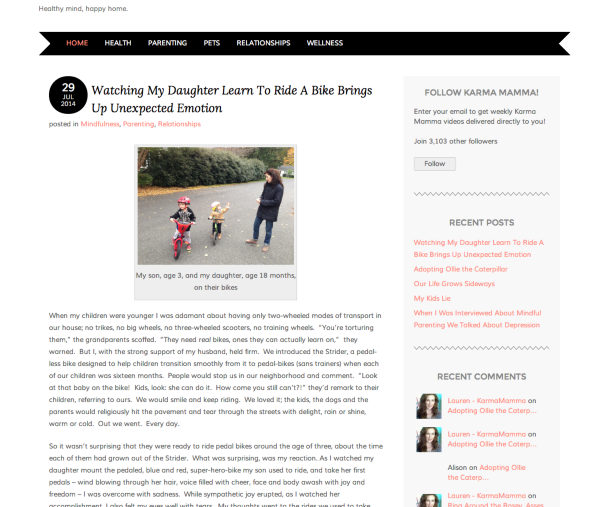
Has it popped up on your side? If not, can you try clearing the data on your phone browser? If you’re on an iPhone, this is done under Settings -> Safari. It looks like this was successfully published but perhaps took some time to be displayed on your phone.
I’m also having trouble receiving email on the account I set up and not sure why.
It looks like you setup email forwarding from the address you mention to an email that starts with realjerseyshore. Is that correct?
Are you having trouble receiving email from anyone or just test emails that you’re sending yourself? If you’re sending a test email from the realjerseyshore this will not work (since the test email would then be delivered to the same account it was sent from). You’ll need to try to send an email from a different address. Can you give that a try?
-
Hi Jeremy,
Thank you so much for getting back to me so quickly. The post seems okay on my end too. I think what happened was that when I went in to do a last minute edit from my phone, the publishing schedule time reset. When I double checked and altered it, it seemed to post as usual.
As for the email forwardig, I was indeed testing. From the forwarding address. I was able to test it from a different address and all seems to be running smoothly. Thank you so much for getting to the bottom of it and for all your help!
Very best,
Lauren -


- The topic ‘Multiple posts on pages’ is closed to new replies.
 WordPress.com Forums