

Multiple posts on pages
-
Oh my gosh, I have another question. Should I start anew? Whatever is best for you and WP, I’m happy to do!
If not, here’s the question – but I can re-post it, no problem.Regarding embedding my videos that are posted on my wp blog through videopress, I clicked on the ‘share’ button and copied the code under ’embed on a webpage’. When I paste the copied code and play it, it takes me to a promo for videopress (asking people to purchase it).
I’m trying to do two things w/the video embed: post the video directly on facebook, and embed the video on another blog, in a post. Should I go about this differently?
Thank you so much,
Lauren -
Hey Lauren,
Here works!
When I paste the copied code and play it, it takes me to a promo for videopress (asking people to purchase it).
Hmm I’m not experiencing that on my side, and I tried both the WordPress.com code and the Copy HTML code. Here’s what I’m seeing:
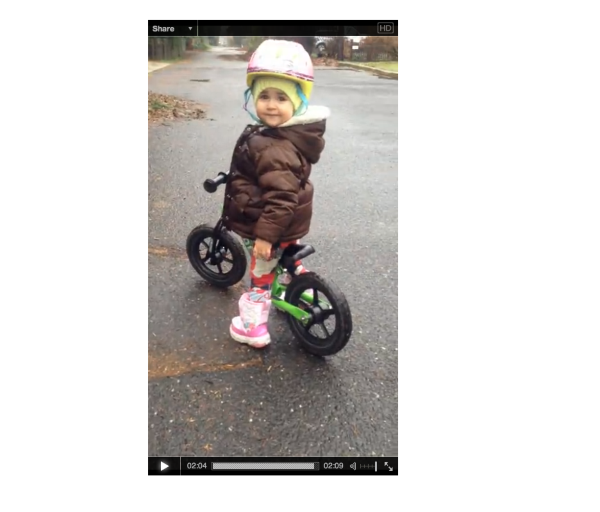
Perhaps you can point me to where you’ve embedded the video so I can see the promo?
I’m trying to do two things w/the video embed: post the video directly on facebook, and embed the video on another blog, in a post. Should I go about this differently?
On another website, the embed codes mentioned above are the best way to go about that. As far as Facebook, I would actually suggest uploading directly to Facebook following the instructions here:
https://www.facebook.com/help/154271141375595/
That’s the best way to make sure the video displays correctly on Facebook. I tested the VideoPress upload multiple ways, and I couldn’t get it to display just right!
-
Hi Jeremy,
Thanks so much for getting back to me! I had to pull the original code I used because it was taking people to a videopress promo and they were sending me notes about it. Because it was on facebook, and I’ve pulled it, I’m not sure how to show it to you unfortunately, and I’m too worried to try it again.With Facebook especially I want to embed instead of uploading so that I can maintain a view count. If I upload directly, I don’t think there’s a well to tell how many times it’s viewed, unless you know differently. I can do this with a link to my WP blog, but when I do, facebook makes the post/image so tiny it gets missed.
If you have any suggestions please let me know. I’m about to use the video embed code on another blog as a guest blogger so I’ll also let you know how that goes.
Thank you!!
Lauren -
Hi again,
I’m not sure if this is helpful but here’s the embed code attached to my top video:
<embed type=”application/x-shockwave-flash” src=”http://s0.videopress.com/player.swf?v=1.03″ width=”400″ height=”224″ wmode=”direct” seamlesstabbing=”true” allowfullscreen=”true” allowscriptaccess=”always” overstretch=”true” flashvars=”guid=gr5QcNBV&isDynamicSeeking=true”></embed> -
Ah – thanks Lauren. That helps to clear things up. So, the issue here is that the embed code you’re using is actually playing a VideoPress video, not your video. You can tell from the src bit:
http://s0.videopress.com/player.swf?v=1.03That’s a VideoPress promo, not your video.
One potential way around this would be to swap the VideoPress URL out for your video URL. You can find your video URL by navigating to the Edit Video screen like this one:
https://karmamamma.wordpress.com/wp-admin/upload.php?item=583#
The Ogg File URL is what we’re looking for. I just tested this out, and it seemed to display the correct video.
The main issues is that the video played sideways for me on Facebook.com and when I insert the Ogg link directly into my address bar. Since the video is playing correctly when it’s uploaded via the VideoPress embed, I don’t believe there’s a way to fix the video display when you paste the link into Facebook.
I’m still trying to think of a way that you could still track the stats on VideoPress, but have the video be played correctly. I’ll keep thinking!
-
Hi Jeremy,
Thanks so much for all above. Regarding the embed code taken directly from the share buttons on my video, I’m confused about why WP is attaching code for a VP promo, instead of code for sharing my video. Do you know how I could fix that?
I followed your suggestion to take the OGG link from the media library and embed that and the site I’m posting to is giving me an error message.:( It’s not facebook, it’s another site I post on. It’s saying it’s an invalid URL. I’m going to try to share the post on Google+ and see if I can pull the video from there. Not sure what to do.
As for the sideways issue, that’s totally me. I shot spontaneously on a phone and the editing system rotates it sideways, unfortunately.
Thank you!! -
Hey Lauren,
I believe you pulled the embed code by going to Share -> Embed on a web page from the video. Is that correct? If so, the link in that code that points to a VideoPress advertisement isn’t able to be changed. If you place the code on a website, it displays your video. It’s just not meant to be displayed on Facebook.
I followed your suggestion to take the OGG link from the media library and embed that and the site I’m posting to is giving me an error message.:( It’s not facebook, it’s another site I post on. It’s saying it’s an invalid URL. I’m going to try to share the post on Google+ and see if I can pull the video from there. Not sure what to do.
If you’re sharing the video on another web page, you should just be able to use the full embed code from the video:
<embed type="application/x-shockwave-flash" src="http://s0.videopress.com/player.swf?v=1.03" width="400" height="224" wmode="direct" seamlesstabbing="true" allowfullscreen="true" allowscriptaccess="always" overstretch="true" flashvars="guid=gr5QcNBV&isDynamicSeeking=true"></embed>What site are you trying to embed on?
-
Hi Jeremy,
Thanks so much!
Yes, I had been going to share, embed and taking that code and posting on Facebook, which was giving me the VP promo. It sounds like if I take the OGG file url from the media library and insert that into a post on Facebook, that would enable me to post and play the video. Is that the best way?As for embedding the video into another site, the site I’m posting to is here: http://theidproject.org/blog/lauren-mattia-levine/2014/07/31/watching-my-daughter-learn-ride-brings-unexpected-emotion
When I copy the embed code into the window for video URLs I get an error message. If I just copy the code into the body of the text, the text shows up. It may be that their site isn’t formatted for or recognizing this type of video.
Thanks so much for looking into it,
Lauren -
Hey Lauren,
From my research and testing so far, the OGG file URL is the best way at the moment. There really isn’t a better way to embed VideoPress videos onto social media sites currently.
As for the other site, it doesn’t look like their site is running on WordPress, which means it might not be setup to recognize the VideoPress embed. However, I’m thinking this should still work. Unfortunately, I don’t have access to their site backend to try, but if you use the Copy HTML link from VideoPress, the code should work on any site that recognizes HTML. Can you make sure you’re entering the code in the HTML editor (akin to the Text Editor at WordPress.com)?
-
Hi Jeremy,
Thank you so much. I’m looking on their site and I’m not noticing an HTML editor. It’s structured similarly to wordpress with the exception that there’s a specific window for entering media URL’s, which isn’t accepting the OGG url. I looked for an HTML editor and found an option to display the source, but I’m thinking that’s not it. I could give you my login and password to go in there and take a look, as long as that’s okay with you and the editor of the other site. (I can check.)
One last question on Facebook, if I write a post and then paste the OGG Url into the post window, it should display the video with the post? Would the views show up on my site stats? I don’t think so but just wanted to check.
Thank you on all!
Lauren -
Hey Lauren,
See below!
I could give you my login and password to go in there and take a look, as long as that’s okay with you and the editor of the other site. (I can check.)
Ah – I’m really not comfortable with that. I’m sorry. While I know WordPress.com really well, I’m clumsy when it comes to other software. I’d hate to break something and not be able to fix it.
One last question on Facebook, if I write a post and then paste the OGG Url into the post window, it should display the video with the post? Would the views show up on my site stats?
Unfortunately, the video appears as a link although it does appear within the post. The display doesn’t look all that great:
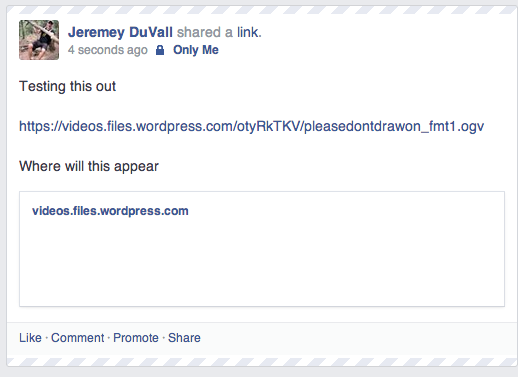
As for stats, they will not be counted when readers click the video from Facebook. Basically, in order for a stat to be recorded, the video has to be played within the VideoPress frame. Copying the OGG url won’t record the video stats.
-
Hi Jeremy,
Thanks so much for getting back to me on all. I’m still in a quandary about posting to Facebook because, from what I’ve noticed, posting an image gets a zillion more eyes and comments than just words. Right now, when my blog posts are published to Facebook, they’re only words – not even a thumbnail anymore. And I noticed that the thumbnails, when they were appearing, we’re given less and less space. That’s why I thought if I can post a link to my blog w some type of visual it might help. I don’t think it’s possible though. Do you know why the posts might be showing up without thumbnails now and what might help promote them?
Thank you again for all,
Lauren -
Hey Lauren,
I’m looking at your latest post here:
http://karmamamma.com/2014/08/05/if-buddha-and-warhol-went-to-water-zumba/
If this post isn’t sharing to Facebook with an image, it’s mostly likely due to the fact that the images at the bottom of the post are too small and you don’t have a featured image set. Facebook should pull an image from the post provided the available images are in the neighborhood of 250×250. The ones I’m seeing are 300x169ish. So, first thing to try is setting a featured image:
Then, try making the images in your posts a bit larger.
Let me know if that works!
-
Hi Jeremy,
Thanks so much! I went in and set a featured image. I also tried to scale the images to a bigger size, but I think you can only scale down. For some reason the editing system I used to create the still images crops them. I’ll see if I can change that in settings, I’m not sure if I can though.
Will Facebook still use the images as they’re sized now? Or do they hold fast to the 250 dimensions?
Also, along the lines of formatting, I’m having trouble creating paragraphs – getting a space between each – in my most recent post. I’m not sure what changed but when I saved the post there weren’t any spaces. Is there a way to adjust this?
Thank you again for all!
Lauren -
Hey Lauren,
You won’t be able to scale an image up beyond the original dimensions when you upload it to WordPress.com. So, your best bet is to upload an image that is larger than what you want to use and then scale it down to fit the post on WordPress.com.
Will Facebook still use the images as they’re sized now? Or do they hold fast to the 250 dimensions?
For Publicizing posts and sharing them with Facebook automatically, you’ll want larger than 250px to be sure it works correctly. If you’re manually sharing the post, you could probably get by with smaller images.
For example, I tried sharing your post here manually:
http://karmamamma.com/2014/08/05/if-buddha-and-warhol-went-to-water-zumba/
The first image that comes up is not within the post. But, the images in the post are included as other options. For the post images to be the preferred image shared alongside the post, you’ll want them to be larger than 250×250.
I’m not sure what changed but when I saved the post there weren’t any spaces. Is there a way to adjust this?
If you take a look at your latest post, you’ll see a few div tags wrapping your paragraphs (Text Editor):
https://karmamamma.wordpress.com/wp-admin/post.php?post=594&action=edit
If you remove those from the beginning and end of each paragraph, this should be fixed.
-
-


- The topic ‘Multiple posts on pages’ is closed to new replies.
 WordPress.com Forums