My browser crashes or fails to load content – bug?
-
Hi,
I am having a difficult time here since the last changes wp did (Reader, old Stats page).
My main browser (Firefox 50.1.0) crashes or fails to load content or is slower than a snail.
I have Chrome and I.E. also installed but don’t use them so frequently. They are both sluggish and fail to load content, but haven’t experienced a crash so far.
I use a desktop computer, windows 7 and have cleared cookies, cache and offline data as supernovia advised. No result whatsoever…
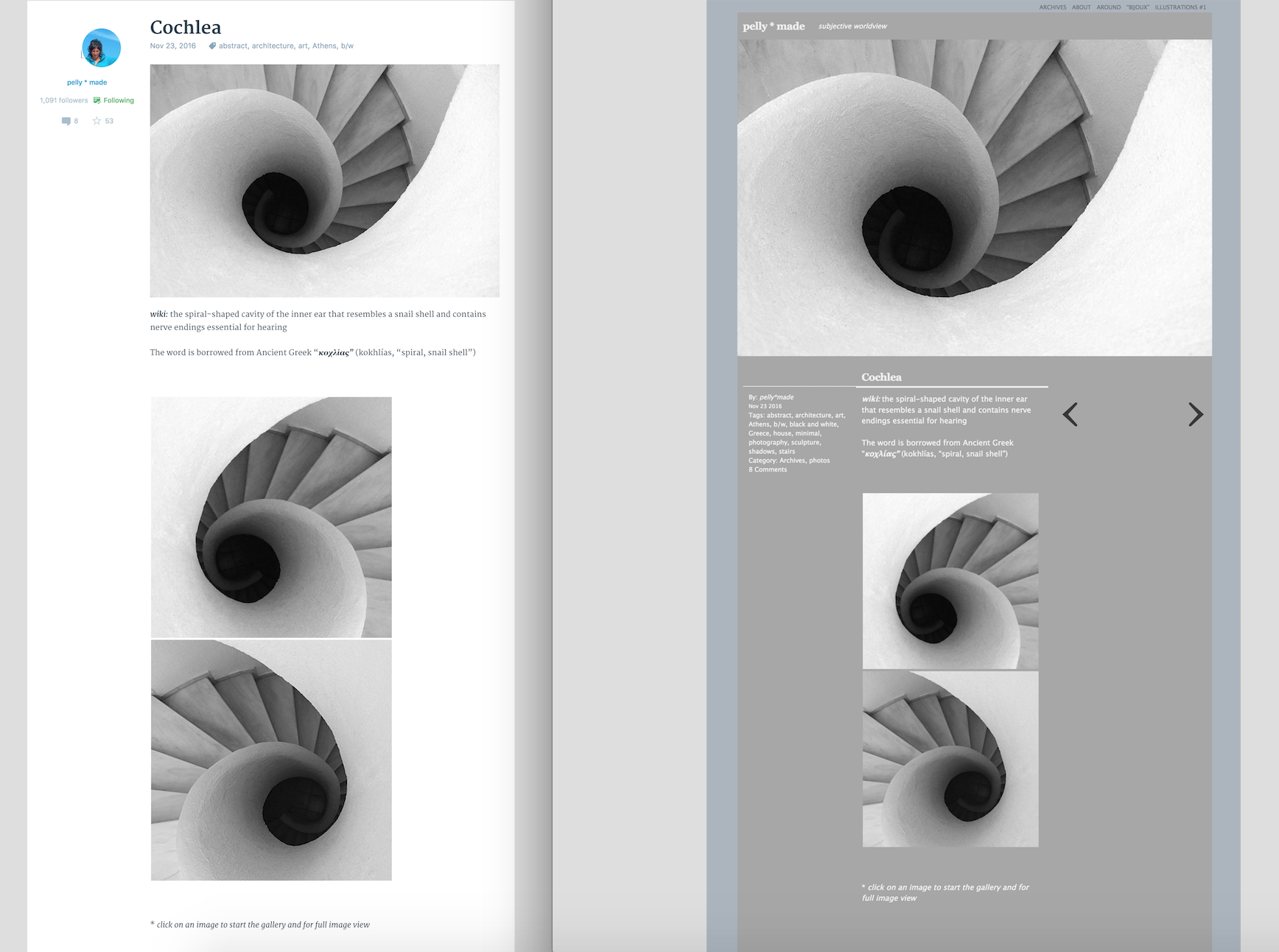
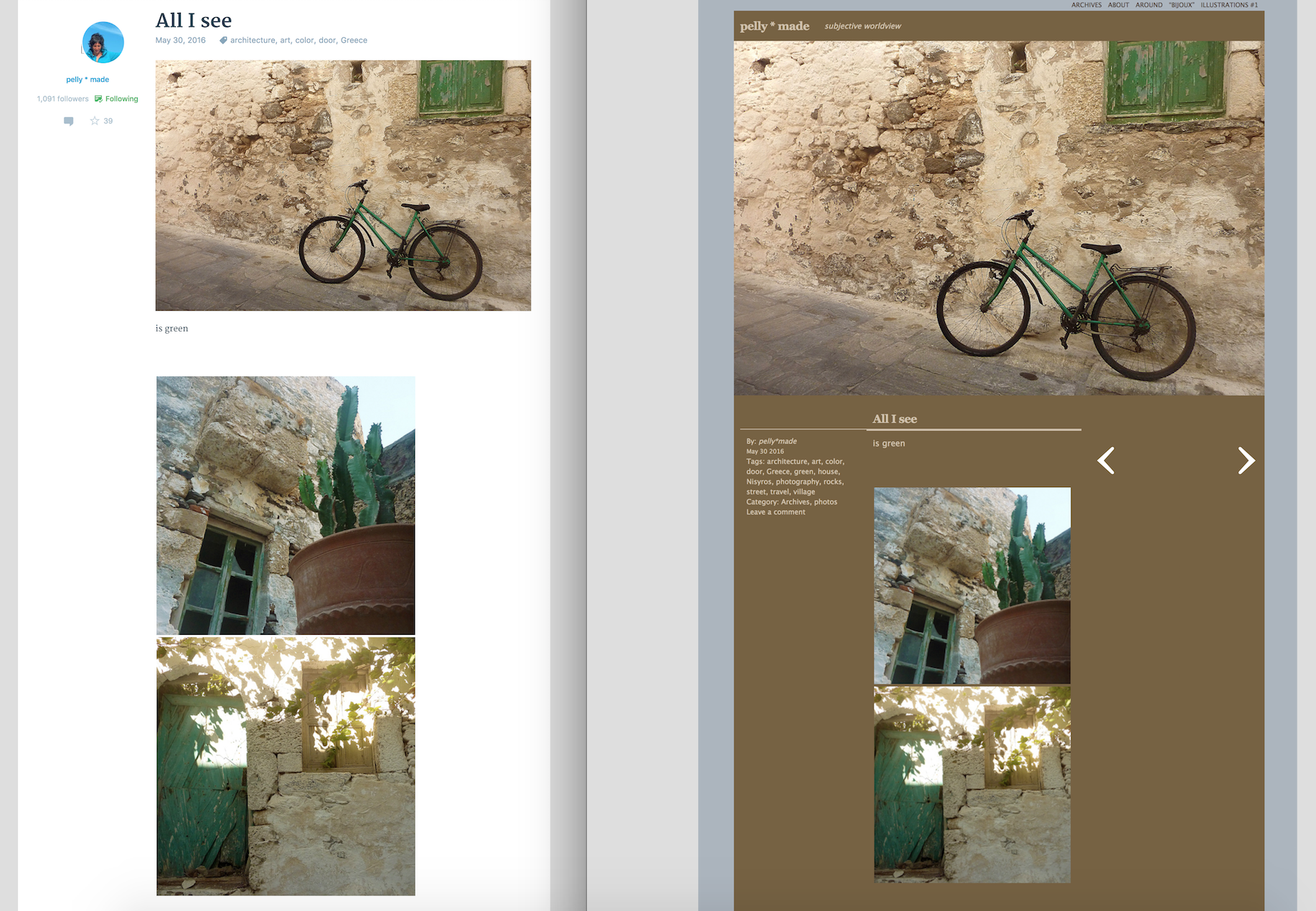
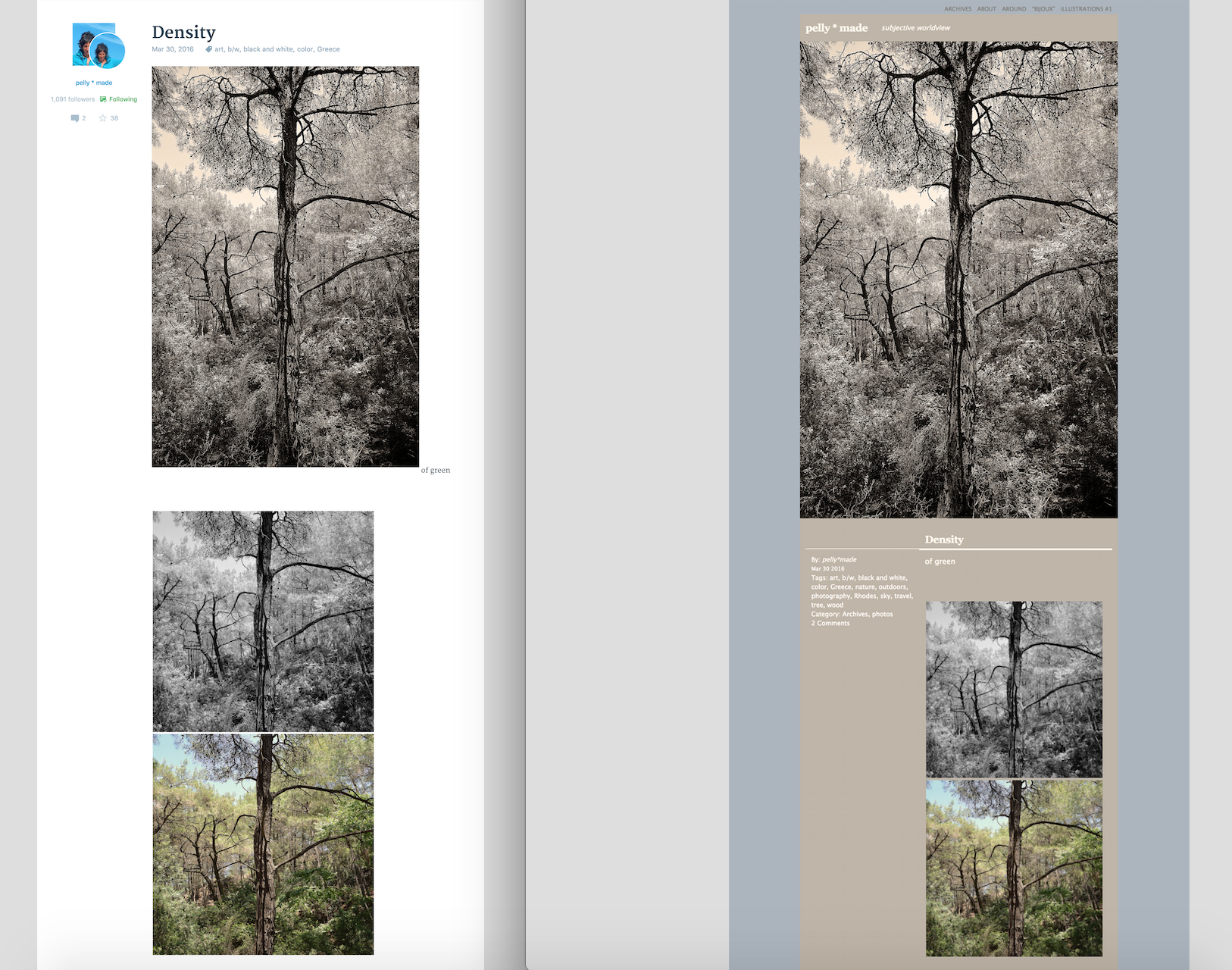
Since the new Reader was launched, I also noticed that some photos of certain posts appear distorted or damaged in my Reader. This happens when the post uses the square gallery type.
designsimply said it was a bug and that it was fixed but not in my case. I still see the photos distorted and damaged.
See screenshots:
– https://pellymade.files.wordpress.com/2017/01/cochlea-23nov_error.jpg Posted November 23*
– https://pellymade.files.wordpress.com/2017/01/all-i-see30may_error.jpg Posted May 30*
– https://pellymade.files.wordpress.com/2017/01/density30mar-error.jpg Posted March 30*
* please, when in my Reader, click on the specific photo to see how it should look like.
ThanksThe blog I need help with is: (visible only to logged in users)
-
Hi,
My main browser (Firefox 50.1.0) crashes or fails to load content or is slower than a snail.
Which content are you having trouble loading? Is it everything, or only certain posts/pages. If you could send me some URLs, it would help me look into the problem for you.
When the content fails to load, what do you see on your screen?
I can see you have recently been speaking to another member of staff about the issues you’ve had with your Reader. I will speak to them and come back to you.
-
Hi,
Which content are you having trouble loading? Is it everything, or only certain posts/pages
When I am in the Reader mostly: all of my tags, the blogs I follow and my own Reader. In a smaller degree my stats, the old stats, my blogs archive page, my blog’s pages and the old editor page, practically everything! But the Reader is truly unbearable…
When the content fails to load, what do you see on your screen?
– When in Reader: a) only the “w” in the center of page b) posts without images, only a gradient (white to gray), gallery posts with no images, gray lines trying to load content but won’t let me scroll down further, only the title of a post without an image (although there are images) c) all of b) but the mouse is unable to click. d) if the browser crashes, I see a message telling me to contact you.
I spoke to supernovia and designsimply, as I have another bug issue. I wrote about it above and provided some screenshots for you to see
I would like both my issues to be resolved pleaseThanks
-
When the content fails to load, what do you see on your screen?
– When in Reader: e) when I click on a post and want to click the back button, to return where I was, 7 out of 10 times, the button is unresponsive ( I see the loading circle for 10 minutes!!!!) and if I am lucky (and the browser doesn’t crash) I finally end up at the beginning of page, not the post I was before.
-
Hi,
Ok, I’m going to look through these issues and do some research into what could be happening. I’ll come back to you when I have an update.
Thanks!
-
Hi again,
I’ve spent some time looking over your messages and the screenshots you provided.
Can you try the following for me:
1. Try running Firefox in ‘safe mode’ and let me know if it creates any improvement. Safe mode temporarily turns off certain extensions and settings that could be causing a problem.
There are some instructions starting safe mode here:
https://support.mozilla.org/en-US/kb/troubleshoot-firefox-issues-using-safe-mode
2. Access your Reader from another computer (ideally on another wifi network) and look to see if any of the problems repeat.
3. Tell me the version number for your browser and your operating system.
If you can do these three things, it should give us more of an insight into what is happening.
Let me know if you have any additional questions.
-
Hi,
1. I tried “safe mode”
– It was just a tad better, as far as loading images BUT the scroll down was unresponsive
– The problem with the distorted images (in the 3 screenshots provided above) still exist2. I accessed my Reader from another computer with another wifi connection and the pages loaded more quickly; I couldn’t stay long there to see if a crash would happen though.
– BUT the problem with the distorted images (in the 3 screenshots provided above) still exist3. I wonder if you really read my messages… I’ve already gave you all that info at the very beginning (the 6th of January!)…
Thanks -
Hi @pellymade!
The missing images, white to gray gradient, and the gray lines you are describing are placeholders that appear when you have a slow internet connection. Those are not bugs.
I see that you are using Firefox 50.1.0 on Windows 7. I ran a test just now using those, and I found that it took 6 seconds to load content initially at my location. We do our best to make a good balance between displaying large images and keeping load times faster at the same time. This is tricky because large images take longer to load. Please know that it’s something our developers are constantly working to make better.
I looked through each of the screenshots you linked above and tested each one and took some notes and screenshots. I couldn’t find any bugs when I tested, and I have included some of my testing notes below for you.
> https://pellymade.files.wordpress.com/2017/01/cochlea-23nov_error.jpg
The images in the cochlea-23nov_error.jpg screenshot you provided do not look distorted to me. My apologies if I’m missing something! I see that the images are slightly different sizes, but they do not look distorted. Is it possible you’re referring to something I’m overlooking? Here is a side-by-side comparison for what I see for the Cochlea post in the Reader compared to your site and this matches with the screenshot you provided: https://cldup.com/gZ-RXFcMhM.png
Links to the Cochlea post for reference:
https://wordpress.com/read/blogs/45243654/posts/10147
https://pellymade.wordpress.com/2016/11/23/cochlea/> https://pellymade.files.wordpress.com/2017/01/all-i-see30may_error.jpg
The images in the all-i-see30may_error.jpg screenshot you provided do not look distorted to me either. This is a side-by-side comparison of the All I see post in the Reader and on your site: https://cldup.com/7gybO3S91f.png
Links to the All I see post for reference:
https://wordpress.com/read/blogs/45243654/posts/9353
https://pellymade.wordpress.com/2016/05/30/all-i-see/> https://pellymade.files.wordpress.com/2017/01/density30mar-error.jpg
In your density30mar-error.jpg screenshot, the images appear to be overlapped. I am not sure why it loaded that way for you but it does look like a temporary glitch to me and I checked and I cannot see the same problem when I load that post to compare. I made a side-by-side comparison of the Density post in the Reader and on your site and here’s how it looks in my test: https://cldup.com/TQsahcd0Hu.png
Links to the Density post for reference:
https://wordpress.com/read/blogs/45243654/posts/9031
https://pellymade.wordpress.com/2016/03/30/density/I used Firefox 50.1.0 on Mac OS X 10.12 for testing, but I did also double check them in Firefox 50 on Windows 7.
-
Hi designsimply,
where to begin…
First, I haven’t answered your emails yet, as I was away for the holidays and I was waiting for the upgrade of my internet connection (…) to take place so I could have a clearer idea about the sluggish Reader and wordpress pages in general. Plus the fact that it’s not easy for me to write and describe all these problems in english; it’s been a month now and this situation is really getting to me…
Part of my frustration is caused by the fact that I don’t get all the answers I seek: I started this thread because supernovia (in the stats feedback sticky post) said that slugginess, failure of loading content and crashing of firefox sounded like a bug issue. Your answer (see below) is only about the slugginess, you don’t say anything about the other two.The missing images, white to gray gradient, and the gray lines you are describing are placeholders that appear when you have a slow internet connection. Those are not bugs
– I already know about the placeholders…
– My internet connection (3,87mbps) was the average speed bloggers have around the world, not in the US, London or Paris for sure, but in the majority of smaller and remote countries and worked just fine for me before the new Reader was launched . As of today my internet connection is 28mbps and although things have improved, the problem still exists as I had some crashes, posts with no image (although if I clicked on the title, there were big images there) and the time it takes for a page to load (Reader/Stats/Blogs) isn’t satisfactory given the high speed.I ran a test just now using those, and I found that it took 6 seconds to load content initially at my location.
Did you test it in the same connection speed I had? Otherwise it doesn’t much make sense.
This is tricky because large images take longer to load. Please know that it’s something our developers are constantly working to make better
What is a large image really? The old Reader had large images and loaded perfectly. Plus I had to manually make all my main pictures larger so that they appeared in the new Reader, remember?!?
Here is an excerpt from a reply of grahaminhats posted in the stats feedback sticky post on January 4th:Unless one has super-fast broadband and a super-fast computer, which most people do not, especially in the farther regions of the world, then the new UI/Editor/Reader is horribly slow. Using more code to achieve less is a failure and no amount of contrived hyperbole or herding of customers can alter the reality. And, why on Earth is the “Reader” loading Olark.
So I am not the only one who noticed this problem after all! I am not a tech savvy but I can surely understand that it’s the way the new Reader was designed by wp and not my internet connection’s speed.
It’s really annoying that from now on I have to pay extra money for a higher internet connection, just for the sake of wp’s lack of respect to us bloggers! Of course that only gives me a partial solution, as other bloggers won’t do the same and I myself may use other computers with slower connectionsAs for the screenshots:
– I can see (and thank you for your screenshots) that in your computer the photos are not distorted. I really don’t know what is happening here…
I tried viewing the posts from another computer, different connection and they look distorted. I tried chrome and I.E in my computer and they are still distorted…
One thing I may add is that when I had that bug issue before (https://en.forums.wordpress.com/topic/hidden-text-appears-in-my-post-reader?replies=31) the “all I see” post appeared distorted and this was because there was a bug in the square gallery type. Here is a screenshot I gave kokkieh that time (June 2, 2016, 10:44 a.m.): https://pellymade.files.wordpress.com/2016/06/messed_up2016-06-01.jpg
The “cochlea” post is newer, but uses the same type of gallery and “density” too.
That’s why I insist about the bug.I need answers to everything I wrote above please.
Thanks -
I’m sorry about your frustration! I will do my best to make sure everything is answered, however, please keep in mind that the Reader has had updates, and will have more updates ongoing, and so past screenshots may no longer be relevant and it would be a good idea to look at a new example for some cases at this point.
Did you test it in the same connection speed I had? Otherwise it doesn’t much make sense.
I did not. I was noting that as a test though. It’s more relevant if I include my connection speed, which was 34 Mb/s down at the time of testing. That comment was just meant to be a point of reference and relevant to my report of this issue to our developers. I included in my forums reply because I wanted you to know I had tested it myself. My test was very anecdotal though and meant to spark interest and give some point of reference. Much more detailed testing and review is happening on the developer side.
Since the new Reader was launched, I also noticed that some photos of certain posts appear distorted or damaged in my Reader.
I feel I have addressed each report of this in detail in past emails and forum replies. Since the Reader has had some updates after you started commenting, would it be possible for you to find one new example of a distorted image from a newer post that I can review again for you if you still think there is a problem? Also, could you clarify what you mean by distorted—you are referring to images that appear squished and not images that are a different size than what you were expecting, correct?
I need answers to everything I wrote above please.
I asked for a new screenshot from you for a newer post so I can try to test what you’ve said about distorted images again. I can also let you know that developers are looking into the reports of slow load times. Other than that, what’s missing?
-
I am really sorry, but I think you are jerking me around. For the last 35 days I report and repeat the same problems I have here over and over, provide screenshots and details, waiting patiently for answers and solutions and all I get is you asking for “new screenshots” and a question to “what’s missing?”????
Mercy!the Reader has had updates, and will have more updates ongoing
I can see that it’s an ongoing torture, because I have a blog in wp that matters to me and I use the Reader on a daily basis! Let’s not get into the new troubles I have after today’s Reader updates… we haven’t begun to solve (or more likely understand) the old ones!
supernovia (in the stats feedback sticky post) said that slugginess, failure of loading content and crashing of firefox sounded like a bug issue
Other than that, what’s missing?
You must be kidding right? Where exactly are the answers to:
– Is crashing, failure of loading and slugginess a BUG??? or NOT???
– Why although I was forced by wp’s actions to upgrade my internet connection to 50kbps I still have crashes, loading failures and sluggish wp pages?
– Is it the code that wp uses the reason or not?I feel I have addressed each report of this in detail in past emails and forum replies.
– What do you mean by that??? You may have tested yourself the specific posts but what you saw isn’t what I see! The problem is still here and although I wrote a whole paragraph in my previous reply:
” I tried viewing the posts from another computer, different connection and they look distorted. I tried chrome and I.E in my computer and they are still distorted…
One thing I may add is that when I had that bug issue before (https://en.forums.wordpress.com/topic/hidden-text-appears-in-my-post-reader?replies=31) the “all I see” post appeared distorted and this was because there was a bug in the square gallery type. Here is a screenshot I gave kokkieh that time (June 2, 2016, 10:44 a.m.): https://pellymade.files.wordpress.com/2016/06/messed_up2016-06-01.jpg
The “cochlea” post is newer, but uses the same type of gallery and “density” too.
That’s why I insist about the bug.”I haven’t seen a reply about it either!
Please, look at my blog for the specific posts and compare them to my Reader’s screenshots!would it be possible for you to find one new example of a distorted image from a newer post that I can review again for you if you still think there is a problem?
No, since there was a problem with the square gallery type, I stopped using it, so there are no new posts. The old screenshots I gave you are what I currently see in my Reader. And yes, I still think there is a problem! Please an answer: Is it a bug, like it was the last time?
could you clarify what you mean by distorted—you are referring to images that appear squished
I am trully amazed that I have to clarify this to you at this point and after all the screenshots I had provided! They appear squished
– https://pellymade.files.wordpress.com/2017/01/cochlea-23nov_error.jpg Posted November 23*
– https://pellymade.files.wordpress.com/2017/01/all-i-see30may_error.jpg Posted May 30*
– https://pellymade.files.wordpress.com/2017/01/density30mar-error.jpg Posted March 30*
* please, when in my Reader, click on the specific photo to see how it should look like.


- The topic ‘My browser crashes or fails to load content – bug?’ is closed to new replies.
 WordPress.com Forums