My delayed-publish Post is showing the wrong date
-
I delayed Publishing a Post, but the date shows as the date I wrote it, not the date I published it.
The blog I need help with is: (visible only to logged in users)
-
Hi there!
Can you give me a link to the post you’re having trouble with? and what date did you publish the post?
-
Thank you – the latest post is on the front (opening) page of http://www.charlies-chat.com and was actually published on 12th July 2014 not on the 5th as it states.
-
Before we go further, I’d like to clarify what has happened here.
When you say the post was published on July 12, is that the date you actually published it, or did you schedule it to post on July 5th and it only showed up on July 12?
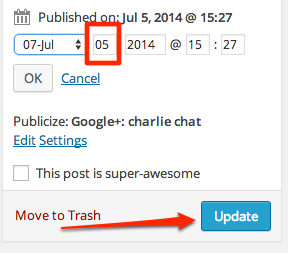
If you originally created the post on July 5th, it may have saved that date in the database and not updated it if you then published it on the 12th. If that’s the case, you can go back at any time and update the published date in the post editor by clicking on the “edit” link next to the published date, just above the Update button.
-
Thank you Jackie – the permalink is as follows: http://charlies-chat.com/2014/07/05/429/
I now have added the Title Blog 3. I published this on 12th July. If I try to edit the published date, I do not seem able to delete the 5th of July and replace that with the 12th. My only options are a month apart.Going back a step…. I ‘composed’ the Post on the 5th and saved it for publishing later (on the 12th), because I saw that was an option and it seemed like a good idea! I did not just save the draft, but went that step further and chose Publish and the date of 12th July (rather than Publish Immediately).
Clearly the creation date is in the system, rather than the correct Publish to the World date!…. -
You should be able to change the date by updating it here:
https://i.cloudup.com/nGKMnb0ovi.pngBe sure to click the Update button when done.
In the future, to prevent this from happening again, be sure to double-check the date here before you publish a post, or when you initially compose it, add the date when you want to publish it at that time (which will schedule it to publish in the future).
-
Unfortunately (!!) the link brings up a window that doesn’t respond to any sort of clicking, so I can’t edit it for some unknown reason. Any thoughts? Also, I was drafting the next Post and when I ‘View Page’ -ed it
it automatically put the date up – which is of course going to be the wrong date too!
Anyway, if you have a cunning plan to make the icloud link you gave me work, I daresay I can also edit the drafted Post.
Thanks -
The link I included was a screenshot – sorry about the confusion there. I was just trying to demonstrate where the option would be in your Dashboard.
You will need to go into your post editor for older posts and update the dates there.


- The topic ‘My delayed-publish Post is showing the wrong date’ is closed to new replies.


 WordPress.com Forums