

my edits disappeared
-
My last hour’s worth of work disappeared and I can’t find the revision history button anywhere.
The blog I need help with is: (visible only to logged in users)
-
To find revision history, find your post in /wp-admin/ :
https://stylefordorks.wordpress.com/wp-admin/edit.php
And edit the post.
In the top right, click on “Browse” next to your count of revisions:
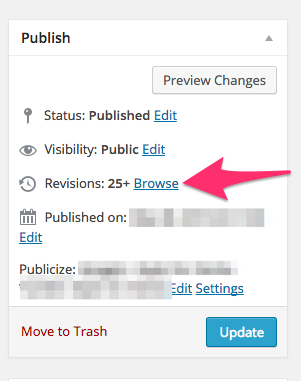
Any edits saved on our servers will be available there.
If you were using the new editor at wordpress.com/post, the edits will only be saved to our servers when you hit the ‘Save Draft’ button, if you Publish or Update the post. Auto-saves are instead saved in your local browser history. If you visit wordpress.com/post you may get an alert that looks like this:

And that will restore any auto-saves from your browser history.
-
Why did you remove auto-save? Isn’t that essential? People’s livelihoods can depend on their writing, and autosave is industry-standard for online media like this.
-
The new editor still attempts an auto save every 2 minutes just as the /wp-admin/ editor does. But it saves that content to your browser’s history, not to our servers. We’ve actually seen this saving more posts in problem circumstances because many people relied on auto-saves over poor network connections, so the auto-saves never made it to our servers in the /wp-admin/ editor.
While if you’re typing in the new editor, the autosave is much more likely to work because it only relies on your browser instead of a network connection.
If you prefer the old auto-save you can still use the /wp-admin/ post editor by visiting it directly:
https://stylefordorks.wordpress.com/wp-admin/post-new.php
Or through the /wp-admin/ dashboard:
-
Ok, so let's say im using the new posting program, which I am. It did NOT say “an old draft is saved.” It simply did not show half of my work.
So where was I supposed to restore from? (By the way, I eventually found the old posting page, but it's VERY unclear how toget to it from the new posting page, and furthermore, isn't that a horribly clunky way to access lost work? Resorting to a prior version?)
Bottom line – how was I supposed to find my lost work without going to the old posting system?
-e
-
how was I supposed to find my lost work without going to the old posting system?
As Alex mentioned, autosaves in the new editor are saved within browser storage. So, for example, let’s say you were writing a post for awhile but then you accidentally closed the window/hit the back key. If you visit wordpress.com/post again, you should be prompted with a Restore message indicating there is a more updated version of your post.


- The topic ‘my edits disappeared’ is closed to new replies.
 WordPress.com Forums