

My front page is not correct when I try to link to facebook. Where do I look to correct this?
-
When I am on my “home” or “front page”, at the bottom where I can attach to facebook, it brings up something different than what is on my front page. I’ve evidently entered something in playing that I need to delete but don’t know where to go. Can you direct me?
thanks
sueThe blog I need help with is: (visible only to logged in users)
-
Hi Sue!
I’d like you to try three things for me to see if the issue goes away.
- First, please give your first page a title. You can call it Home, as a test, if you’d like.
- Then, you can add a Featured Image, as that is the thumbnail we’re suggesting that Facebook use when you share a post. For instance, on this page, you might want your own picture, or a photo of your dogs.
Here is information about how Facebook chooses an image:
http://en.support.wordpress.com/facebook-image-thumbnail/Make sure you save any changes you make to your page.
- Finally, I’d like you to click on the link below and add your homepage URL to the box and click “debug.”
Next, let’s give it another try. Please take a look at your site, click the Facebook sharing button, and let me know how it goes. If you need more assistance, I’m happy to help!
Looking forward to hearing from you. Thanks very much.
-
Hi – you lost me on the “homepage URL”. You are dealing with a novice who knows enough to be dangerous and not enough to be knowledgeable.
thanks,
sue -
I’ve done everything. It is picking up a picture of the two dogs that I don’t want and cannot figure out where I have entered to get rid of it.
I put my http://www.suzannewgibson.com in the debug and it shows that picture there.
sorry to be such a pain.
-
Hi Sue!
You’re not a pain at all :) I’m more than happy to help!
Hi – you lost me on the “homepage URL”. You are dealing with a novice who knows enough to be dangerous and not enough to be knowledgeable.
Your homepage URL is suzannewgibson.com
I’ve done everything. It is picking up a picture of the two dogs that I don’t want and cannot figure out where I have entered to get rid of it.
I think you’ve actually completed all the steps successfully. This is what I see when I try out your Facebook sharing button on your front page:
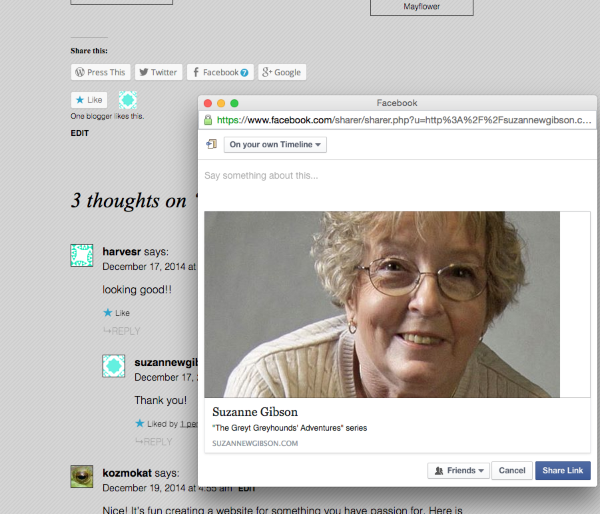
Is this what you’re hoping will be seen?
If you don’t see this when you click that sharing button, it’s possible that your browser has saved the old content and is displaying that for you. That saved information is placed in your “cache.” You can clear the cache, so you can view your site with a clean slate. Here’s how:
Try to clear out your cache, and then take another look at your front page. Click the Facebook sharing button again, and see if you also view the correct text/photo.
Thanks, Sue! I am looking forward to hearing how all of this works out for you. Just let me know if you have more questions! All the best to you.
-
Hi – Thanks for all of your help. With your help and Jason last night, things are looking good and all is well. I do have another email question in that I’m waiting for an answer, but I’ll wait until I get in place in the queue for answering.
It all looks really good. I am so pleased with it and all the help you guys in support are giving me. Thanks again and have a Greyt Merry Christmas.
-
Terrific! I’m so glad that issue is settled. I’ll keep an eye out for your emailed question. Either I, or another Happiness Engineer, will get in touch about it as soon as possible!
Best of luck with the site and the adorable pups!
Cheers :)
-
-


- The topic ‘My front page is not correct when I try to link to facebook. Where do I look to correct this?’ is closed to new replies.


 WordPress.com Forums