My host is WordPress.com and I have problems with google authenticator
-
I like to use Windows Live Writer to post and no after I have the google authenticador Im not able to use any more…my host is wordpress.com and I need help.
Also, I’d like to UPDATE my wordpress , it looks old, still the same since I start but I didn’t find the “update” link any where. Please, I really need help!!!
Thanks for your suppport!Denise
http://www.daybydayfitfashion.comThe blog I need help with is: (visible only to logged in users)
-
-
I meant the new version of wordpress and I’d love to still posting using my windows live writer but I cannot log in any more, I think is because of google authenticator….What should I do? Please I need help .
Thanks a lot!!
-
“The new version of WordPress”
I have no idea what you mean by that. I’m afraid I can’t help you.
Microsoft said that it would stop supporting Windows Live Writer soon. Maybe that is the problem you are having?
-
Are you referring to the blog at http://daybydayfitfashion.com/? If so, that is a blog hosted on WordPress.com and is running the most up-to-date version of WordPress by default.
It doesn’t appear that the account daybydayfashion12 has enabled two-factor authentication. Where are you needing to use Google Authenticator?
-
thank you for your reply…Yes it is my site. I already disable google authetnticator. I thougth I have old version of WordPress because I dont have collors fonts to make my posts…I cannot use links of the places where my readers can buy the clothes that I wear(fashion blog)…I use to make my posts first at windows live writer but now I can not post any more…What you can tell me about this…thanks a lot!!
-
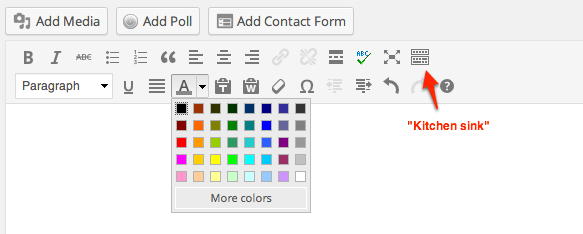
You can modify the color of your text by selecting a block of text and then clicking on the letter A in the Dashboard Visual editor, which will bring up a box of color choices like this:
https://i.cloudup.com/1zG8g7do3F.jpgIf you don’t see that option, click on the “kitchen sink” button to open it up.
For links, if you again select a block of text, you can make it a link by clicking on the link button. Note that the button will be greyed out if you don’t have any text selected. For more information, check out the page here:
http://en.support.wordpress.com/links/For help using Windows Live Writer with WordPress.com, see:
http://en.support.wordpress.com/xml-rpc/windows-live-writer/ -
Thank you so much for your help!! How about widgets? I cannot add some in my blog and how can I install plugins??? Sorry for bother you, but I don’t have nobody to help me…Thanks a lot!!
-
@daybydayfashion12
You don’t need to have Staff answer such questions.On the bottom of your Admin page you will find a link to the step by step Learn WordPress.com blogging Tutorial prepared by Staff. http://learn.wordpress.com/
The support documentation is all found at the Support link http://en.support.wordpress.com which is also on the bottom of your Admin page.
Type in widgets http://en.support.wordpress.com/?s=widgets and click search. Results here http://en.support.wordpress.com/widgets/
Type in plugins and click search.
There is no FTP access and no blogger installed plugin capability on any free hosted WordPress.com blogs.
http://en.support.wordpress.com/ftp-access/
http://en.support.wordpress.com/plugins/There is no upgrade you can purchase here that provides FTP access and the ability to install plugins and or any third party themes. See here for a full comparison WordPress.com vs. WordPress.org
http://support.wordpress.com/com-vs-org/If you want FTP access and to install plugins or third party themes into a site then you will have to hire a web host http://wordpress.org/hosting/ and set up your own WordPress.org install.


- The topic ‘My host is WordPress.com and I have problems with google authenticator’ is closed to new replies.
 WordPress.com Forums