

My initial 14 posts aren't being publicized.
-
All my posts aren’t showing up on my Facebook page, Google Plus page, and Twitter account. No idea what I’m doing wrong, but I wanted to start up this page, connect the blog to these services, then publish the 14 drafts I had, and then see then appear on all of them. I tried disconnecting/reconnecting, then also republishing (move to draft first)… I also checked to make sure all the services were selected when publicizing a post. I realized I couldn’t be logged in as a “Facebook page account”, and had to be logged in as my main Facebook account. But nothing’s working still. Please help.
The blog I need help with is: (visible only to logged in users)
-
Also, I notice some of the meta information isn’t right. og:image on my littlechomper.com page is set to “https://s0.wp.com/i/blank.jpg”, and the twitter:site is “@wordpressdotcom”. Probably other things not working either.
-
I see the Facebook update and Twitter getting posted to now, but not google plus. Still notice Facebook, including its debug tools, picking up an og:image of blank.jpg.
-
Hey Scott,
Let me address each issue individually:
No idea what I’m doing wrong, but I wanted to start up this page, connect the blog to these services, then publish the 14 drafts I had, and then see then appear on all of them.
I suspect the issue here was that the individual Publicize accounts weren’t setup when the post was initially created. When you create a post then connect a social network to Publicize, you will need to manually go back and check the network under the post in order for Publicize to work.
I know you mentioned making sure the networks were checked, but when I check on your post “Do not disturb” for example, the networks are not checked:

It’s entirely possible that this is a bug, so I’d like to see if we can reproduce it going forward. For new posts that you create with Publicize already added to your blog, can you let me know if they are publicized correctly?
I tried disconnecting/reconnecting, then also republishing (move to draft first)
This will not retrigger the Publicize action. You will need to manually publish them. I apologize!
I notice some of the meta information isn’t right. og:image on my littlechomper.com page is set to “https://s0.wp.com/i/blank.jpg”
You can change this by uploading a blog icon on the right-hand side of the page here:
https://littlechomper.wordpress.com/wp-admin/options-general.php
We refer to this icon as a Blavatar. More on Blavatars here:
http://en.support.wordpress.com/avatars/blavatars/
Twitter:site is “@wordpressdotcom”
It looks like you have the Twitter account setup correctly under “Twitter username to include…” here:
https://littlechomper.wordpress.com/wp-admin/options-general.php?page=sharing
The Twitter:site meta information on Facebook is likely just cached and should update within the next few days.
I see the Facebook update and Twitter getting posted to now, but not google plus
As I mentioned above, can you let me know if this affects newly-published posts?
-
The wordpress.com support here is awesome! But still, I don’t see any google plus updates, and I definitely had the box checked. I just posted again, and only saw updates on Facebook and Twitter. It should be pointed to here as well:
https://plus.google.com/+Littlechomperluna
Please advise?
-
Hi Scott!
The wordpress.com support here is awesome!
Great! We’re happy to hear that.
I don’t see any google plus updates, and I definitely had the box checked.
That’s odd. Can you let me know where you’re posting from (the new or classic editor)? The URL in the address bar when you’re editing a post should help you tell the difference:
Classic editor: http://littlechomper.wordpress.com/wp-admin….
New editor: http://wordpress.com/post
-
I’ve generally been using the new editor, so probably that one. Although I can’t be 100% sure, because I think even after I chose to post with it, I’ve seen the old editor appear on its own before. Maybe because I accessed it in a different way, I don’t know. I would’ve thought once you opt for the new editor, it only loads that up for editing until you switch it back, but I don’t think that’s what happened.
-
Hey Scott,
Thanks for the additional info. Can you try starting and publishing your next post from the classic editor here?
https://littlechomper.wordpress.com/wp-admin/edit.php
If you click “Add New” at the top, you shouldn’t be directed to the new editor. If you are, please click “Switch to the Classic Editor” in the top right-hand corner. I’m wondering if there might be a small bug with Publicize and Google Plus from the new editor.
-
-
Great Scott! I appreciate your help troubleshooting this. Let me know if the post successfully publishes to Google +!
-
-
Hey Scott!
Can you visit the following link?
https://plus.google.com/u/2/apps
From that page, you should see WordPress listed like this:
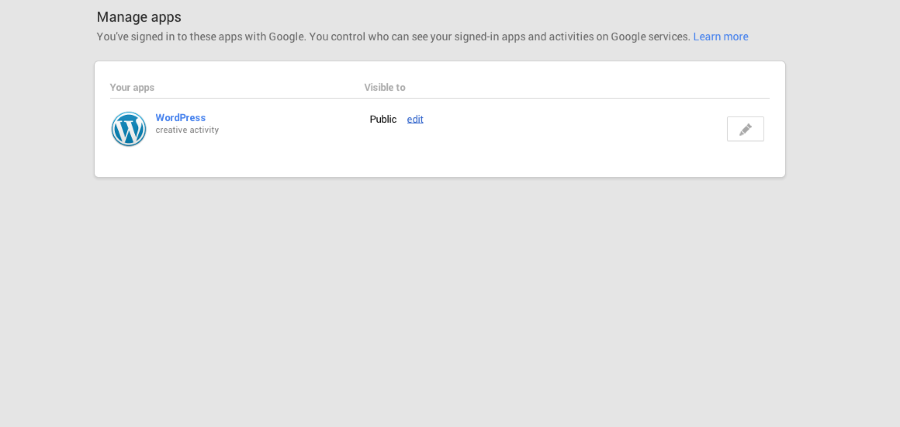
Can you let me know if it shows “Public” under “Visible to”?
-
It showed “Your circles” instead of “Public”. I changed it to “Public” guessing that’s what you wanted me to try next. Will probably have another post to try this weekend. This troubleshooting is definitely helping motivate me to keep posting.
-
That’s certainly a beneficial side effect! However, I don’t think “Your Circles” instead of “Public” is causing the issue. I’m still digging around. In the meantime, can you try fully deleting the connection and reconnecting it one last time?
http://en.support.wordpress.com/publicize/#reconnecting-services
Those instructions are a bit different than just removing it from the WordPress.com side.
-
Procedure followed, although that link is a bit out of date from the Google Plus side. I can provide screenshots for what I did… not sure if this forum takes images though, but I think it was the same thing, having “Revoked Access” for WordPress.com. Still, with two new posts, nothing’s showing up to the google plus page.
-
Hi Scott,
Thanks for the additional details. I’m not sure what’s going on here. I’ve tested this every which way, and the Google+ Publicize has worked each time. I’m still investigating!
-
-
-
-


- The topic ‘My initial 14 posts aren't being publicized.’ is closed to new replies.
 WordPress.com Forums