

my published pages 'cannot be found'
-
Hi,
Suddenly 7 out of my 9 published pages ‘cannot be found’ when users click on the menu bar. The pages have been online for seven years now, so I am not sure what causes the problem. Also it seems that new pages that appear as ‘published’ in my dashboard cannot be found either. Here, is a link to my webpages. https://wordpress.com/pages/eleftheria121.wordpress.com. I would be grateful for any advice on how to solve this problem. -
Hello,
Sorry to hear that. I’m only counting 6 pages not showing:
https://eleftheria121.wordpress.com/education/
https://eleftheria121.wordpress.com/research/visibility-analysis-in-fully-3d-spaces/
https://eleftheria121.wordpress.com/research/visibility-analysis-in-fully-3d-spaces/
https://eleftheria121.wordpress.com/publications-dissertations-conferences/
https://eleftheria121.wordpress.com/publications-dissertations-conferences/forthcoming-spatial-analysis-in-past-built-spaces-workshop/
https://eleftheria121.wordpress.com/academic-awards-and-grants/Can you tell me the page I’m missing?
Are these pages still in you Pages page here: https://wordpress.com/pages/eleftheria121.wordpress.com
Are they under Published, Drafts or Trash?
For the menu bar, in your Menus page here https://wordpress.com/menus/eleftheria121.wordpress.com, do all pages have the correct links?
-
Thanks for the reply. Yes, my mistake. Only 6 are not showing. Yes, they are still in my pages under Published. I cannot see links to any of my pages in the Menus. Are the page titles listed under Menus supposed to be linked to the pages?
-
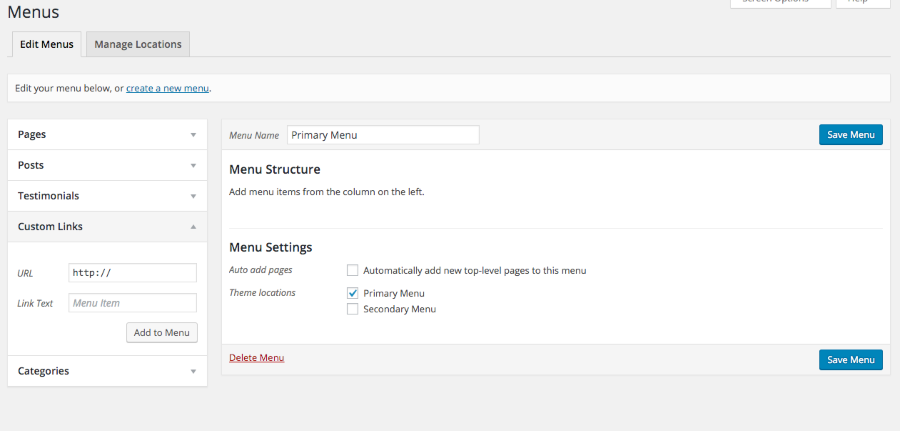
They should be. I’m not entirely sure why this is happening so here’s a suggestion on what to do next. Again, this is just a suggestion. You can delete your primary menu and recreate it in your Appearance -> Menus page here: https://eleftheria121.wordpress.com/wp-admin/nav-menus.php
Here’s the support page on Menus:
https://en.support.wordpress.com/menus/If that doesn’t work then instead of adding pages to your menu, add custom links instead. In the URL field, enter the page’s URL. Get the URL directly from the page you’d like to add. In the Link Text field, enter the title of the page. Click Add to Menu and once you have added all of the pages, click Save Menu.
-
-
Thanks. I created a new menu, and I also tried to add links instead of pages but there is the same problem with my old pages and also new pages I published. I will contact a member of staff for help as this may be a general wordpress.com problem.
-
I added the modlook tag to call their attention. Please wait for their reply and click Subscribe to Topic on the right side so that you are notified when they reply.
-
Thank you for tagging this thread @elzrjose!
@eleftheria121: There was an error on our end causing that message to display on your pages. I’m sorry for the trouble! :( I have now fixed the error on your site and you will be able to view your pages again.
Please don’t hesitate to get in touch if anything else comes up.
-
-



- The topic ‘my published pages 'cannot be found'’ is closed to new replies.
 WordPress.com Forums