

My sidebar has disappeared. (http://pumabydesign001.com/)
-
Simple: No sidebar. It’s gone.
The blog I need help with is: (visible only to logged in users)
-
Hi there!
I just visited your site and I’m seeing your sidebar:
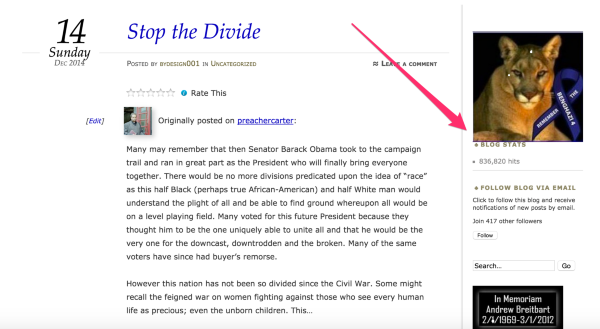
Were you able to clear up this issue on your own?
Or were you viewing your site in a window with smaller size? With your current settings, at screen sizes (or window sizes) less than 800 pixels the sidebar widgets move to the footer area.
Please let me know. :)
Best,
-Alex G.
-
Thanks for your reply Alex. I use Firefox. Upon receipt of your email, I accessed site on Firefox and Google Chrome. While visible on Google Chrome, sidebar is not visible on Firefox. In retrospect, I should have checked other browsers before submitting this question. Oh boy, my apologies for wasting your time but again, I thank you for your concern on my part. I’ll figure it out….
-
Hi there!
Certainly not a waste of time, this kind of thing is what we’re here for! However, I also see your sidebar appear per usual in my Firefox browser.
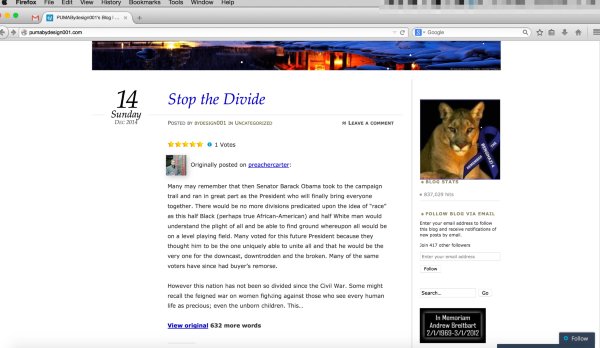
The first steps I’d take are clearing the browser’s cache and cookies in Firefox:
After resetting those and refreshing the site, if your browser still doesn’t display the sidebar I’d check if any browser Add-Ons, like adblockers and such, are interfering.
If you’ll take a screenshot of your site and add it to your media library that would be helpful as well.
Best,
-Alex G.


- The topic ‘My sidebar has disappeared. (http://pumabydesign001.com/)’ is closed to new replies.
 WordPress.com Forums