

My sidebar is showing at the bottom of the page
-
I am using the expound theme for my blog but the sidebar is showing below my posts on the home page. I think this may be because it is using 1 column but I don’t know how to change it. Any help?
The blog I need help with is: (visible only to logged in users)
-
I am using Andrea and have the same trouble. Last time I was told it was a glitch in the theme, but now it is happening again!
-
I was told by a developer at Elto.com (formerly Tweaky) that you need to customize the CSS in order to remove the widget column from the home page while preserving it on the posts/pages.
-
chrisscarr1 – that’s how Expound is meant to look; have a peek at the demo, which shows the first featured post in the area at the top, with no sidebar next to it.
http://expounddemo.wordpress.com/
Once you add more posts, the sidebar will appear to their right.
baziaantoni – could you please start a new thread for your issue with Andrea and add the tag modlook in the Tags area?
-
Dear Happiness Engineer kathrynwp> I have no idea what you are talking about. baziaantoni
-
baziaantoni – you can start a new thread in the Themes forum by filling out the form here:
https://en.forums.wordpress.com/forum/themes#postform
Add the word modlook to the Tags where I’ve shown you in red here:
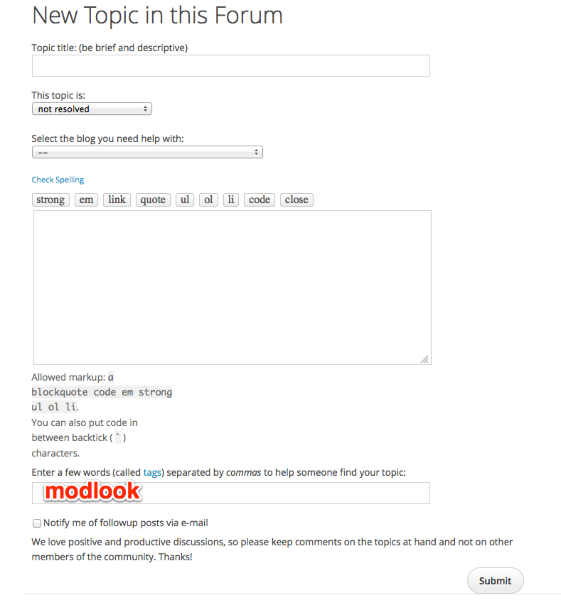
Adding that word will make sure it gets staff attention. Thanks.


- The topic ‘My sidebar is showing at the bottom of the page’ is closed to new replies.
 WordPress.com Forums