

My sites have all disappeared.
-
When logging in to my account Username: fearnsj I had a message that my account has been blocked as a security precaution and i need to reset my password. I cannot do this as I think that the account is linked to my previous work email: (email visible only to moderators and staff)
I also have an account created at a later date username: janet1066 which is currently linked to my current email: (email visible only to moderators and staff)
I hope you can help, I would be devastated if I have permanently lost my travel blogs :(Self-declared URL: https://ukrevisited.wordpress.com/
Jetpack: Unknown
WP.com: UnknownThe blog I need help with is: (visible only to logged in users)
-
To request help with recovering your account:
- Visit WordPress.com and click the “Log in” button.
- Click the “Lost your password?” link at the bottom of the screen. You can also click this link to access the Lost Password page directly.
- Click the “Need More Help?” link uder the field for entering your username/email address:
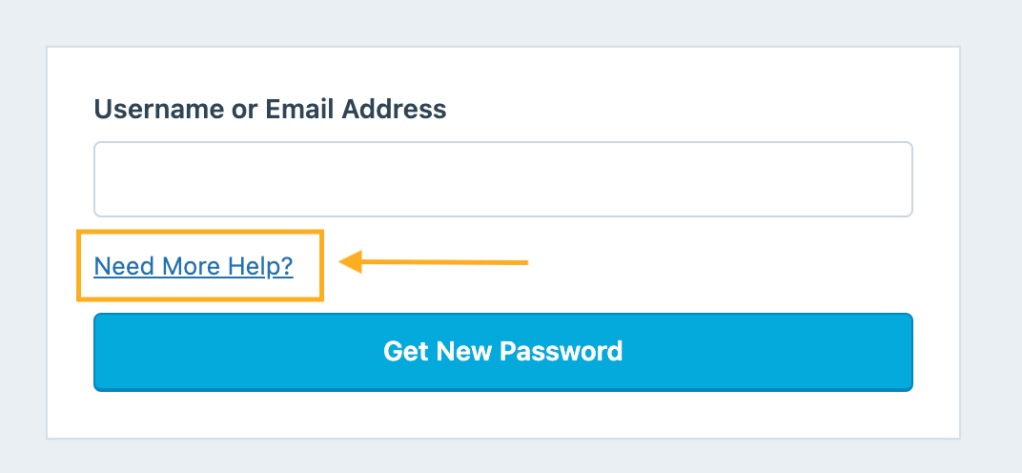
On the subsequent account recovery page, you can provide certain information to verify that you are the owner of the account you’re trying to log in to. We will require at least one of the following pieces of information:
- Transaction ID: A transaction ID is a unique alphanumeric code generated for your payment. If you purchased an upgrade on the site with a credit card, PayPal, or another method, you can retrieve a transaction ID from your bank or PayPal statements or locate a past WordPress.com receipt sent to your email address.
- Activation URL or key: When you created your WordPress.com account, we sent an activation link to your email address that you were required to click. If the email you received included a confirmation button instead of a link, you can copy the activation URL by right-clicking on the button and selecting “Copy Link Address” (this text may vary slightly depending on your browser.)
- Two-Step Authentication Codes: If your account has two-step authentication, you can provide a current code from your authenticator app to prove ownership.
We cannot accept any other information to verify your identity other than the options listed above.
You can add other details at the bottom of the form that may help.
- Then, click the “Recover my account” button to send your information to WordPress.com support.
We will contact you with a response or a request for additional information. Please do not submit the form multiple times for the same account while waiting to hear from us. Once we have reviewed the proof verifying you are the account owner, we will assist you with resetting your password and regaining access to your WordPress.com account.
I hope that clarifies things!


- The topic ‘My sites have all disappeared.’ is closed to new replies.
 WordPress.com Forums