

My wordpress link in my Facebook cannot be opened
-
My friends used to be able to access my blog via the wordpress post on my Facebook page. However, while the post is available, it doesn’t open for them to read the blog.
Please advise.
The blog I need help with is: (visible only to logged in users)
-
Hi Vicky!
Could you please send over the URL displayed on your Facebook post that leads to a page error? I tried to access it via your Facebook page directly, but it looks like your posts are limited to friends only. The link should look like one of the following:
– vickychong.wordpress.com/2014/06/07/link
– wp.me/p3QNlB-…
-
Hi Jeremey,
I just realised that the link on my PC is ok but its the ones on smartphones. There is no link to the wordpress post on the FB apps either on iPhone or Android.
The FB ob PC has “Vicky Chong published Old Path White Clouds – Walking in the Footsteps of the Buddha by Thich Nhat Hanh on WordPress.
15 hours ago
Old Path White Clouds – Walking in the Footsteps of the Buddha by Thich Nhat Hanh”But the apps on Facebook only has “Vicky Chong published an article on WordPress”
This happened to the last two posts. Previously there is always a box with a link to the post on the Apps. I hope this is clear. I tried to post a screen shot from my phone but couldn’t but this is the image url if you can open it.
Thanks.
-
Hi Jeremey,
I just realised that the link on my PC is ok but its the ones on smartphones. There is no link to the wordpress post on the FB apps either on iPhone or Android.
The FB ob PC has “Vicky Chong published Old Path White Clouds – Walking in the Footsteps of the Buddha by Thich Nhat Hanh on WordPress.
15 hours ago
Old Path White Clouds – Walking in the Footsteps of the Buddha by Thich Nhat Hanh”But the apps on Facebook only has “Vicky Chong published an article on WordPress”
This happened to the last two posts. Previously there is always a box with a link to the post on the Apps. I hope this is clear. I tried to post a screen shot from my phone but couldn’t but this is the image url if you can open it.
Thanks.
-
Hi Vicky!
Unfortunately, I can’t see that image. It looks like it’s a link from your email. In order to see it, I would need to log into your email account.
When you publish a post to Facebook, the social network tries to determine how to display your content so it looks the best. For example, when I’ve published a post with a good bit of content, here’s how it appears on the mobile app:
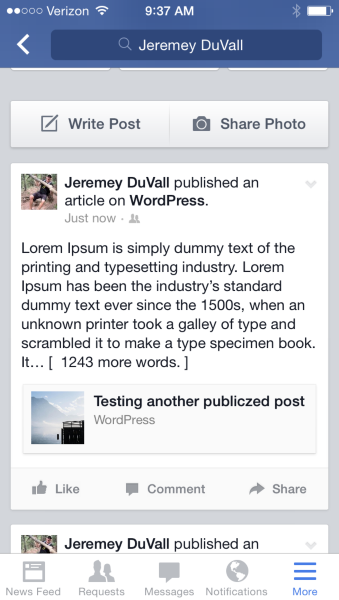
However, if the post has only one sentence or so and then a large image, Facebook assumes that it’s an image-only post and publishes it like this:
https://cloudup.com/iAmUguucIEU (no obvious link)
Can you let me know if your posts look like one of the above examples?
-
Hi Jeremy,
Thanks for your reply. Please advise how I can insert my screen shot here so you know what I mean.
My wordpress post used to be like your first example until my last two posts.
In your second example, you have a title link to the post on wordpress, which doesn’t appear in my at all. Hence my readers cannot access the post via Facebook
Hope u know what I mean.
Thanks.
-
Hi Jeramy,
I just posted a new blog on WordPress and the link is now back on for this new blog on my Facebook Apps.
I really don’t know what is going on, but if you have rectify this, I thank you very much.
I hope the subsequent posts will not have any problem.
regards,
Vicky -
Hey Vicky,
Great! I’m glad the last post worked well. If you have any trouble in the future, please send over a screenshot. You can do that by following the instructions here:
-
Hi Jeremey,
Thanks for the instruction. I thought I would just let you see what I had described before.

I was informed of this by my facebook readers. Glad it’s up ok now.
Thanks very much.
Vicky
-
Hey Vicky!
Thanks so much for the screenshot. If this happens again, could you manage to get a screenshot of the entire Facebook post so I can see the whole thing?
-
-
Hi Vicky,
I was able to reproduce this. I have asked our developer regarding this. I’ll update you as soon as I hear back.
In the meantime, if you want a link available for each post, please share the post manually using the Facebook share button at the bottom of the post. The one you see here:

Let me know if you have any questions with this!
-
Hi Grace,
As mentioned earlier, my problem is mysteriously solved. I don’t know what happened, probably thanks to Jeremy, the link is back.
Thanks. You people are great.
Vicky -


- The topic ‘My wordpress link in my Facebook cannot be opened’ is closed to new replies.
 WordPress.com Forums