

Name servers modifications cannot save
-
Could you double check the name servers you gave us?
Primary DNS : sys1.vdg.ovh
Secondary DNS : sdns2.ovh.netWe’ve tried the ones above several times and they don’t work.
Is there a small mistake in what you sent?
-
Hi,
I am the owner of the server hosting the website tryandplay.com and I can confirm the DNS are correct :
sys1.vdg.ovh (87.98.170.15) & sdns2.ovh.net (213.251.188.141)I have several others domain names with that same configuration and none had any issue with those DNS.
Is the new .ovh extension could be a problem to change the DNS configuration of the domain name tryandplay.com ?
Is it possible to remove the status code “clientUpdateProhibited” of the domain name tryandplay.com so we can modify it ourselves ? By the way, is it normal to have “clientRenewProhibited”, meaning that domain name cannot be renew ?
-
I have several others domain names with that same configuration and none had any issue with those DNS.
Could you send us examples of sites where these name servers are working?
We see “invalid TLD error” when we try to use them.
Thanks!
-
Sure,
* viedegeek.fr
* popscope.fr
* bargaming.fr
* nemcoshow.fr
* wirejess.comWhen I use the zonecheck tool (http://www.afnic.fr/fr/produits-et-services/services/zonecheck/formulaire-complet/) with the new DNS, I have a success result which means that the DNS are ready to be used by the domain name.
-
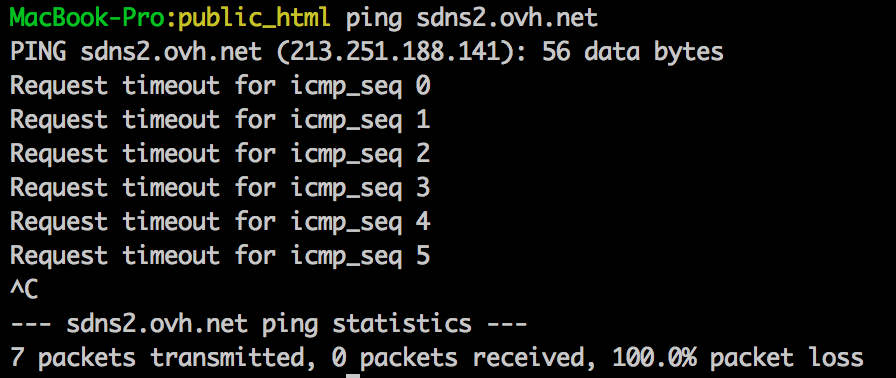
Please check to ensure sdns2.ovh.net is up and running. We are getting timeouts when we try to ping it, and the name servers won’t change if both servers aren’t available.
-
sdns2.ovh.net is a secondary dns server maintained by OVH. This DNS is up and running but they have deactivated the ICMP protocol because it’s just a secondary DNS server, no more. It’s seems weird that the DNS server need to be pinged to configure the domain name ; I changed several domain names a few days ago (.fr and .com) without more configuration than today.
If it’s not possible, we can instead let WordPress manage the DNS area (set ns1/2/3.wordpress.com) et try to configure the DNS area to point to the host server.
-
-
@gracejiyoung : as I say earlier, the ICMP protocol is disabled on sdns2.ovh.net, therefore ping is not available with that server (and I cannot change anything with it, as I do not control it). But the DNS service is up and works normally.
-
-
@gracejiyoung What I want to say is that the secondary DNS server is working fine but the domain name tryandplay.com not.
As I think we will not find a solution for changing the DNS server, is it possible you reset the DNS servers to set the original one of WordPress (ns1.wordpress.com, ns2.wordpress.com, …). As the domain name has the status “clientUpdateProhibited” we cannot change anything in the administration panel by ourselves (choose custom DNS, nor change to the DNS of WordPress).Il will try to manage the DNS configuration directly from the administration panel after that.
-


- The topic ‘Name servers modifications cannot save’ is closed to new replies.
 WordPress.com Forums