

Need help on removing the dark side of the theme and make others wider
-
Need help on removing the dark side of the theme and make others relatively wider
The blog I need help with is: (visible only to logged in users)
-
Hi there!
Could you please check this screenshot below to confirm what do you mean by “dark side of the theme”?
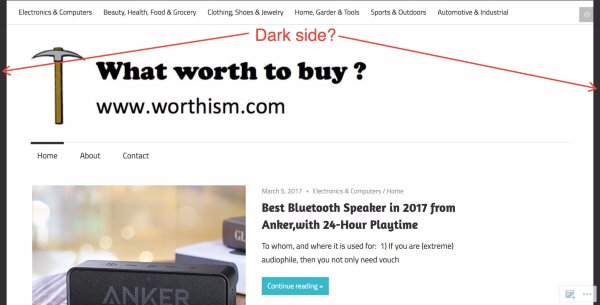
Also what exactly would you like to make wider?
Cheers!
-
Yes , those are the dark side , when the dark side are remove , the theme should stretch to the full width
-
dear Catiakitahara
it did not change the view on computer, it still go dark side …. on mobile , it become worse ,with chrome and safari on mobile , the theme over stretched to the extent , the words are not able to proper display , some beginning words of paragraph simply does not show , please get back to the original theme , i don’t want to try now ,
-
Hi there, the dark sides are the background color for the body section. Add the following to make that white like the content area.
body {
	background-color: #fff;
}
In your other CSS rule, it is not advisable to use a width over 100% as that would mean (in the case of your 120% width) that 20% of the content would be outside the bounds of the window/screen on smaller screens. Remove that rule and add the following instead.
.no-sidebar .content-area {
	width:100%;
	max-width: 100%;
}


- The topic ‘Need help on removing the dark side of the theme and make others wider’ is closed to new replies.
 WordPress.com Forums