need help with color and adding a menu.
-
1.the color of the left coloum is black even after i changed it many times to match the header colour.
2. i want to add a link through which people can connect with me, like a contact page which has my email address and phone number. anyone can write in there and i will get an email.
3. my blog opens up to show my first post, i want it to open up to show a particular slideshow of images.thanks
varunThe blog I need help with is: (visible only to logged in users)
-
Hi there!
I’m happy to help with those! Let’s go through them:
1.the color of the left coloum is black even after i changed it many times to match the header colour.
You’ll need the Custom Design upgrade to customize the colors and fonts on your site.
2. i want to add a link through which people can connect with me, like a contact page which has my email address and phone number. anyone can write in there and i will get an email.
You can set up a contact form following these directions:
http://en.support.wordpress.com/contact-form/
3. my blog opens up to show my first post, i want it to open up to show a particular slideshow of images.
You can set this up by creating a Page and putting a Slideshow gallery in it. Then change your Front Page to be that page. Make sure you make another page for your blog posts!
Let me know if I can help further! :)
-
hi that helps .
i want to understand ,this .. pardon my ignornace.
my heading “varun bhasin photography” needs to be smaller and in a different font , now i tried doing that a number of times , it shows as changed in the customize window but when i save and open the website it doesnt show it as changed.
the same thing is also hapeneing with my background pattern that i want.
lastly how can i add another three headings to the side apart from wedding stories, for eg. i want to add travelogs and fashion also with only pictures under there. is that possible?
please help -
You can change the background color of your site using the Background tab under Appearance in your Dashboard.
To change font sizes and colors, you can do so in the Customize feature, which is part of Custom Design: http://en.support.wordpress.com/custom-design/ You have the upgrade on your varunbhasin.wordpress.com site – is this the one you are wanting to change?
As far as including other content in the sidebar, you can do so by using Categories. If you create a category for travelogs and one for fashion, you can then use a Custom Menu that displays only posts with those categories in your sidebar:
-
hey .. thnks for the help, but frankly i really cant figure it out … i tried all combinations u mentioned but could get another category on the side under the wedding stories category. im using a zoren theme , is that something to do with this issue. if not can i have a more “category for dummies” sort of help please .
and also now my posts automatically dont have a featured image like they used to have earlier. that also sucks .. althgh i have a featured image selected in the post and saved. but it doesnt show in the post on the site .. HELLP
-
ok another problem .. i added a new post and one of my older posts disappeared .. is there a limit of 5 posts only …
-
For the categories in the sidebar:
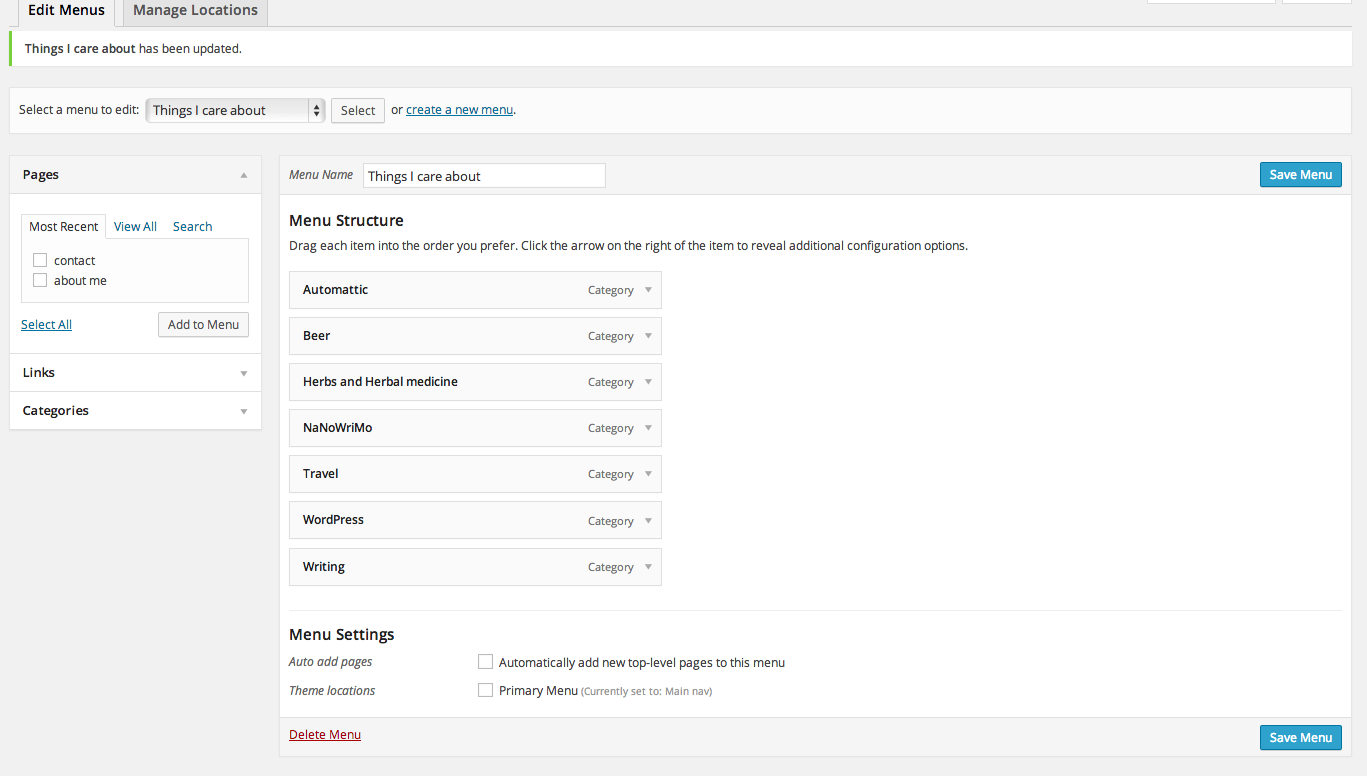
1) create a custom menu that includes each category, like this:
https://i.cloudup.com/sM4o4v8jH9.png2) add a custom menu widget, and choose the custom menu with the categories as in step 1:
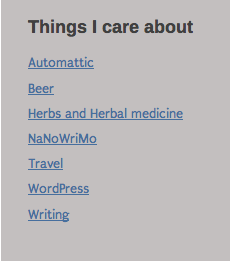
https://i.cloudup.com/N8Tnf2etvu.png%5D3) It will look something like this in your sidebar:
https://i.cloudup.com/Ca3ZgmFHaS.pngFor the featured image issue, the featured images will appear only on the home page, if you set it to display blog posts. Since you don’t have it set that way, the images will not appear as they don’t show up on individual posts.
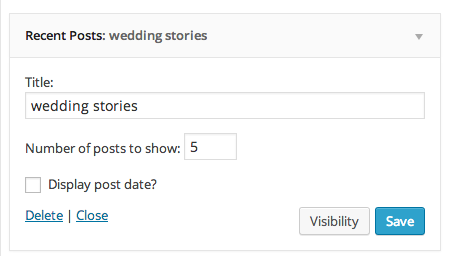
As for the last question about why only 5 show up, that’s because you are using the Recent Posts widget and have it set to only show 5:
-
jackie dana .. thanks , i need to start a computer course for dummies soon….. ur the best … thanks …
-
You might try the website we have for people new to WordPress.com:
-
Ok hey Jackie, it’s me again…. Everything else is sorted out except for one thing. I really can’t make another category to appear under the one I have on right now.
I have “wedding stories” with 6 posts. Under that I want “travel stories” with 6 posts. I have made a menu but its just not appearing under there. Neither is the category coming up. Can u help me make one right under “wedding stories”. Ull have to be a little layman-ish with me please.
Thanks -
I’m not sure you can do exactly what you’re describing using categories, as we don’t have a widget that will allow you to display a category header and just posts under that category.
You can display recent posts, like you’re doing, or you can display some of your categories in a custom menu like I described.
You could add your category pages as link categories, and add the posts under each category as links, or create a text widget with manually-entered links of posts, but both would become pretty time-consuming to maintain.


- The topic ‘need help with color and adding a menu.’ is closed to new replies.
 WordPress.com Forums