

NEED HELP:Missing Sharing Button on list (Facebook, etc) and Sidebar not working
-
Most of the Sharing Buttons Services are missing like Facebook, Twitter, etc not on the listing like before.
The only sharing buttons I have are: Email, Print, Google+, Press this, Blog and Post to FriendFeed. Which I have dragged into the “Enabled Services” area. Still does not show in my posts below…for sharing.
Also, my wordpress sidebar is not working properly, the widget for “Facebook Like Box”, and a few other widgets as well…seems broken. Does not show or display on sidebar to my blog. I have tried removing, and adding again. Nothing seems to work.
Can anybody tell me what I can do? Is anyone else having the same problem.The blog I need help with is: (visible only to logged in users)
-
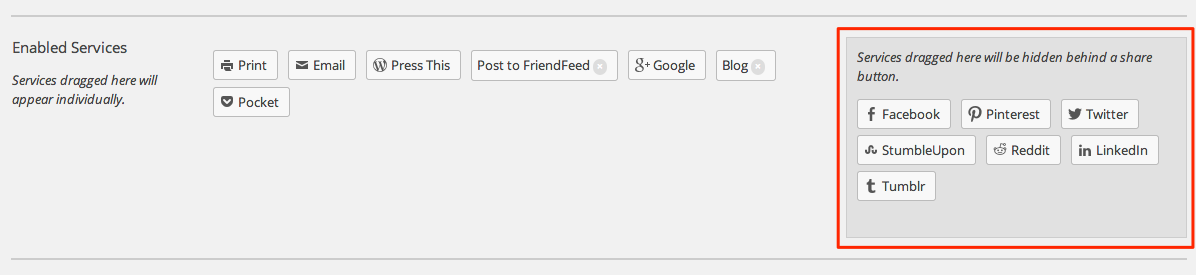
It looks like you’ve moved several services to the ‘hide behind a share button’ section of your sharing settings:
https://dedeporsche.wordpress.com/wp-admin/options-general.php?page=sharing
Move them back to the main section for them to appear as individual buttons again.
I only see two widgets on your site currently. The Follow Button and the Follow Blog widgets. Can you add the widgets your having trouble with so I can take a look?
-
Hi
Thanks I will do that, but I think I did remove them back and forth to see if something would work. Last time I did put them to the sharing setting. I will check again. Not “behind a share Button”
Yes, I have just 2 widgets right now, because I added the Facebook Like Box and Music Player, Posts, etc…but did not show on the sidebar. I will look again…
Give me a few minutes I will check both
Thanks for your reply and help. -
Ok I checked…I doesn’t appear that I have any share buttons , “Behind a share button”, they’re all in the sharing setting.
Also, I added 4 more widgets
1. Facebook Like Box
2. Music Player
3. Posts
4. Calendar -
I mean all the services are in the share setting area
But I have no Facebook service on the services available listing
as well as a few others not showing or available
I only see and have these
Email, Print, Google+, Press this, Blog and Post to FriendFeed -
Alright. Here’s what I see in your sharing settings. Everything inside the red box is hidden behind a button that says ‘More”:
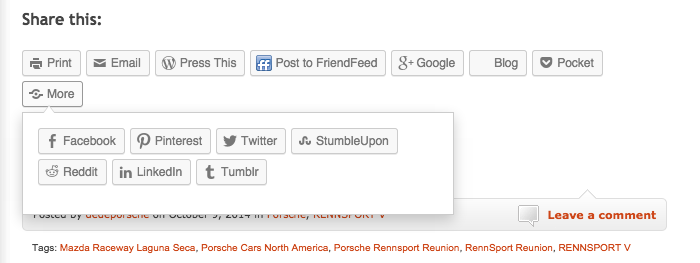
And here’s what I see on your post:
As for your widgets, everything but the Music Player seems to be appearing. You’ve set the Music Player to only appear on Author pages. Is that what you wanted to do?
-
wow, I don’t even see that, what’s in that red box on the right. Mine is left blank.
https://cldup.com/TDWkHAzmng.pngI made some screenshot, but I don’t know if you got them via my gmail reply, showing the red box on the right empty, nothing there.
And as far as the share buttons, I don’t see anything on my posts, appears different than you
-
-
I only can see 3 widgets on the sidebar
1. my posts listing
2. calendar
3. following blogand no share button at bottom of the post
apparently you are seeing everything but I am not. Not sure whats wrong that I can’t see the share button or have the services available -
-
Ok, I figured out what it was regarding the sharing buttons that I could not see. Adblock Plus is identifying the sharing buttons as ads. I turned off my Adblock in chrome, and the sharing buttons reappeared.
Funny to know that Adblock is blocking the sharing buttons. I know that it has not always done this, since I’ve used Adblocks before since I began using WP, and I have always had Adblock installed and functional. I guess it might be a change in the blocking software.
Now to solve the widgets issue. I still do not see Facebook Like Box, and other ones
-
Ok, somehow the widgets are working now. I guess the Adblock was the problem? Not sure.
But now my widgets are on my blog….the Facebook Like Box is showing up!! -
That would do it! I was going to ask about that next. Adblock Plus and social media blockers like DisconnectMe can prevent sharing buttons and widgets from appearing because they block all content from those sources.
Is everything working correctly now? If you’d like to keep using Adblock Plus, you could add an exception for your site. Or just turn it off when you need to make these changes and turn it back on when you’re done.
-
Thank you Shawana for your reply and support!
Yes, I had Adblock Plus and that was it (Chrome). I did turn it off and then I turn Adblock back on…so far so good!But I did notice when I went to just to: http://dedeporsche.com/
it showed all the widgets that I had added , like the “Facebook Like Box” at the top of the page.But when I went to one posting it was missing the “Facebook Like Box”, & it showed some widgets, not all of them. The “Porsche Music” widget is at the top. So I don’t know why that’s happening. Would you know?
http://dedeporsche.com/2014/10/21/porsche-opens-pop-up-store-with-sound-lab-in-new-york-hot-spot/ -
I just wanted to add, its pretty easy to tell when your visibility settings have ‘turned off’ a widget on a particular page if you open that page in the Customizer. The widget pane in the Customizer will display any inactive widgets as dark gray.
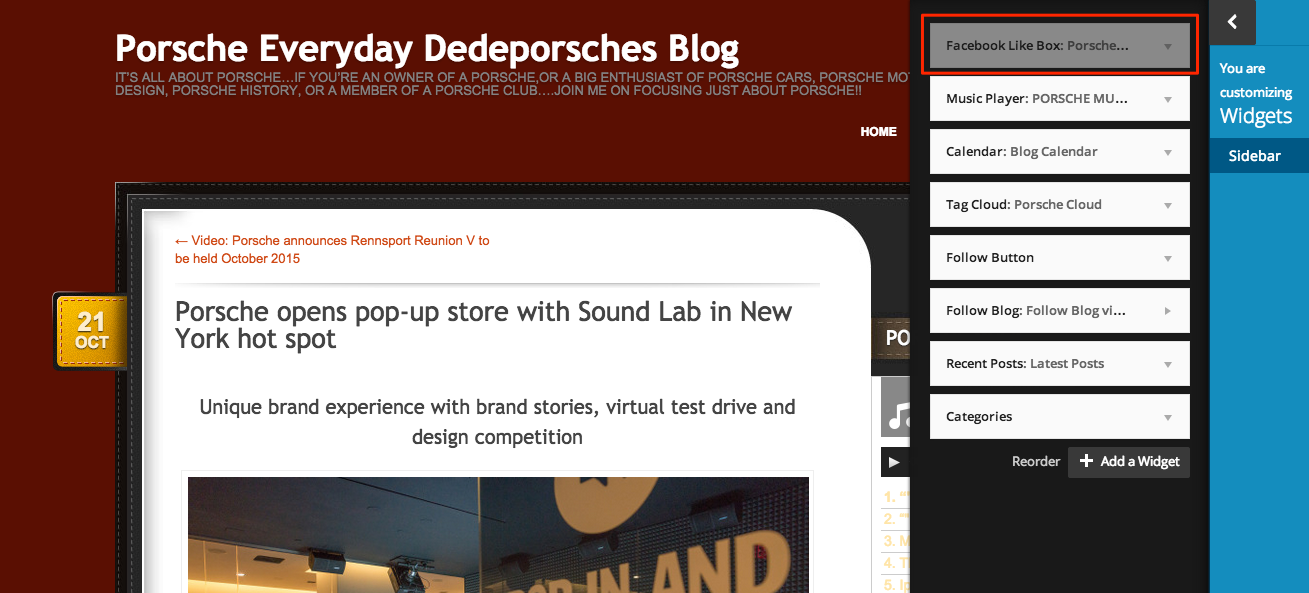
-
Thanks again Shawana, you made my day!!!
I just fixed the visibility settings…now it shows both ways.
I am so happy!
I think I’m ok for now. -
-
Ok, I will do.
Thanks Shawna for your help & support.
I’m still learning my way around WordPress.


- The topic ‘NEED HELP:Missing Sharing Button on list (Facebook, etc) and Sidebar not working’ is closed to new replies.
 WordPress.com Forums