

Need to change URL of a page to my domain name with nothing at the end
-
Hi,
I’m not sure how to correctly explain this, but somehow I ended up with /home at the end of my website’s home page and there is nothing on my main URL page. For example, http://www.whatreallyishealthy.com has nothing on it (it says ‘nothing found’) and the ‘home’ page URL is http://www.whatreallyishealthy.com/home. I want my home page to be the domain name with nothing after it (I believe this is called the server name). In other words, I don’t want /home at the end of the URL (I believe this is called the resource ID). Is there a way to fix this? Essentially, I want to remove the /home from the end of the home page’s URL.
Thank you,
Christine
The blog I need help with is: (visible only to logged in users)
-
Once you publish your Home page, you can set it as your site’s front page here:
https://whatreallyishealthy.wordpress.com/wp-admin/options-reading.php
Set a Static “Home” Page (Front Page)
If you have additional questions, please let us know :-)
-
I do not have the static front page option in the customizer any longer. I selected it initially but now it’s gone. Could that be because my site is set at “private” right now?
In my list of “pages” in the WP Admin my “home” page says it is the front page, but it is not. My blog posts are showing up on the main URL page and my “home” page has /home at the end.
-
It has to do with the status of your Home page. At present, you have it set to Private:
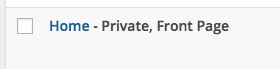
It needs to be set to Public:
Since your entire site is set to Private, this page will still not be visible to anyone except authorized users of your site.
Once you set this page to public, the following options will appear in the Settings > Reading section of your Dashboard:
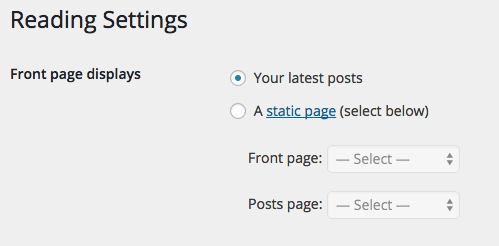
Then, you can set your site’s Front page to your Home page.
If you need further clarification, let me know :-)
-
That fixed it. Thank you so much!
Question: Can I have my posts and other pages set to public too since my site is set to private?
-
In other words, will the posts and pages remain invisible if the site is set to private?
-
In other words, will the posts and pages remain invisible if the site is set to private?
The site visibility setting overrides the individual page setting. If your site is set to private, the site will only be visible to those you specifically setup. I’m afraid it isn’t possible to set the blog as private and mark certain pages as public. The workaround would be to set the entire blog to public and then control the privacy for individual pages.
-


- The topic ‘Need to change URL of a page to my domain name with nothing at the end’ is closed to new replies.
 WordPress.com Forums