

Need to go 'off-line' for …
-
… a short(ish) period while various ‘things’ (health … unexciting things like that … unless you think that a bloke with MS is kinky and if that’s the case I really think you should probably see a ‘shrink’).
The point is: 1. Is there a simple way of taking Storyboard4 ‘off-line’ for a short period (two-to-three days) while some adjustments (domestically, internationally, ‘galatically’) are made. If that is possible could I;
2. Leave a page under the the existing storyboard4.com thingy that explained (naturellemente) that we were ‘making some changes and normal service would be resumed shortly and … AND …
and also (I think this must be numbre trois?);3. Essentially, it this: can I, easily, put up a ‘home’ page explaining this, that and deffinitely the other with selected links to ‘archives’. And … and that ‘normale’ service will be resumed shortly?
I hope someone will come up with a (easyish) solution.
The blog I need help with is: (visible only to logged in users)
-
I can think of two options for you.
1) You can set your entire site to private (under Settings > Reading).
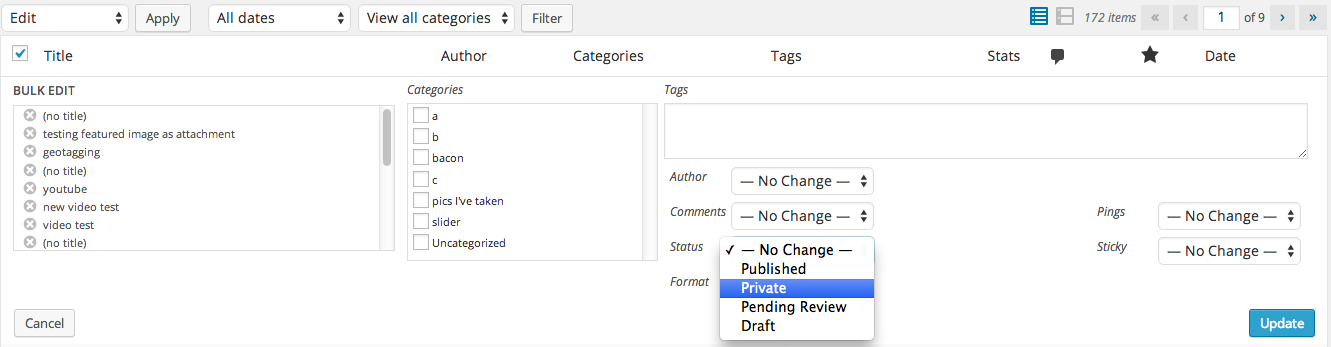
2) You can set the majority of your posts/pages to private and keep one page public. To do this quickly, go to your All Posts view in the Dashboard, and select them all with a check mark in the box next to them. Under the Bulk Actions drop down menu, choose “Edit”. That will pop up a window like this, where under “Status” you can then set them all to Private at once:
-
Thanks. I’ll look at those suggestions after I’ve ‘braved’ Braunstone Town and bought my paper and other sundries; I was up until about 3pm last night/this morning finishing some editorial/design work for a local charity. I think the second suggestion may best fit my needs.
-


- The topic ‘Need to go 'off-line' for …’ is closed to new replies.
 WordPress.com Forums