Nested list formatting
-
I have a basic understanding of html and can usually find the solutions for any problems with a quick web search, but I have spent a couple hours trying to search the web for help with this problem and have finally decided to seek help on this forum.
The main issue I have is that I want a list which includes several nested lists all using numbers, and I want to use the same number for all items at each level. For example (just using spaces to indent the following list):
1. item
2. sub-item
3. sub-sub-item
2. sub-item
3. sub-sub-item
4. sub-sub-sub-item
1. item
2. sub-itemI have determined how to change the value of the number using
<li value="number">. I cannot determine how to change the style of the sub-lists, which are capital letters for sub-lists and lower case roman numerals for sub-sub-lists. The W3 tutorial on html lists says thattype="1"can be added to format the list with numbers, so<ol type="1"><i>should</i> create a numbered list, but it appears that WordPress ignores this and the sub-lists are formatted with letters and roman numerals despite using<ol type="1">, although the values can be set (eg. value=”2″ makes B/b/ii). For example, I can make a list that is:1. item
B. item
iii. item
B. itemAnother problem I have is when I switch from html to visual to see how the list looks and then go back to html, the code for the list is slightly changed. I would like to have it indented to be able to easily see which closing tag goes to which level, but WordPress changes the indentation. When I tried adding hidden comments, new closing tags were added. For example, when I added hidden text like
<!-- closing 2 -->WordPress changed it toon one line, then<!-- closing 2 -->on the next line.Here is the code that, from my understanding and the W3 tutorials, should produce what I want (and is indented to keep track of what ol/li codes have been closed):
- item
<ol type="1">
<li value="2">sub-item
<li value="2">sub-item
<ol type="1">
<li value="3">sub-sub-item<li value="2">sub-item
That code should produce:
1. item
2. sub-item
2. sub-item
3. sub-sub-item
2. sub-itemWhen I entered the above code for the list, then went from html to visual and back to html, it was changed to:
- item
<ol type="1">
<li value="2">sub-item
<li value="2">sub-item
<ol type="1">
<li value="3">sub-sub-item<li value="2">sub-item
That removed my indentation, but more importantly, it displayed as:
1. item
B. sub-item
B. sub-item
iii. sub-sub-item
B. sub-itemThe reason I want this format for a list is to incorporate a simple family tree (no more than about 20-30 individuals, not an entire tree with hundreds of individuals) to show the relationship between a few generations. This formatting is similar to a common genealogical numbering system, with the number indicating the generation. I was working on a page today where I want to include a tree with about 25 individuals in 4 generations and then indicate which individuals emigrated to the United States and when (by using bold, italics, & italicized bold). The numbering system is:
1. person (born [date/town], died [date/town])
+ married [date/town], to spouse (born [date/town], died [date/town])
2. child (born [date/town], died [date/town])
+ married [date/town], to spouse (born [date/town], died [date/town])
3. child…
2. child……and so fourth, indenting for each generation.
I can add the second line for the spouse without any problems, just by placing the content on a second line in the list item and before the nested list for their children, eg.
- person
+ spouse- child
Just mentioning that in case it would be affected by the coding for the solution to my problem.
Thanks in advance for your help!!
The blog I need help with is: (visible only to logged in users)
- item
-
The post was not formatted the way I had typed it. I don’t see any option to edit or delete the post and change it to the intended formatting (and I did not see any way to preview it before posting). Sorry.
I had used spaces to indent the lists, but they are displayed without any indentation. You can probably figure out the way they should have been formatted. A couple sections of code are displayed continuously, but were supposed to be on separate lines, with some lines indented. Hopefully, you can at least understand from the prose what they would look like.
I didn’t realize the code would be in a box like quotes. I did not include any “p” code in my post. The comments about adding hidden text had [backslash]ol code, which was removed.
Sorry about that, but I swear I did not see a “preview” option for the post and now don’t see how to delete or modify the first post.
-
Do you have a page or post that I can look at? I can look even if it is a draft. It doesn’t have to be published.
-
I have published:this web page, which contains a list of individuals at the end. They have numbers based on what indent level they should be.
-
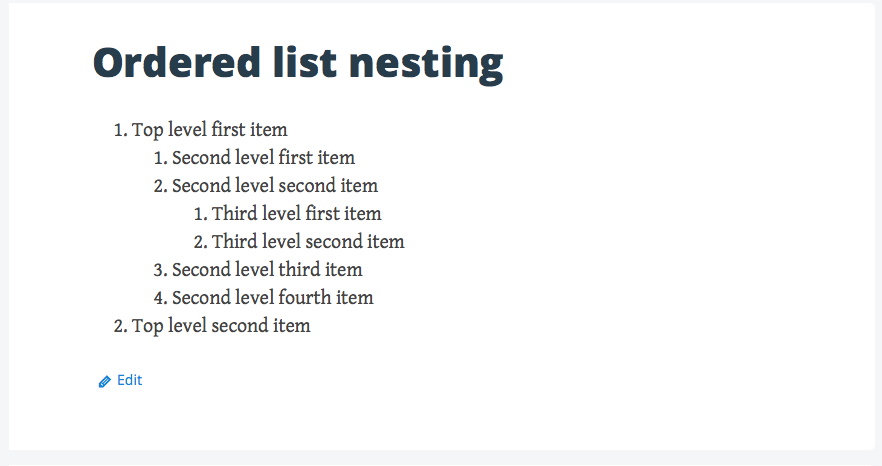
Hi, have a look at this screenshot from my test site. This is the way that Big Brother, and most themes do nested lists: https://cldup.com/KysPbcZI0i.png .
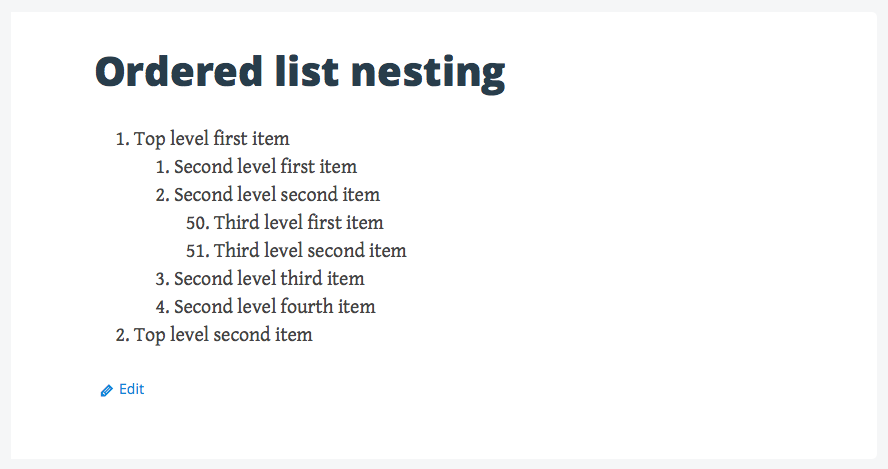
We can change the start number for any ordered list or nested order list by using a start attribute on the opening
- tag for the section we want to reorder. Note how the third level nesting starts with 50: https://cldup.com/mDx8ztPlOu.png .
This was the modification I made to the ordered list code from the Text tab in the page editor.
<ol start="50">On ordered lists, the procedure for creating them in WordPress that I’ve used for a long time. is to click the ordered list button, enter the text and press return to create more. When I want to move to another level inside, I use the Increase Indent button on the lower row of tools. I then create the items on that level, and if I want to move back out to the left, I use the Decrease Indent button.
Play around with that and see if you can get what you want and let me know how things go.
-
-


- The topic ‘Nested list formatting’ is closed to new replies.
 WordPress.com Forums