netbanking
-
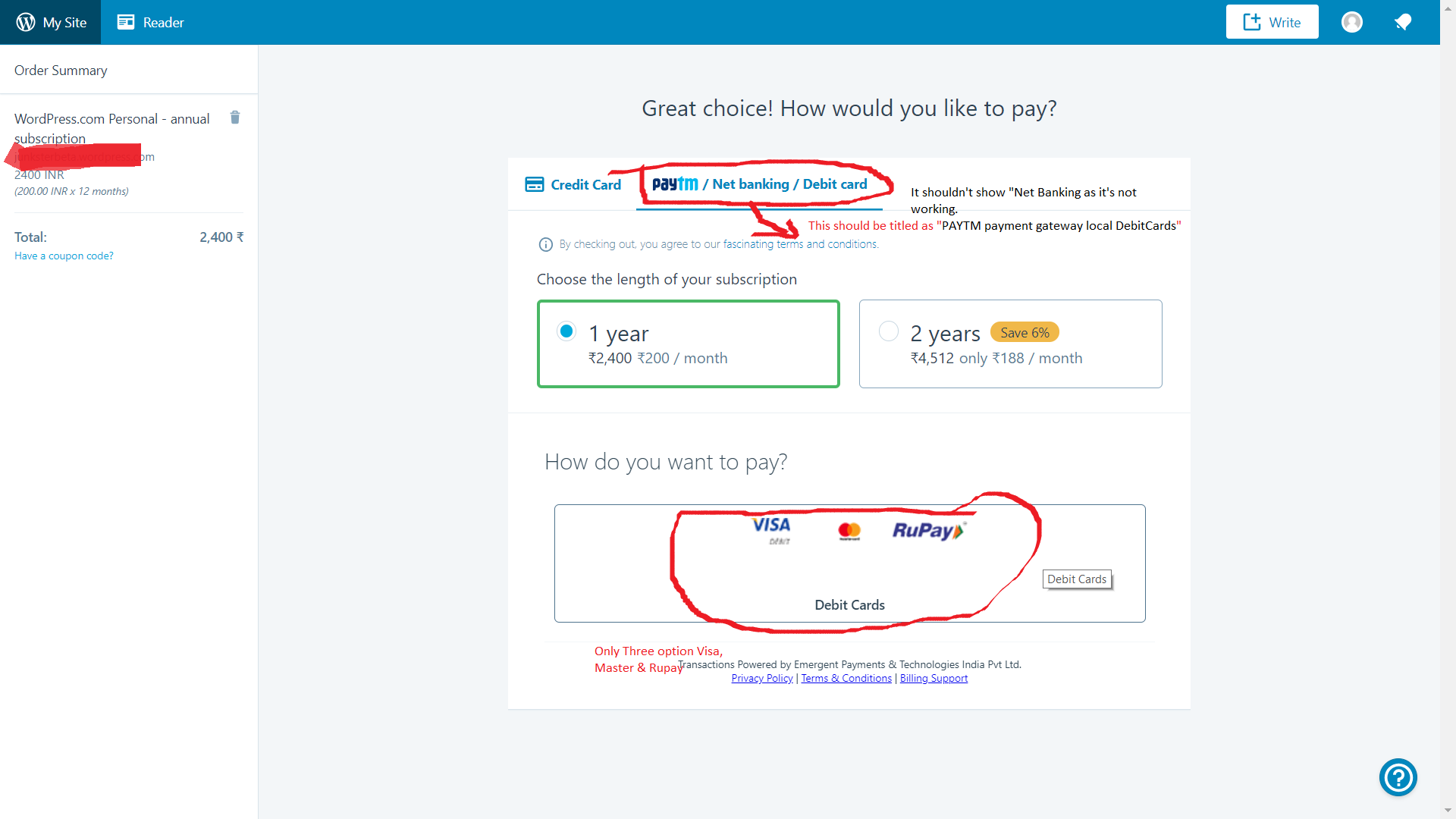
While upgrading, when clicked on Netbanking/paytm option, you get only an option to pay via Debit card.
Cannot find an option to via netbanking or Paytm, although those options are mentioned on Checkout page.
The blog I need help with is: (visible only to logged in users)
-
Hi there,
Sorry for the inconvenience!
Cannot find an option to via netbanking or Paytm, although those options are mentioned on Checkout page.
Currently, you can only pay by “Visa”,”Master” or “Rupay” through that option “PayTM, I am answering you because I have tested it with my test account who’s currency is set to INR.
I would also report this to the Happiness Engineer and Staff to change that title instead, it should show “PayTM” payment gateway because the netbanking is not showing up.
@staff, please check the screenshot as I have taken from my testing account as it’s not showing NetBanking option.
Screenshot: https://cldup.com/6ehVW2eADf.pngThanks!
-
-
Hi bim654,
Just to confirm — are you trying up upgrade while physically based in India or are you currently in a different country?
If you let me know, I can look into this further.
@vishalmukadam — thanks for the screenshot, I’ll double check on this with our payments team. -
-
Yay! @gemmacevans
I just checked the page, now it has been fixed now I am able to see the “Netbanking & PayTM” options on the checkout page, thanks for forwarding the issue to payments team.
Thanks so much!
@bim654
Now you can pay through PayTM wallet & Netbanking.Cheers! Happy Blogging!
-
Yes, I can see the options now.
Also, can you please let me know what difference does it make if Consumer or Business is selected?
-
Hi bim654,
That’s great to hear! Selecting “Business” provides the option to enter a full address and tax details for reclaiming GST (Goods and Sales) tax — that information isn’t required when “Consumer” is selected.
-


- The topic ‘netbanking’ is closed to new replies.
 WordPress.com Forums