'neu anfangen'
-
Huhu, ich würde meinen Blog gerne resetten lassen – habe nun alles gelöscht aber es werden immernoch Bilder angezeigt (Bsp: https://playlita.files.wordpress.com/2015/11/2015-11-05-11-10-17.jpg) und auch ein Teil vom Speicher bleibt belegt. Ich wäre euch sehr dankbar wenn ihr meinen Blog resetten könntet. Vielen Dank im vorraus
The blog I need help with is: (visible only to logged in users)
-
Hi there – I am a volunteer and perhaps I can help.
It sounds like you need this article:
https://en.support.wordpress.com/empty-site/Let us know if this helps!
-Cat
-
thanks @timethief!
@playlita, besuchen Sie bitte diese URL Ihre Frage noch einmal zu schreiben und Hilfe aus dem entsprechenden Forum erhalten:
http://de.support.wordpress.com/Best,
-Cat -
Hey
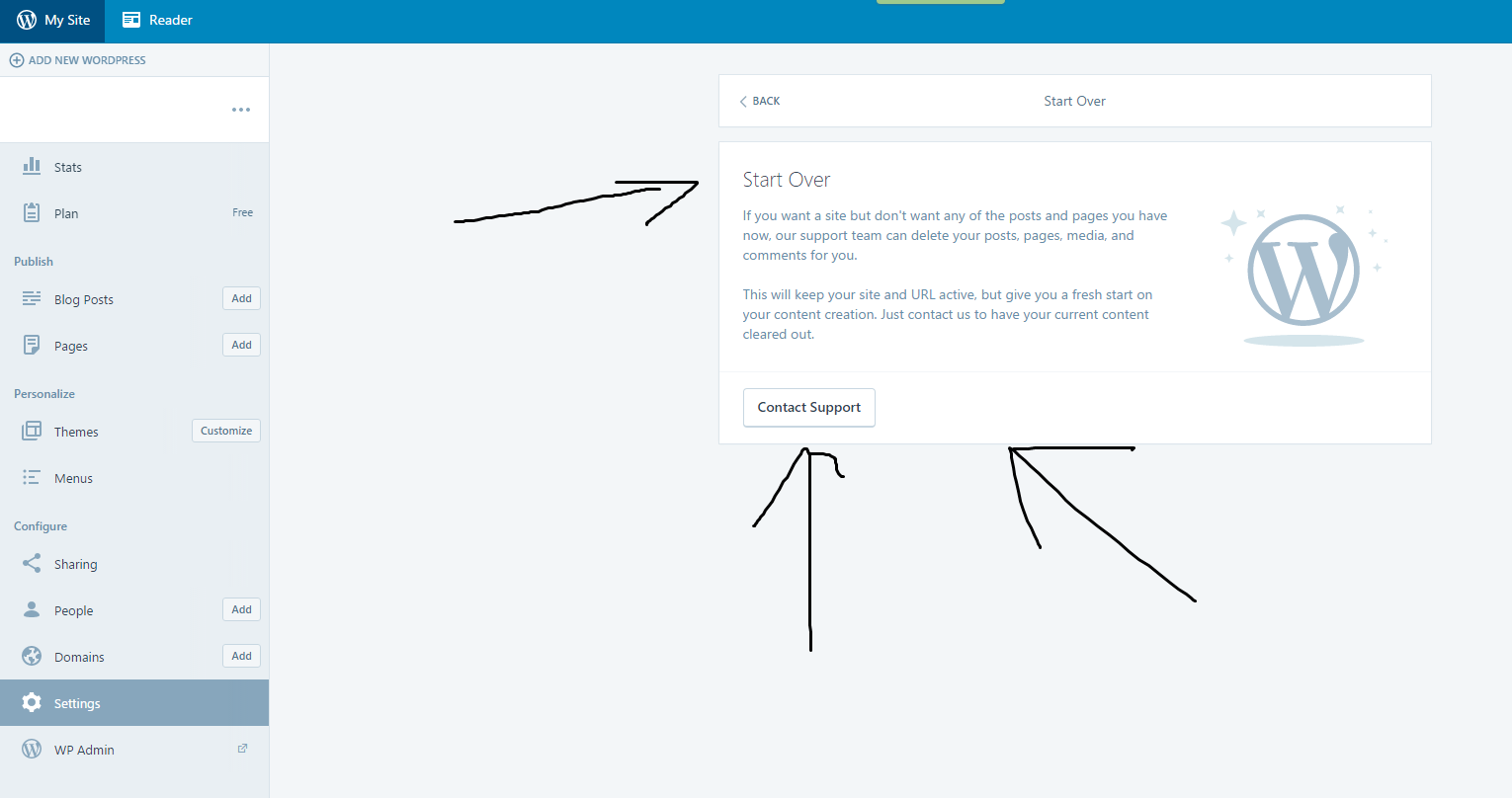
i was in the settings menu of my blog, and there was an option for a “reset” of my blog. The Option said, WordPress Admins can reset my blog (including deleteing all pics etc). Ofc i deleted everything but the strage says still im using xxMb of xxMB. The link of the picture is a picture i already deleted from my wordpress storage but im confused because you can still see it. Thats why i used the “reset option” – in this option i had to write to the support and finally my “support request” is now here.
I just want that an WordPress Admin resets my Blog completely and removed all my “data” (like the picture in the link) from the server. I saw people used this link from my picture and i didnt want this. So please reset it complete – i need a new start with my blog.thank you
-
-
@playlita, besuchen Sie bitte diese URL Ihre Frage noch einmal zu schreiben und Hilfe aus dem entsprechenden Forum erhalten:
http://de.support.wordpress.com/Best,
-Cat -
-
It says “Für Unterstützung beim Leeren deiner Website kontaktiere uns direkt oder melde dich im englischen Support-Forum.” this means in english: For support with resetting your blog contact us directly or write in the english support forum.
Im here now – please reset my blog completly and delete the pictures from the wordpress server
-
@playlita – just a guess, but it sounds like perhaps you need this article:
https://de.support.wordpress.com/empty-site/Let us know if this helps!
-Cat
(Volunteer) -
Hello playlita!
I’m not sure if I understood your question… I checked your site at “playlita.wordpress.com” and didn’t find any content or media. You have only your blog’s Blavatar set, as you can see going at:
https://playlita.wordpress.com/wp-admin/options-general.php
Here is more information about Blavatars:
-
@playlita
I believe that what you need help with is setting up your site.The Admin login link to the dashboard for every blog hosted by wordpress.COM is:
http://NAME_OF_BLOG.wordpress.com/wp-admin/* You will have to replace “name_of_blog” with your actual blog’s name in that URL.
http://playlita.wordpress.com/wp-admin/
Note that your detailed theme description page with set-up instructions is here https://wordpress.com/themes/afterlight/ and the live demo site is here https://afterlightdemo.wordpress.com/
re: the front page error message found on every new .wordpress.com blog
There is nothing wrong with your blog.
By default, the front page of the blog is the only page that will display all published posts on it. As soon as you publish a post, not a page, the error message will be gone. http://en.support.wordpress.com/post-vs-page/
1. For creating a post in the New editor see here http://en.support.wordpress.com/posts/#publish-a-new-post
For creating a page in the new editor see here
http://en.support.wordpress.com/pages/#create-a-new-page2. For editing in the new editor see:
http://en.support.wordpress.com/posts/edit-posts-screen/
http://en.support.wordpress.com/pages/edit-pages-screen/3. All images in the theme can be replaced with your own images. For using the new editor to upload images see the instructions that Staff provided here https://en.forums.wordpress.com/topic/images-arent-clickable-any-more?replies=15#post-2530659
- For uploading images into posts and pages see here http://en.support.wordpress.com/images/adding-images-to-posts-or-pages/
- Here are more details about the options for uploading images http://wpbtips.wordpress.com/2009/04/26/images-the-three-link-options/
- For troubleshooting images see here > http://en.support.wordpress.com/images/troubleshooting-images/
4. The support documentation is all found at the Support link http://en.support.wordpress.com which is also on the bottom of your Admin page.
5. re: website or blog?
On the bottom of your Admin page you will find a link to the step by step Learn WordPress.com blogging Tutorial prepared by Staff. http://learn.wordpress.com/ See also the “Video Quick Start” tutorial http://en.support.wordpress.com/video-quick-start/
A blog is a website. The difference between blog and website is simply structure and semantics.
A blog is a post based website designed for interactive communication. As the posts are frequently updated and appear on the front page of the site it’s very attractive to search engines.
What most people call a website is merely a page based site that functions as a one-way noticeboard. As the structure is page based and as pages are for static content that rarely changes, and as pages do not have RSS feeds, and as others do not backlink to pages, it is not as attractive to search engines as a post based blog structured site is.
Any WordPress blog can be restructured from being post based to being page based – no upgrade required. For greater clarity read > http://en.support.wordpress.com/using-wordpress-to-create-a-website/
See also:
https://en.support.wordpress.com/five-step-blog-setup/
https://en.support.wordpress.com/five-step-website-setup/
and my post at https://onecoolsite.wordpress.com/2013/07/25/create-a-wordpress-website-step-by-step/ -
@catscholz : this link you send me says i HAVE TO WRITE HERE if i want a “reset” of my blog
@timethief : thank you for thinking im stupid like this – i use wordpress since 2009
@carinapilar : http://fs5.directupload.net/images/160226/4vci96f7.png <– this is what i want. Ofc i deleted all my postings and media – BUT for example: (https://playlita.files.wordpress.com/2015/11/2015-11-05-11-10-17.jpg) this is an picture of a post i already deleted AND i deleted the picture from my media – why can i still see it ? (after cleaning cache from my pc/browser) It should be gone after deleting everything but its still there – so PLEASE make the “start over” and delete all my medias from wordpress server – i wanna start a new project asap. PLEASE
-
@playlita
I do not assume anyone posting here is stupid and I am sad that you think that. I thought what I posted would help you. :(https://playlita.files.wordpress.com/2015/11/2015-11-05-11-10-17.jpg produces a 404 file not found error message. That indicates that it has been deleted from the blog so resetting the blog makes no sense.
Log out and clear your browser cache please https://en.support.wordpress.com/browser-issues/#clearing-your-browser-cache
IMPORTANT NOTE: Deleting blogs and/or blog content does not remove indexed content from the SERPs (search engine page results). Google and Bing only clear their caches of deleted indexed content that produces a 404 (page not found) every 3 – 6 months. To completely remove an entire page from Google search results after it produces a 404 (page not found):
https://support.google.com/webmasters/answer/6332384?hl=en&ref_topic=1724262&vid=0-635749429504660340-12158368555624983465&rd=1 -
@playlita
As your PDF file produces a 404 page not found and that means it has been deleted from the blog. I have tagged this thread so Staff clear the media cache and take it off the servers. Please be patient while waiting. -
im not a newbie with wordpress and co. I cleared cashe/cookies etc and i used another PC too and there is the picture (i never used wordpress with the other pc). I asked also a friend (he never visited my blog) to use this link and he can see my picture too. So it cant be completly deleted if people can still see the picture when they use the link. Thats why i want the “start over”
-
hi @playlita – your thread has been tagged your thread for staff to see. thanks for your patience.
-
btw it isnt a pdf – the picture from the link is a .jpg and the screenshot i made for carinapillar is .png-picture
-
-
@playlita
This is to ley you know that I get a 404 page not found on all 3 of my computers when I click https://playlita.files.wordpress.com/2015/11/2015-11-05-11-10-17.jpgI have tagged this thread so Staff clear the media cache and take it off the servers. Please be patient while waiting.


- The topic ‘'neu anfangen'’ is closed to new replies.
 WordPress.com Forums