

New editor: configuring image opening
-
I’m having problem with the new editor: old posts like this, made on the old editor, turns the images clickable, and they open full-size so. But in my last post, none image opens when clicked. Is this a bug? Is this intended? Why can’t I configure image opening like in the old editor?
The blog I need help with is: (visible only to logged in users)
-
Hello kixty9!
To add a link to the images on the new editor you have to click on the “Insert/edit link” icon, as follows:
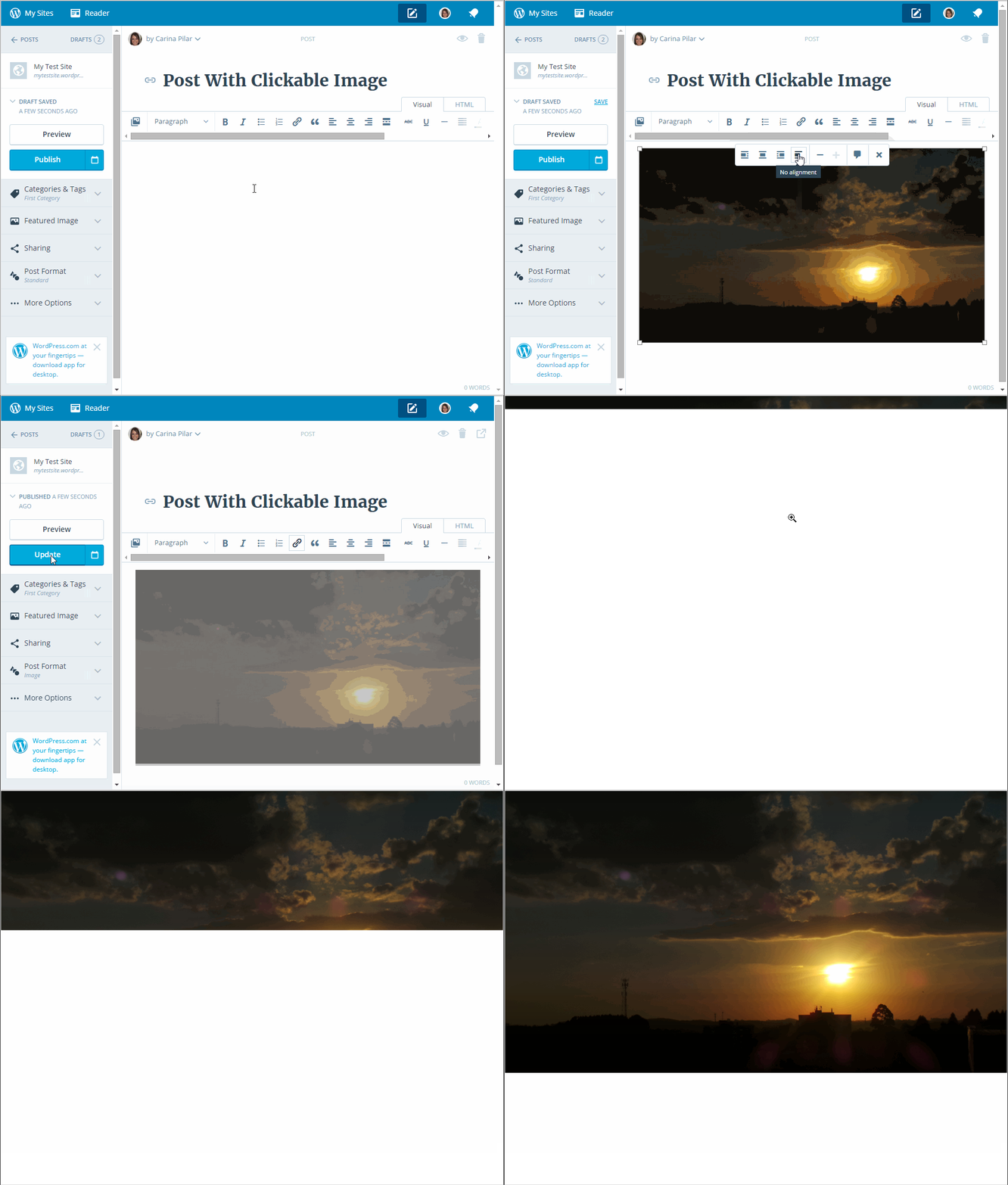
-
Thanks, indeed this works, I fixed all recent images that were added without links. But, can you explain for me why the automatic linking is not present in the new editor? It’s pretty useful!
-
There are many missing features in the new editor. Note all the sidebar tags here https://en.forums.wordpress.com/topic/editor-feedback?replies=775
-
OK, but so it’s missing, but planned? My doubt is if this change is proposital or accidental.
-
It’s a new infant editor that has been in development for 2 long years now. The upcoming iterations may add all of the features that are found in the classic editor that are currently missing or not. As for me, I ran out of patience and I use only the classic editor and classic user interface.
-
I wasn’t wanting to use the new editor in the beginning, but it’s indeed much better than the old. It works better and looks better! Just have one or another problem, like this I pointed out in this thread.
But the old WP-admin is much better than the ‘new administration’. So I use the new editor, and the old admin.
The Windows WordPress.com client helped me to like the new editor too… I like having a program specifically to blog on. This way I don’t have annoying web browser problems, like I had last year.
-
kixty9, good to hear that you’re using the Windows WordPress app! It’s definitely good to have an option besides the browsers.
Like @timethief said, some features are not in the new editor yet, but it’s planned to add those WP-Admin features to the images.
-
-
it’s indeed much better than the old. It works better and looks better!
That’s a matter of opinion and you are entitled to yours just as I am entitled to mine.
I have blogged here for nearly 10 years and the claim the new editor is better than the classic editor is not my truth.
I’m a desktop blogger and using the new editor that lacks so many features I’m accustomed to using to publish a post is more difficult, takes longer and has made my blogging experience less enjoyable.
-
timethief, can you please tell me which features you are missing in the new editor? Maybe I learn new features this way…
-
If you go to https://en.forums.wordpress.com/topic/editor-feedback?replies=775 and note all the sidebar tags there you will find that most of those are missing features.
-
Appears that these tags aren’t up-to-date. For example, “cannot add image captions” and “cant resize images” do not currently apply to the new editor, it can do that. I think the tags were added as the problems were detected, and not removed after fixed. This makes senses, but turns the tags useless to know which features you are currently missing.
-
@kixty9
WordPress.com is the site where all new WordPress features are first introduced and where WordPress versions are up and running about 1 month prior to being released to wordpressORG users. I think you would be a great at volunteering to be a wordpress.COM BETA tester. You can do that here https://horizonfeedback.wordpress.com/For a quick read WordPress gets even more open-source with Calypso update provides an good summary of what’s has been overhauled in the CMS and why the two year project was undertaken.
You can also read more about The Story Behind the New WordPress.com.
-
. I think the tags were added as the problems were detected, and not removed after fixed. This makes senses, but turns the tags useless to know which features you are currently missing.
You are correct. Staff stopped responding about a month in that thread. As features were added or fixed the tags were not deleted. Only Staff are currently aware of the master list of all which features that are currently “missing”. And only they know which “missing” features will not be added to the new editor.
-
P.S. I do expect future iterations will eventually result in a new editor that is equal to the classic one but until that happens I’m using the classic editor.
-
I didn’t know this service (Horizon). But I have fear of damaging my blog if I use BETA features. Like the informations I lost in Minecraft snapshot and Firefox Nightly.
I will check the texts you linked, later. Thanks.
-
That’s not a service. It’s a wordpress.COM blog Staff have set up for BETA testing purposes. https://horizonfeedback.wordpress.com/
Note that one can register as many test blogs as they want and set them to private. All sites are independent and what we do on one has no impact on any others.
-
OK, I’ve read the links you posted. I did not know https://developer.wordpress.com/blog/ .
https://horizon.wordpress.com/ is a service. The https://horizonfeedback.wordpress.com/ is just a news blog about the Horizon service.
-
That’s a matter of opinion and you are entitled to yours just as I am entitled to mine.


- The topic ‘New editor: configuring image opening’ is closed to new replies.
 WordPress.com Forums