

New "features"
-
What have you done to WordPress now? I pre-scedule all my posts, and that option seems to have disappeared from “new”. Editing no longer has the sidebar that lets me go back to the blog. I regularly index my posts, using the feature that shows past posts as possible links. Apparently no longer available. And that beep beep thing is ridiculous.
The blog I need help with is: (visible only to logged in users)
-
Just found another problem. I have a number of lists and poems on my blog, and I have carefully formatted these with line breaks rather than new paragraphs (shift-return instead of return.) When I added a new line to one list an hour ago, all of the old line breaks had changed to paragraph breaks (extra line). NOT acceptable.
-
Hi there!
I understand that you’re frustrated with this recent change. I’m more than happy to pass on any bugs or functionality issues that you’re having.
I pre-scedule all my posts, and that option seems to have disappeared from “new”.
You can still schedule your posts from the sidebar. You’ll want to open the Publish module, second from the top:
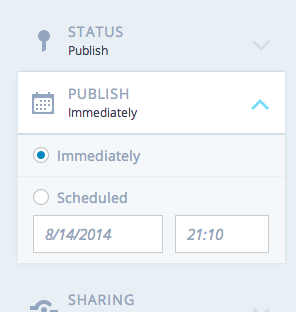
I regularly index my posts, using the feature that shows past posts as possible links. Apparently no longer available.
Thanks for mentioning this! We have had a few users ask for this to be added, I’ll add your request to the discussion.
I have a number of lists and poems on my blog, and I have carefully formatted these with line breaks rather than new paragraphs (shift-return instead of return.) When I added a new line to one list an hour ago, all of the old line breaks had changed to paragraph breaks (extra line).
You can fix this through the Text editor. You’ll just need to remove the extra < p > tags from your post and remove any extra line breaks in the Text editor.
We’ve also added a link to the new editor that will take you right back to the old editor if you prefer.
Let me know if I can help further!
-
I can’t find anything called publish, though I did find the return to the classic post.
As for going into text to fix the problem with line break, this is a real pain in the neck if I have to do it every time I add something to a long list, which I do almost daily. -
The new editor, when editing an existing post, does NOT have any link to the classic editor. And I just about got mouser’s shoulder taking the extra spaces out of ONE list with the Text editor, and it took about 15 minutes. I’m supposed to do this daily?
-
Hi there!
Are you still not seeing the banner to take you to classic mode when you’re editing an existing post? I just checked on my own site and I see the banner. Let me know if you don’t!
-
If you can tell me how to send it, I have a screen capture of what I got when I tried to edit an existing post. If there’s a classic mode I certainly don’t see it. (This is not one of the lists, but the following (Saturday) post should be added to a long list and I don’t look forward to removing the extra spaces your “upgrade” put in by hand with the text editor.)
-
-
I’m sorry this is being a nuisance. I’d love that screenshot. You can just upload it to your Media Library and I’ll be able to see it.
Here’s the banner I see when I visit the new editor:

-
-
Thanks so much for that!
Can you clear your cache and cookies? This should reset the banner for you:
Let me know if that doesn’t work.
-
I am beginning to suspect it depends on how you get to edit. What I usually do for a new post is hover on the name of my blog at the upper left of any post, and click “new” on the drop-down menu that appears. This give me the new editor with no option for advanced scheduling. If I go from the dashboard to “all posts,” and click on “new” I get what looks like the old editor. Likewise if I click “new” under “posts ” on the dashboard sidebar. Bringing up the current blog by clicking on its title and then selecting “edit” on the short dropdown gives the new editor. I’ll find out tomorrow whether I can add something to one of my list posts without getting all of those unwanted spaces between lines.
I did clear the cache, though not cookies.


- The topic ‘New "features"’ is closed to new replies.
 WordPress.com Forums