

New platform for editing posts, this one you created.
-
I have a couple of things to ask for the sorbet!
Simple things.
I wil arrange them in one of my blogs and you will be able to see what I need. I will list it all also!
Because, this sorbet really fits to both the blog idea, as a new thing every day, with a regular booklet, that has a beggining, midle and possibly no end…but with a few arrangements I guess the developers can make this theme perfectly suitable for both purposes!
I am already using it in some blogs to make easier for me and students to read from beggining to “end”. But always from the first post, not from the earliest post!
Thanks a lot!
Will be talking soon!
Please do not close our topic!
Thank you!
You are still the best in the world to deal with.I know, I know, that american society is plural, but to deal with americans or citizens in America, for work is the best!
Thanks! -
Just adding to the end of previous post…Even if you at wordpress are all over the world, not even american citizens, or whatever, what I meant is the whole “mind” of american thing to work is the best!!! Thanks particularly to you Shawna!
-
Hi, Shawna,
I am back again to talk about the theme Sorbet.
I has features that I love a lot, that I think should and could be more evident and they are not!!! So, I would like to ask the developers if they can do something about it. I will list below my suggestions.
I would like you to open this link, which is a link to a post of my blog.
http://adrias.info/2014/08/06/astro-ayu-bate-bola-astro-ayurvedico-rendoso/
So, you can see, in the layout, that there are 2 arrows, almost sutle as water marks, in the left and right, indicating respectively previous and next post. So, this IS GREAT! iT IS VERY NICE…SO, click in one of the arows to go to a post, and what happens? The next post or previous as you choose, show up, horizontally…it is loaded in a horizontal way!!!!
WONDERFUL because it opens the possibility to deal with the whole blog, at times, almost as a booklet, if one is in one post, and click in next, next, next, can read from older to newer in a kind of booklet, see?????? And looks good! And if one chooses not to have any widgets, it will look wonderful.So….It is a feature which is very good, but need to be more “avaiable” along the actual design of the site. It is avaiable ONLY if you click direct in a post, or open a specific post as I indicated.
It is not there when you go straight to the blog ( in my case, my posts fall in this link: http://www.adrias.info/blog) …If you go straight to the blog, one can read the posts there WITHOUT clicking in the link header of the post. In my blog when can read 2 posts VERTICALLY organized by default, and in each one of them, you cannot see the so spetacular arrows I mentioned.
My request….
I would like to have these arrows always. I will set up that my blog shows ONLY 1 ONE post …So, I would like that one someone arrives at http://www.adrias.info/blog, this person could go to the previous posts with that arrow.
And actually, whenever a post would be loaded, it would be horizontally never vertically.See?
Now, what happens, now my blog shows 2 posts, one on top of the other, and below the last one there is a small box in black where you can read older posts or in portuguese posts antigos.
So, my request would be to remove this box, which by the way is totally a “turn off” to continue to read previous posts…because the transaltion, although absolutely correct, sounds as the posts are from the times of “once upon a time”…it is not attractive. And the box in black also, very sad. It does not make justice to such a smooth theme with such beautiful fonts!Summary.
What I want.
1-I will set my blog (and all others I have) to show just 1 post. So the latest post will have those beautiful arrows to previous one.
It will not have the black box with “older posts”…
And the post will be loaded horizontally (like it does when one sees an specific link for a post, as I explained in the begginining). And so successively…
2- And I would ask if the arrows could be a bit more appeling, for people to see it easily….!! Some redish colour something…Well, well, is it possible?
I would be eternally grateful!!Best,
Adriana -
Hi Adriana!
Please see my responses inline below:
I will set my blog (and all others I have) to show just 1 post. So the latest post will have those beautiful arrows to previous one.
It will not have the black box with “older posts”…
And the post will be loaded horizontally (like it does when one sees an specific link for a post,I see what you mean here. First, thanks for the kind words regarding the arrows. We’re glad you like that navigation between individual posts!
As for including the arrows on archive and main pages, that would be a bit tough. For one, it’s hard to determine what post to go to next. I understand what you’re saying with setting the blog page to display only one post. However, the horizontal loading you mention is still a bit difficult.
For now, this isn’t something we’re going to change within the Sorbet theme. We’ll continue to have the sidebar arrows for individual post pages, but the main archives will load vertically. However, we might put a theme out in the future that offers this feature!
The main way to turn off the black box that loads older posts is to turn on infinite scroll here:
https://adrias.wordpress.com/wp-admin/options-reading.php
Just check the box next to “Scroll Infinitely”. This way, your posts will automatically load (seven at at time) when someone scrolls down your blog page. The posts will still load vertically.
And I would ask if the arrows could be a bit more appeling, for people to see it easily….!! Some redish colour something…
I can definitely help you to style these and make them stand out a bit more. However, we will need to use CSS to do that, which would require the Custom Design upgrade here:
http://en.support.wordpress.com/custom-design/
If you purchased that upgrade, here’s a sneak peek at what we could do with the arrows:
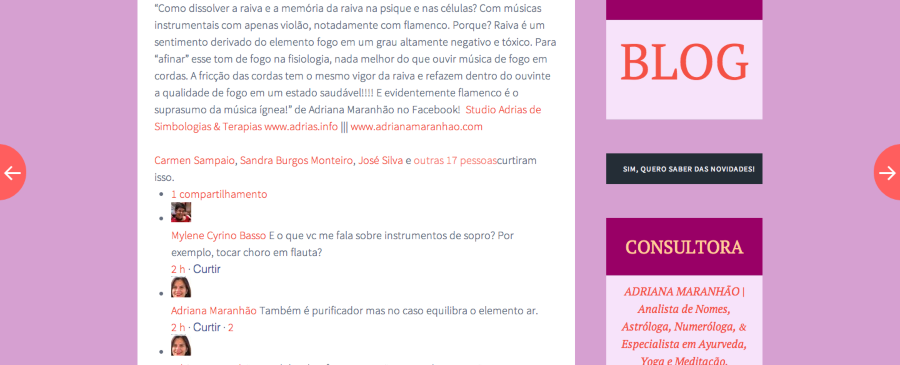
Is that something you would want to do?
-
Hi, Jereme,
Thanks again,
See I will read again what you suggest and all and will reply again.
Although I have read fasta, I yes, I would ask you all to put a new theme in the future that is this sorbet inproved into a booklet, same fonts, same easyness, arrows, but that a person can go on blogging, and can inform to the new reader that one can start in a certain post and continue reading, and reading. And that the whole theme is for a 1 post always..to be ready always to be a book! I can help with ideas for that. Ok, for now I will read again and answer soon, ok!
Best!!
ADri -
-
Dear Jeremy,
Something really wired is happening in one of my private blogs.
The blog is: http://gpstorientacaoameditacao.wordpress.com/The last post is this: http://gpstorientacaoameditacao.wordpress.com/2014/08/10/indice-curso/
Problem: When you see this last post, as you click in the link above, you will notice, that it does show an arrow to the right!!! Although it is the last post! And the most wired thing…if you click in this arrow it shows a post from 25 july! And this post also has an arrow to the next past post of july, and so on.This wired thing started to happen, when I changed the date of a last post. Called Experiência Transcendental. This was a post of august, I changed as a post of july and now it shows, strangely after the current last post, as I related above.
Please let me know what is this.
Take a look in the panel posts too.It is so wired, because I have been working a lot in publishing and organizing new posts into past posts, to make a sequence and it was working perfectly.
Hope you can help me.
Best,
Adriana -
Hi Adriana,
I just checked out the post you mentioned, and I’m not seeing an arrow on the right-hand side of the page as shown here:
https://gpstorientacaoameditacao.wordpress.com/wp-admin/upload.php?item=230
Note, I’ve uploaded that photo to your Media Library since your site is private. You’ll see an arrow on the left-hand side, but I’m not seeing on on the right.
Can you let me know if you’re still seeing it on your side?
-
Hi, Jeremy…
You know…the problem solved by itself on the same day I reported.
Can´t explain what happened, but it did solve.
Thanks a lot anyway!!
All the best,
Adriana -
Hi again, see on top. That thing isof the arrow is already ok, as I mentioned in the previous message.
The problem I am facing today is that I am sending invitation for friends to be viewer in this same blog, but they do not receive the invitations!
As you saw it is a private blog and I was trying to invite some viewers, but the email doesn´t arrive with the invitation.
Can you help?
Best,
Adriana -
Hi Adriana,
Can you let me know the email address of someone you tried to send an invite to that did not receive the invite? I don’t see any pending invitations listed here:
https://adriasconsultoria.wordpress.com/wp-admin/users.php?page=wpcom-invite-users
Please note, the email will appear as “redacted” in the forum thread, but it will be visible to staff members.
Also, it currently looks like your blog is public. Did you mean to change that?
-
Dear Jeremy,
Yes, you will see pending invitation. Because it is in this blog here (not in the one you looked).http://gpstorientacaoameditacao.wordpress.com/
the pending email is (email visible only to moderators and staff)
I sent twice, and asked her, she said she didn´t receive, not even in spam area of gmail.
Ok, thanks a lot.
Adriana -
Continuation of the above message!
Dear Jeremy,
My friend from this pending email (email visible only to moderators and staff) has just accepted the invitation. But note…she just saw it when she logged to wordpress, because I warned her, I mean I told her. If she hadn´t logged to wordpress, she would never know. I think she should have received the email, to call her attention about the invitation.
Ok, Let me know.
ADri -
Dear Jeremy,
About the email issue…”now my friend” says she did receive the email.
Sorry for bothering!
So sorry!!
Thanks a lot.
Topic solved for me!
Best,
Adri -
Dear Jeremy,
About the email issue…”now my friend” says she did receive the email.
Sorry for bothering!
So sorry!!
Thanks a lot.
Topic solved for me!
Best,
Adri -
-
Thanks Jeremy,
Very nice talking to you.
Do you have anyone that works well with css to customize my blog, my sorbet is almost perfect, but I need to personlize it a bit more.
I cannot work alone with this, because I have plenty to read for my work and to write, I cannot devote my self to study css.
Best,
Adri -
Hi Adri!
The best place to ask CSS questions for minor tweaks would be the CSS customizations forum here:
https://en.forums.wordpress.com/forum/css-customization
The folks in that forum will be able to provide you with some help in the CSS arena!
-
Thanks a lot, Jeremy!
Yes, a forum helps!
I will check that out!
Thanks again,
Best,
Adri -


- The topic ‘New platform for editing posts, this one you created.’ is closed to new replies.
 WordPress.com Forums