

New Post Title Feature to Capture First Sentence if No Title
-
WordPress.com is clearly testing a new feature that deals with those of us who forget once in a while to add a the post title, leaving the post slug set to the post ID number and the post title blank.
The new feature now captures the first sentence of the post and truncates it with …, an excellent idea, however it is not working exactly right.
Please pass onto the WordPress.com UI team that when the mistake is noted, and the title is edited and changed, it updates in the post slug and appears in the Edit Post screen, but when published, the title is still missing.
You can see this on a private site of mine http://lorelleteacher.wordpress.com/ with the post on images.
Thanks!
The blog I need help with is: (visible only to logged in users)
-
Hi there!
Can you point me to a specific post with this issue? Are you publishing on the front of your site using the P2 editor? Or are you using the WordPress.com editor:
the title is edited and changed, it updates in the post slug and appears in the Edit Post screen, but when published, the title is still missing.
Can you explain more about what you mean here? You’ve published the post and are editing again? But the title doesn’t change on the front of the post when you save your update?
-
I thought I was clear the first time. Here goes a second try.
Publishing from the Admin not the front end, I forgot to put the title of a post, specifically https://lorelleteacher.wordpress.com/2015/02/27/images/. As you can see from the URL, the post slug is now there, and the title of the post should be “Images” after fixing it. Here is the step by step.
1. Published a post and forgot the title.
2. WordPress.com new feature to grab the first X words of the first sentence became the post title upon publishing.
3. I edited the publish post to fix the title to “Images” and updated.
4. The post now has no title on the front page of the site nor the single post pageview.
5. I checked to ensure that the post format was set to standard, which is was, having not changed that, therefore the front page and single post pageview should display the post title. It doesn’t.I know the UI team is working on all this, so this is clearly a bug. After editing a published post that used the “forgot title, get first sentence,” the database should update with the new edited post title. Clearly it is not.
Just tell them all Lorelle broke WordPress.com again. Those that have been around a while will laugh and say, “Not again.” :D
Thanks.
-
One more note. This is unique to the P2 Theme. Just tested it on two other Themes and it doesn’t capture the first part of the sentence. I thought it was a new feature being tested across WordPress.com as it makes so much sense.
So the P2 Theme folks need to be contacted.
Sorry, I should have checked it out sooner and better before coming here.
-
Hi Lorelle,
Yes, the auto-generated title is a feature only for P2 right now.
I’ve been able to replicate the situation with your steps, but on my test site I was able to edit the site title further and have it display correctly. Not entirely sure why it’s not updating on your site as it should. Since that’s really the core of the bug (one should be able to see the image title) I’m going to continue experimenting.
To make sure I’m replicating your steps precisely and recreate the bug, would you please clarify whether you were posting/editing in the P2 editor on your blog page, the /wp-admin/ post editor (here), or the new editor (here), or switching between any of for both of these steps?
- 1. Published a post and forgot the title.
- 3. I edited the publish post to fix the title to “Images” and updated.
-
Thanks, Alex. You rock.
Used the backend, not the AJAXy front end or new editor. Not happy with that thing at all. Takes AGES to load with the new API, and I’m on dinosaur web connection, even though I could throw a rock and hit Intel. SIGH.
Didn’t switch between visual and text editor either. Just the text editor:
1. Hit publish
2. Switched to the tab with the preview (accessed by view post – been nailed by the nonce too many times so I now avoid Preview), refreshed
3. Noticed the title was missing, switched back to text editor tab and added the title and hit update. Title is there in the text editor and the permalink updated to post title.
4. No change on the front end. Still no title. Continues to be no title. Title-less. :D Even tried a different browser.Thanks!
-
Hahaha, Intel probably would probably not appreciate the thrown stones.
I’ve been able to replicate the issue entirely using your steps. I think the issue is something about editing P2 posts that include HTML elements, because I was able to edit posts titles, etc, when I used my own plain text within the HTML editor — but when I copy+pasted your HTML from the “Images” post, I could get the failure you’ve found.
But nothing looks out of the ordinary with your post, so I think it’s just HTML elements in general.
I don’t have a smooth way to fix the issue and let you edit the title at the moment, so what I’d suggest to “fix” the problem on your site is to create a new post, use Copy a Post to get all your content from the failed “Images” post, add the title (haha!), then backdate it and publish — then delete the failed post.
I’ll get the bug to our developer team once I nail down the details, but I’ll be testing it.
Thanks again for the catch!
-Alex G.
-
Bonkers. What would the HTML pasted…oh, well. Trust me to break WordPress still. On a daily basis. LOL!
Thanks for pushing this through. Very strange indeed.
And knowing as many Intel employees as I do, I think they would appreciate the rocks. :D
Thanks!
-
There are ghosts in the machine.
I copied the post content from the text editor and trashed the post.
Created a new one using the text editor and made sure the title “Images” was in place before publishing. Slug is now image-2. Fine. Post Format is standard. Pasted in the new text in the text editor. All done on the backend not the front.
Published.
NO FREAKING TITLE! Unbelievable.
Just tried another post exactly the same way, many copies and pastes, no save draft, and it has the title.
Is there some rule in P2 that says a post cannot be titled “Images?”
Seriously bonkers. The ghosts must be in the machine now.
-
Definitely ghosts! Or a wizard did it!
I passed your HTML through a validator and it appears to be valid for anything we’d, the only exception being this snippet:
<img class="aligncenter size-full wp-image-59" src="https://lorelleteacher.files.wordpress.com/2015/02/images-monitor-comparison-of-web-page-widths.png" alt="Computer monitor featuring images widths as seen on a web page." width="600" height="392" />That final “/” character isn’t needed, not sure where it came from, but I’ve seen that hurt some of our pages before, believe it or not.
Does that small edit help at all?
Also adding this to my bug report and testing. No idea how the HTML in a post body could affect a title out of WP-admin…
-
I think I’ve tracked it down. :)
The bug is when the title is also found in the first line of the post. In this post, the “Images” title fails:
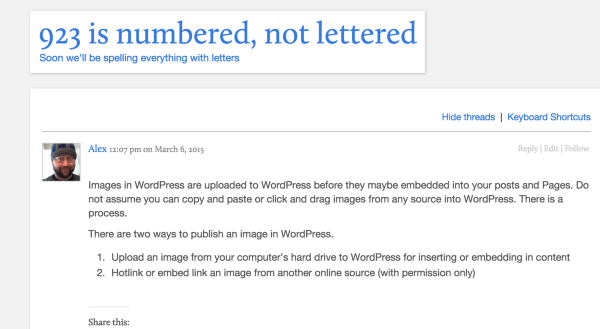
In this one it does not:
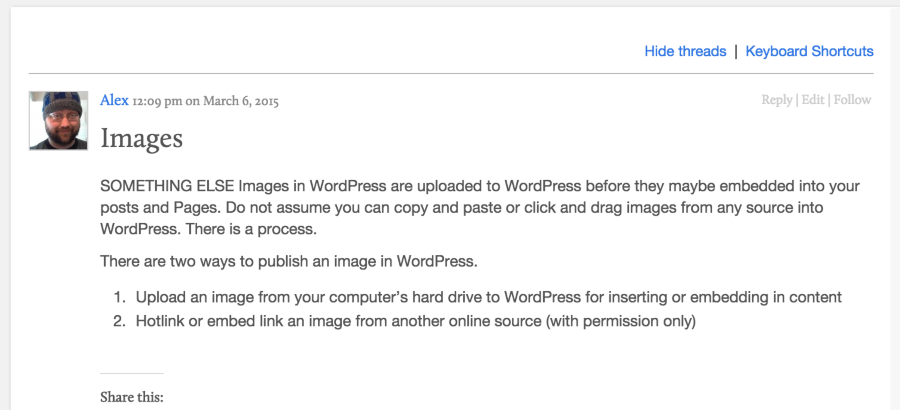
Definitely a bug!
-Alex G.
-
That’s incredible! Can’t believe you found that. You are the best, my friend. Thank you!
-
Test, test, and test again, haha.
Thanks for all your reports, Lorelle. We appreciate it. :)


- The topic ‘New Post Title Feature to Capture First Sentence if No Title’ is closed to new replies.
 WordPress.com Forums