

New Posts Appear Atop of Sticky Posts
-
I’ve encountered a very weird problem. I’ve made 3 posts “sticky.” However, any new post I write still shows above the sticky posts. It should show AFTER the sticky posts, right?
What am I doing wrong???
The blog I need help with is: (visible only to logged in users)
-
Due to the sound of crickets chirping here, and my deep dive into the web for “sticky posts not working”, I’ve determined that there is a bug with respect to sticky posts that WordPress has been unable to fix for a very long time. This is probably a semi-random kind of bug because if it was truly broken for all WordPress users, then WordPress would’ve made it a severe top-level priority to fix it.
At any rate, my workaround is to create a multi-level menu to show the “sticky” posts and to hell with this sticky posts feature that will probably never be truly fixed.
-
Hi there,
Is this in regards to jrmpc2022.wordpress.com? Did you try to see if the same issue arises when using a different theme? Sticky posts, in general, are working fine when testing on my end, but it sounds like the potential bug may be theme related.
-
You must be kidding. The basic functionality of WordPress is dependent on the theme used?!
I’ll try it just to confirm the bug but I really don’t want to switch themes. I spent a great deal of time choosing and customizing the theme I’m using.
-
Okay, I tried switching to the Twenty Twenty theme, which I previously used in another WordPress blog. In that blog, sticky posts worked.
Oddly, in this blog, sticky posts don’t work. Same theme, two different blogs. How bizarre is that?
The other blog is five years old, if that’s significant.
-
@ryersonjrmpc understandable if you’ve already put effort into customizing. You can switch back though. The old theme’s homepage will likely show up in https://wordpress.com/pages/drafts and be reactivated when you switch back.
I’ll also test here – it looks you had Redhill, then Twenty Twenty, then Redhill again. I assume Rehill is the one with a bug?
-
Ah, I was investigating this a bit before replying & missed your second response.
You switched *to* Twenty Twenty though correct?
-
I did a little more digging.
I think this is an issue with the Blog Posts Block. It seems there was a little discussion on whether to make it display sticky posts when those posts could override the specific post settings within the block.
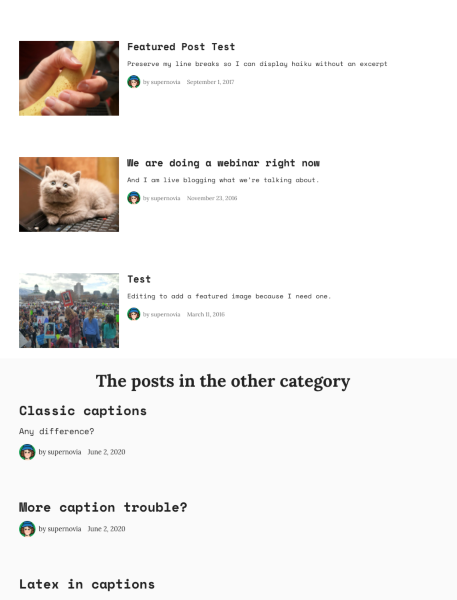
Would you consider adding the sticky posts to a category (“Featured” or “Announcements” or whatever) and specifying that for this block?
Then you can add another posts block below that to show other posts.
It’d look somewhat like this, depending on how you set it up.
-
Okay, I tried putting those three sticky posts in the “Featured” category.
Then I created a new post in the “Uncategorized” category. Made no difference. It still appeared above the sticky posts.
-
Sorry I wasn’t clear. Tap the block, then using the settings on the right (tap the gear icon if needed) you can specify a category / tag for that block. Can you try that?
-
I’m still unclear about what you mean. I’ve already set the category “Featured” for the sticky posts. It’s in the “Document” tab of Settings.
The three sticky posts are in category “Featured”. The new post is in category “Uncategorized”.
What else is needed?
-
Edit your page titled Blog.
Click on the blog posts block in that page.
Change the settings for that block, so in the Block tab of the editor settings, to assign a category to the block.
That will have the block only display the posts for that category.
=====
If that’s not what you want, if you want a page that displays all your posts, but with sticky posts at the top, then you can’t use the Blog Posts block, as that block doesn’t respect the sticky setting.
Instead, you’ll need to specify a page as a posts page which will automatically show all your published posts.
To do that, go to My Site ->Design ->Customize and click on Homepage settings. Under the Posts Page option, select your page titled “Blog”. Then click Save at the top.
Unrelated, but I also noticed your site’s Home page is currently set to draft. You’ll want to publish that, or it won’t work correctly.
Go go My Site ->Site ->Pages. You have two pages titled “Home”, both set to draft. Select the one that’s also set as the front page, and make sure to click Publish inside the editor.
-
Okay, thanks for the info. It is now perfectly clear. This information is difficult to find. It ought to be made more easily available.


- The topic ‘New Posts Appear Atop of Sticky Posts’ is closed to new replies.
 WordPress.com Forums