

new stats page doesn't show total followers
-
Hi, the old stats page used to show the total number of followers of my blog (www.youcanthidethespark.wordpress.com), i.e. wordpress + email subscribers combined. The new stats page doesn’t do this. Am I missing something? How come there’s no longer a combined total; the thing that most people want to know?!
Thanks
KatherineThe blog I need help with is: (visible only to logged in users)
-
Hey Katherine,
You can still view all your Followers in the new version of your Site Stats. To do so, simply click “View All” at the bottom of your Followers box, as seen here:
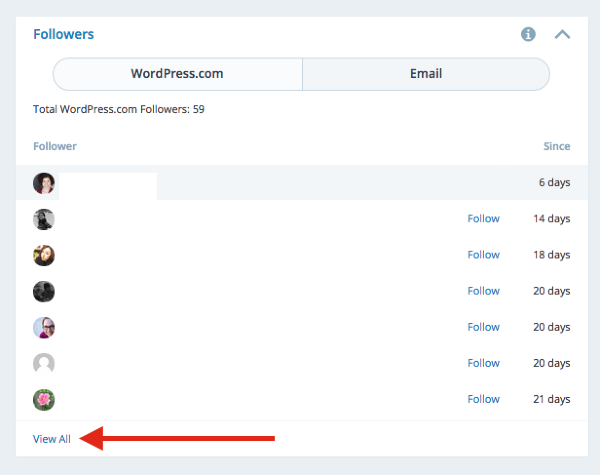
After doing this, the combined Followers count will appear.You are always welcome to take a look at your Site Stats in the Classic Dashboard, if you prefer that format:
https://youcanthidethespark.wordpress.com/wp-admin/index.php?page=statsI hope this helps! If you have any other concerns, drop me a note. Thanks much!
-
Hi there, thanks for this. I have tried pressing VIEW ALL and all it does is display all my wordpress.com followers but not give me the combined total, so I end up using the old stats page all the time!
-
Hey there,
Well, I’m glad that you have a way you can view the stats in the manner you want. However…
If you have a moment, please add your suggestion to our Ideas forum so our developers know how you’re interested in viewing your stats in the new dashboard.
https://en.forums.wordpress.com/forum/ideas
Our developers really like to see what our users want.
Thank you again!
-


- The topic ‘new stats page doesn't show total followers’ is closed to new replies.
 WordPress.com Forums